
mbblbalkjcikhpladidpimlfiapdffdh


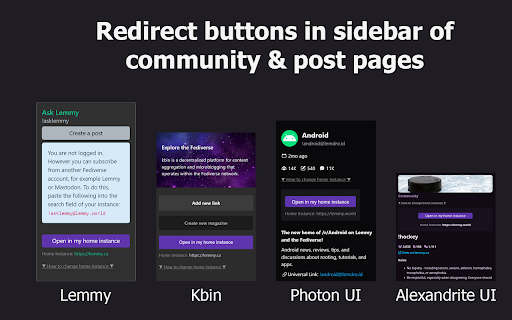

Simplify your Lemmy & Kbin experience with tools for your instance and communities - Support for Lemmy and Kbin instances, as well as Alexandrite & Photon frontends. - Post to Lemmy/Kbin: - Instance Assistant can generate a draft post with autofilled title/link/body - Use the popup menu for most news sites, videos, and other webpages - For images, you can rightclick on the image itself - Search for posts: - Find and open all posts that have a link to the site you are on. Use it to find posts about news articles, videos, and more - Search for communities and content without leaving the page: - You can use the popup menu or sidebar to search for communities (with lemmyverse.net), and for content (with search-lemmy.com) - Redirect to your home instance: - When you are on a foreign instance, buttons will be available in the sidebar to open the COMMUNITY, POST, or USER in your home instance, allowing you to participate immediately - Open links in home instance: - If you come across a Lemmy/Kbin link anywhere on the web, you can right click to open it in your home instance - Improved Error Pages: - 'Community not found' pages now have better information and buttons to trigger a fetch, open the community in the source instance, and more. This also supports alternative front-ends - Customizable: - Customize list of instances in the popup/sidebar to let you quickly switch home instances. This is great for if you have multiple accounts on different instances - You can change the default behaviour of the extension, customize the popup & sidebar menus, and turn off features you don't want to use. Lemmy and Kbin are a part of the Fediverse, a network of interconnected social media platforms that work similar to Reddit. This extension is designed to make it easier to use these platforms and make the most of decentralized social media while mimizing the difficulties that may come with it. For example, you may make an account on "https://lemmy.ca". You may google a community or topic and come across a page on a different instance (ex. "https://lemmy.ml/c/technology"). If you want to subscribe to the community, you will need to copy the code (!technology@lemmy.ml), open your home instance, and then paste it into the search page. If you want to comment on the post, you will then need to track it down somehow by scrolling through the community. This extension will let you jump to the version on your home instance (ex. "https://lemmy.ca/c/technology@lemmy.ml"), allowing you to subscribe and participate immediately. There are many other features as well, and hopefully many more to come! :)

Lemmy Enhanced Overlay (LEO)
Quickly show images from page, they're overlayed on current page and eliminate the need to open tabs or scrolling to open links. Lemmy Enhanced Overlay (LEO) is a UI overlay for making lemmy easier to browse your Home Page (personal account view coming soon). Opening images through keyboard keys, images showing over layed on the page automatically on traversal. To activate and de-active the extension in the old.lemmy.world site press the ESCAPE key on keyboard. Once in an active state, the W, S, SpaceBar, and Shift keys become control keys. W : Go to next image in page, will be displayed in an image overlay on page. S : Go to previous image in page, will be displayed in an image overlay on page. SpaceBar : Go to the next lemmy page, loads first image of this page automatically. Shift : Go to previous lemmy page, loads first image of this page automatically. Pressing escape will disable the extension. If the extension was paused, pressing it again will load the last image that was displayed.

Consent-O-Matic
Cookie pop-ups are designed to be confusing and make you 'agree' to be tracked. This add-on automatically answers consent pop-ups for you, so you can't be manipulated. Set your preferences once, and let the technology do the rest! This add-on is built and maintained by workers at Aarhus University in Denmark. We are privacy researchers that got tired of seeing how companies violate the EU's General Data Protection Regulation (GDPR). Because the organisations that enforce the GDPR do not have enough resources, we built this add-on to help them out. We looked at 680 pop-ups and combined their data processing purposes into 5 categories that you can toggle on or off. Sometimes our categories don't perfectly match those on the website, so then we will choose the more privacy preserving option. The first version of this add-on works with 4 popular pop-ups: Cookiebot, OneTrust, QuantCast, and TrustArc. The add-on is open source, so anyone can add additional pop-ups through our template system: https://github.com/cavi-au/Consent-O-Matic. Most recent changes: * Fixed issues related to manifest v3 * Fixed a bug causing some rules to not complete properly, leaving the popup open

FediAct
Simplifies interactions on other Mastodon instances than your own. Visit https://github.com/lartsch/FediAct for more. A Chrome/Firefox extension that simplifies following and post interactions on other Mastodon instances than your own. All data is processed on your machine locally! Visit the Github page to read up-to-date information on: - Supported features - Setup steps - Screenshots/GIFs - Additional usage notes If you like this addon, consider donating: https://paypal.me/lartsch

Kagi Search
Set Kagi as your default search engine while also preserving your session in private browsing. Remember to enable 'Allow Incognito'. - Easily set your default search engine to be Kagi - Allows Kagi to work in Private Browsing (remember to click 'allow incognito') - Search-by-image by right-clicking on an image Kagi Search for Chrome is fully open source. Please review the installation instructions, and if you wish, the source code available at: https://github.com/kagisearch/chrome_extension_basic
