
lafooengjljmipillledmadfcpannkbc
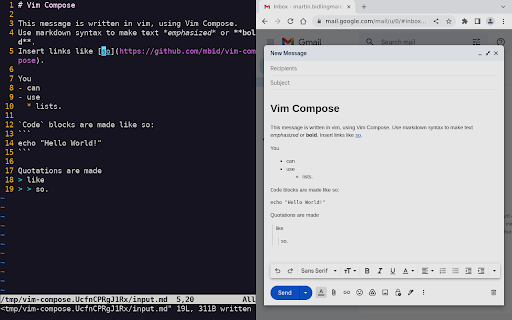
Compose mail and other text on the web as markdown in vim. Vim Compose allows you to use the vim text editor within your browser to compose and edit text in input fields. To open the vim, simply focus on an input field and either press Ctrl-Shift-E or click the Vim Compose extension button in the toolbar. Any text you save in vim will be automatically copied back to the input field in your browser. If the input field supports formatted text, you can also use markdown for formatting. Please note that Vim Compose is currently only compatible with Linux systems and requires the installation of a native app. You can find installation instructions for the native app at the following link: https://github.com/mbid/vim-compose

MonAmi Note
This companion extension for MonAmi Note Web/Desktop enables quick note-taking and text clipping while browsing web pages This is a companion extension for the MonAmi Note Web/Desktop — a Dropbox-based note-taking app. Features of the Extension: • Write notes in a side window, with the title and URL automatically filled. • Quickly save selected text from a webpage as a note. • Upload notes to your free or paid Dropbox account. How to Use: • To run the Web app: Click the cloud icon in the extension’s popup window, or go directly to https://monami.simbust.com. • To run the Desktop app: Download the app from https://simbust.com/download. Features of the Web/Desktop App: • Notes are stored locally and on Dropbox, synced for access from any browser or computer without a subscription fee. • Runs on Android/iOS devices without needing a dedicated app; just use a mobile browser and save it as a Progressive Web App (PWA). • Uses an open, Markdown-based format for compatibility and flexibility. • Supports tags, hierarchical folders, and multiple notebooks for robust organization. • Features a familiar 3-pane interface (folder tree, notes list, note content) similar to Windows Explorer or Mac Finder. • Offers multiple editing modes (Markdown, WYSIWYG, side-by-side) to suit different workflows.

CX Enable Vim
The JavaScript IDE (https://ace.c9.io/) used by Code Expert (https://expert.ethz.ch/) supports vim keybindings. This add-on enables them. The add-on can be disabled by clicking on its icon in the toolbar.

VIM typer
This extension allows use vim keys for text editing. Other vim plugins allows you to navigate in browser or webpage. This extension allows you to use vim keys while typing in input fields. Currently only `textarea` HTML elements are supported. Enable vim keys Plugins functionality can be toggled with special key combination adjustable via `chrome://extensions/shortcuts`: - `alt` + `v` on windows / linux - `Command` + `Control` + `v` on macOS It is because, sometimes you may don't want to `VIM typer` interfere with other vim like plugins. Please look at the indicator (small red square in top left corner). When it becomes green: the plugin functions are available.

Read Me Later - Save Tabs to Read List
Quickly save all of your tabs for later reading with just one click! Keep Your Tabs Organized + Store Tabs for Later 📚 😵 Problem: Are you overwhelmed by a growing list of to-read tabs that clutter your browser and make it hard to stay focused? 🤩 Solution: Meet Read Me Later! — the ultimate Chrome extension for tab management designed to keep your browser neat and optimized. Easily save browser tabs for later without the chaos, ensuring an efficient and clean workspace. 🚀 Features: ⭐ Effortless Tab Management: Store one or all of your open tabs with a single click, and optionally close them to optimize browser performance and reduce load. ⭐ Smart Input Bar: Quickly save any site with our intelligent input bar, featuring basic auto-completion for faster access. ⭐ Quick Searches on the Fly: Need to Google something but short on time? Type your query directly into the extension and press enter to save it for later. 👨💻 For Developers: ⭐ Open Source: Contribute to or fork the project on GitHub: https://github.com/yvantot/read-me-later-chromium-extension ❔ Why Choose Read Me Later? Maximize productivity with the ultimate tab management tool that keeps your browser clutter-free. Read Me Later helps you maintain a fast, responsive browser by offloading tabs without losing track of important content. Perfect for those who need a reliable browser productivity extension to stay organized and focused. ❔ Optimize Your Browser Experience: Designed to save and close tabs seamlessly, this Chrome read later extension ensures you never lose a valuable link while keeping your workspace clean and efficient. ❔ Perfect for Busy Professionals: If you're juggling multiple tasks and need to manage your time efficiently, this extension is your go-to tool. Stay organized, reduce distractions, and always have your important links just a click away.
