
jaloichkfcnjhekicmdnnjcbemhmdmpg


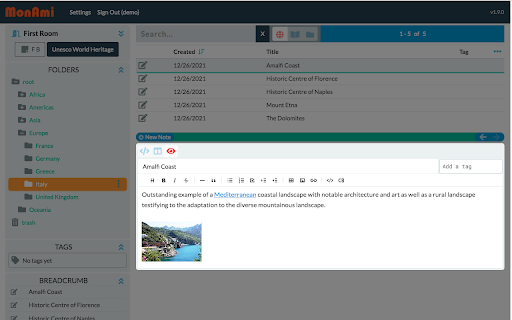
This companion extension for MonAmi Note Web/Desktop enables quick note-taking and text clipping while browsing web pages This is a companion extension for the MonAmi Note Web/Desktop — a Dropbox-based note-taking app. Features of the Extension: • Write notes in a side window, with the title and URL automatically filled. • Quickly save selected text from a webpage as a note. • Upload notes to your free or paid Dropbox account. How to Use: • To run the Web app: Click the cloud icon in the extension’s popup window, or go directly to https://monami.simbust.com. • To run the Desktop app: Download the app from https://simbust.com/download. Features of the Web/Desktop App: • Notes are stored locally and on Dropbox, synced for access from any browser or computer without a subscription fee. • Runs on Android/iOS devices without needing a dedicated app; just use a mobile browser and save it as a Progressive Web App (PWA). • Uses an open, Markdown-based format for compatibility and flexibility. • Supports tags, hierarchical folders, and multiple notebooks for robust organization. • Features a familiar 3-pane interface (folder tree, notes list, note content) similar to Windows Explorer or Mac Finder. • Offers multiple editing modes (Markdown, WYSIWYG, side-by-side) to suit different workflows.

Bookmark It — Personal & Team Bookmarks
Save, share, and find bookmarks in one click. Personal collections and shared team workspaces, with fast import and instant search. Bookmarks are a necessary evil. Lost in folders. Buried in browsers. Impossible to share. Almost no one bookmarks the way they actually want to — and almost no one can collaborate on bookmarks with their team, family, or friends. It's the only bookmarking app that combines real ease of use, real organization power, and real collaboration in a single place — for yourself, your team, and everyone in between. 🚀 Get started in seconds ● One-click import from your existing Chrome bookmarks bar ● One-click import from your browser history ● No spreadsheets, no copy-paste, no re-saving ● Free plan with no credit card. Ever. 👤 Personal + 👥 Team workspaces ● Keep a private collection just for you ● Spin up a shared workspace for your team, family, or side project ● Invite anyone in seconds — everyone sees the latest version, every time ● No more "send me that link again" in Slack, Messages, or email 🔍 Find anything in one click ● Recently Viewed history puts the page you're looking for one click away ● Instant search across every bookmark in every workspace ● Collections, tags, and notes that scale from 10 bookmarks to 10,000 📌 Bookmark from anywhere ● Browser extension — save the active tab with one click ● Menubar app — save and search without leaving what you're doing ● Web app — organize and manage from any device ● Title, URL, and page details pre-filled so saving really is one click 💬 Built for collaboration ● Share entire collections, not just single links ● Add notes and context so teammates understand why a bookmark matters ● Organize together — for work projects, family hubs, reading lists, travel planning, recipe collections, anything 🪄 More than a bookmark manager ● Boosted productivity — spend less time searching, more time doing ● Onboarding made easy — new teammates get the full knowledge hub on day one ● Cross-platform — your bookmarks follow you across browsers and devices ● Upstream from the browser into a dedicated app you'll actually open Stop losing links in chat threads. Stop emailing yourself URLs. Stop maintaining bookmarks five different places. Bookmark It is the home for every link that matters — personal, professional, and everything in between. 🔒 Privacy first ● We will never sell or share your data ● Imports are optional and read-only — we never modify your native browser bookmarks ● Page content is never sent to our servers

OutlierClips
A free and private clipping tool for podcasters needing to capture text content to prepare their podcast episodes. Clip and capture research to prepare for podcast episodes, blog posts, job interviews, sales meetings, or any other upcoming event. Search Podchaser.com for the person you're preparing to speak or meet with. Use whatever notes app you want to store your research. Do you research your upcoming guests and/or topics to prepare your podcast? Do you research people before meetings or sales calls? If you're an outlier, you do. As you search the Web for the person you're preparing to interview or meet with, you highlight a piece of content you want to save, activate the OutlierClips extension: clip full articles, bios, facts, notes, quotes, or any other text you come across online. OutlierClips captures several bits of data with each clip: the text you highlighted, the page link where you clipped the content, the name you've given the clip, and any custom notes you've added about the clipped content. With complete privacy — no account needed. Just keep clipping as you research. Spend 10 minutes, or an hour, or whatever amount of time researching your person or topic. OutlierClips adds each clip to your virtual clipboard (privately, securely), creating a clean, running log of organized, text-based content. You can even highlight a person's first and last name, activate the extension, and perform a quick search on Podchaser.com to see if the person has said anything profound on recent podcast episodes. (Coming soon, you'll be able to quickly search LinkedIn as well.) After your last clip, when your research session is done and you're ready to start reviewing all of your clips, you click the "Copy All" button in the OutlierClips sidebar, then paste all of your clips into the app of your choice — anywhere you store your notes and outlines for episodes. No matter how many clips you captured. One or 1,000. If you're using Google Sheets or Airtable or some other database to paste your content in a more structured way, OutlierClips can take things one step further: You can tap the "Download CSV" button at the bottom of the overlay after clipping your last item of research and the .csv file will download to your computer. You can then import all of your clips at once. Faster research, encouraging you to prepare better for interviews, calls, meetings, or any upcoming event.

Tanuki Utilities
Provide useful utilities for GitLab users. * Change the GitLab favicon to a project icon; you can easily distinguish many GitLab tabs. * Move "Copy reference" button on top bar; the button is always shown for your easy access. This extension tries to change favicons in the **all** sites by default. You can specify which GitLab site (e.g. gitlab.com or your self-hosted site) you would like to change favicons. #### Change the GitLab favicon to a project icon

Thymeline
Add events to your timeline the easy way Keep track of everything important about your projects all in one place. Meet Thymeline, the free Chrome extension that will magically transform your project chaos into an organized masterpiece. Created for Project Managers. Here is how Thymeline saves you time. No APIs. No integrations. As simple as copy & paste. Easily copy relevant information from any of your existing tools or apps without any hassle. Once you download the chrome extension... Step 1: Visit any website. Step 2: Highlight any text. Step 3: Click on the Thymeline Chrome extension Step 4: Add to existing Thymelines. That’s it! Thymeline can handle as many projects as you’re juggling. Create as many Thymelines as you need! Multiple projects, multiple Thymelines, we can handle it. Keep track of it all in a simple interface. Share with others Share your Thymelines with others on your team with view or edit privileges, keeping everyone on the same page. Want to keep it private? You can do that too.
