
nedaclhgmnpefbdepagkknapbgdalcej
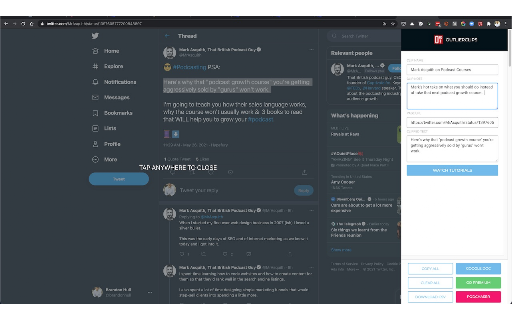
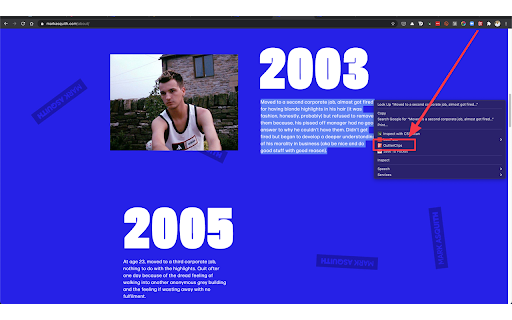

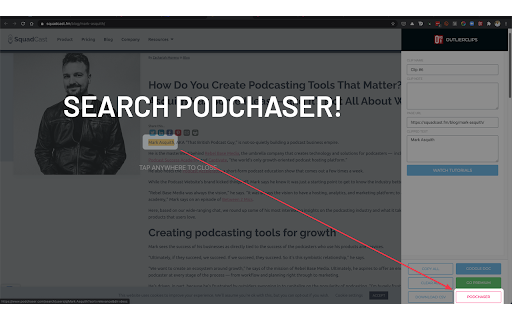
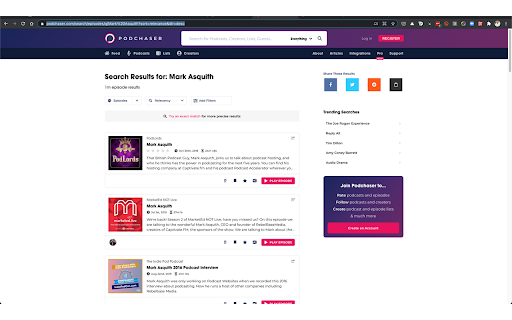
A free and private clipping tool for podcasters needing to capture text content to prepare their podcast episodes. Clip and capture research to prepare for podcast episodes, blog posts, job interviews, sales meetings, or any other upcoming event. Search Podchaser.com for the person you're preparing to speak or meet with. Use whatever notes app you want to store your research. Do you research your upcoming guests and/or topics to prepare your podcast? Do you research people before meetings or sales calls? If you're an outlier, you do. As you search the Web for the person you're preparing to interview or meet with, you highlight a piece of content you want to save, activate the OutlierClips extension: clip full articles, bios, facts, notes, quotes, or any other text you come across online. OutlierClips captures several bits of data with each clip: the text you highlighted, the page link where you clipped the content, the name you've given the clip, and any custom notes you've added about the clipped content. With complete privacy — no account needed. Just keep clipping as you research. Spend 10 minutes, or an hour, or whatever amount of time researching your person or topic. OutlierClips adds each clip to your virtual clipboard (privately, securely), creating a clean, running log of organized, text-based content. You can even highlight a person's first and last name, activate the extension, and perform a quick search on Podchaser.com to see if the person has said anything profound on recent podcast episodes. (Coming soon, you'll be able to quickly search LinkedIn as well.) After your last clip, when your research session is done and you're ready to start reviewing all of your clips, you click the "Copy All" button in the OutlierClips sidebar, then paste all of your clips into the app of your choice — anywhere you store your notes and outlines for episodes. No matter how many clips you captured. One or 1,000. If you're using Google Sheets or Airtable or some other database to paste your content in a more structured way, OutlierClips can take things one step further: You can tap the "Download CSV" button at the bottom of the overlay after clipping your last item of research and the .csv file will download to your computer. You can then import all of your clips at once. Faster research, encouraging you to prepare better for interviews, calls, meetings, or any upcoming event.

BriskNote: New Tab Notes that Sync across Devices
Take notes on any new browser tab and sync them with your phone Make your life more productive with every new browser tab you open. Taking a note is as simple as opening a new tab. Access your notes across platforms - browsers, mobile apps, and the web. If you spend a good amount of time on your web browser, and you like to take quick notes, then BriskNote is for you. BriskNote is the perfect middle ground between oversimplified sticky notes and complex desktop note-taking software. BriskNote is perfect for taking notes while having conversations, jotting down spontaneous ideas, making lists, storing drafts or pieces of code, and so on. And of course, it's absolutely free!

Highlightion - Save Highlights to Notion
Highlight content on any web page and save to Notion databases. Highlightion is a tool that synchronizes your highlights on any web page with Notion databases. Notion is an all-in-one workspace that includes notes, tasks, wikis, and databases. If you haven't used Notion yet, you should start now. Notion databases are perfect for storing all your highlighted pieces. With Highlightion, every single highlight is stored as an item or page in a Notion database. ✅ Once you highlight something on a web page, you can send the highlight to a Notion database along with other properties such as page URL, tags, and notes. ✅ After that, you can view your saved highlights right inside your Notion database. ✅ You can also create different views of the Notion database to organize your highlights. ✅ Sharing the Notion database with others is also an option. We hope this synchronization tool helps you become more efficient and makes your life easier. 💌 If you have any questions or suggestions, please contact us at support@highlightion.com

myReach Web Clipper
Save the things that matter on the web in an interconnected network Introducing myReach: Unleash Your Productivity with AI-Powered Superpowers Discover the browser extension that revolutionizes how you save, organize, and access your digital knowledge. myReach is your second brain, seamlessly integrating with your browser to empower you with AI-driven intelligence and effortless retrieval of information. 📚 Save Anything, Find Everything: Capture websites, files, images, notes, and contacts effortlessly, and connect them to relevant tags. No more struggling to remember where you saved that important document or the name of a website – myReach lets you search based on your personal context, empowering you to find what you need quickly and effortlessly. 💡 AI-Assistant at Your Fingertips: Meet your smart AI-Assistant powered by myReach. Simply ask any question about your saved items, and it will instantly provide answers. Whether you need contract details, summarized articles, or reminders from your past conversations, it has the knowledge to assist you effortlessly. No more tedious searching or reading through endless pages – just ask and get instant answers. 🗂️ Organize Your Way: Say goodbye to traditional folders and embrace the freedom of myReach’s flexible workspaces. Create customized workspaces to separate business and personal matters, ensuring efficient organization and effortless collaboration for teams. With myReach, everyone can find the same document using their own context, eliminating the need for extensive training or navigating complex folder structures. 🔍 Intelligent Search, Even in Images: Extracted text from images and files makes every piece of content searchable, delivering unparalleled convenience and efficiency. Locate information buried within images effortlessly, saving you time and frustration. ⚡️ Enhance and Integrate: Customize your saved items with properties like rating, description, cost, and more, allowing for deeper organization and personalization. Seamlessly integrate myReach with your favorite tools, including Evernote, Zapier, Twitter, Google Maps, and more, expanding its capabilities and streamlining your workflow. Welcome to your personal knowledge hub, designed to boost productivity and streamline information retrieval. With myReach, your browser gains superpowers, empowering you to save, connect, and access your digital world effortlessly. Embrace the future of intelligent organization and download myReach today. Get myReach, and unlock a world of limitless knowledge at your fingertips

Research Notes
Bookmark, tag or add notes to pages, highlight and save quotes or images, save selected Google searches, filter out search results. KEEP NOTES AND ORGANIZE PAGES Bookmark, tag or add notes to pages. SAVE & HIGHLIGHT QUOTES Save quotes or other text snippets from pages (or PDFs), highlight quotes on the page. SAVE IMAGES Save images with pages - either pictures directly from the page or copy-pasted screenshots via a tool like Snipping Tool or Paint. TAGS WITH VALUE Advanced tagging: you can add values to the tags. For example, to record a page’s author, add a tag like “Author: ”. Or, when searching for products and comparing good websites with alternative offerings, add tags to pages such as “Product: ” or “Price: ”. You can group and sort by tags and values separately on the all notes -page. RESEARCH UNDER SEPARATE TOPICS All your pages and searches will be saved under topics that you define. This helps keep your different research topics - be it work, school or hobbies - separated from each other. SAVE YOUR GOOGLE OR GOOGLE SCHOLAR SEARCHES When studying a topic in-depth, save searches to remember what search terms you’ve used, which ones got great results and how far into the results you have looked. By default, search saving is turned off, it can be activated for each Google search tab separately. HELPFUL SEARCHING OPTIONS Cross out and hide search results that are not useful. Instantly add notes and tags to results straight in your Google search. OVERVIEW OF SAVED RESEARCH A special all notes -page gives a comprehensive overview of your topics, pages and searches. See your researched pages either in list or table format. Filter pages by text, tags, notes or bookmarks. PRIVATE The information that you create while working with the extension - addresses, searches, notes, tags, etc - is stored exclusively in your own browser and is not shared with anyone. We only collect anonymous analytics information about this products usage to get an overview of what features are used. DO YOU HAVE QUESTIONS OR RECOMMENDATIONS? We are open to feedback about this product, about existing features or new ideas - just send as an e-mail (feedback@onlineresearchnotes.com) or drop by in our Discord server (https://discord.gg/pE9BMg2m). And please do inform us also about any possible bugs that may be lurking. FREE This extension is free to use.
