
laameccjpleogmfhilmffpdbiibgbekf
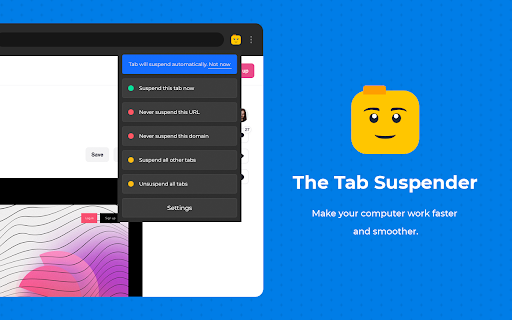
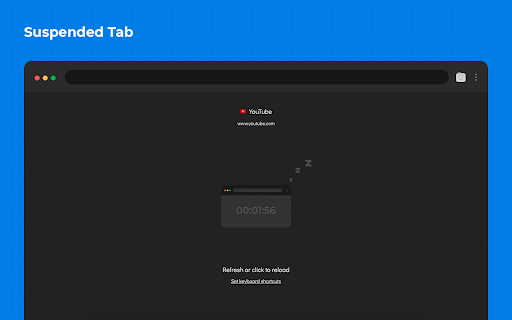
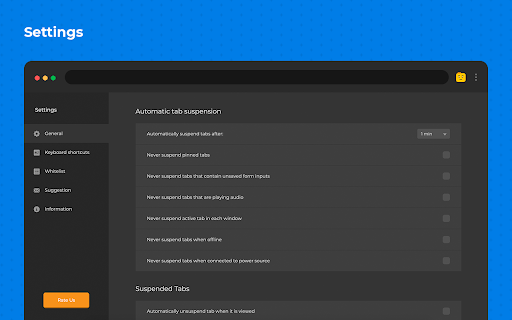
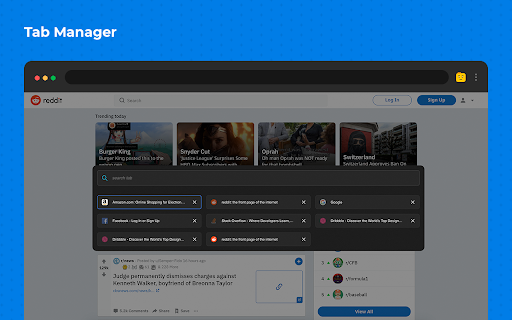
Suspend tabs you are not using to save memory usage and make your computer run faster. Reduce the load on your device, and battery. Automatically suspend tabs that aren’t used at the moment. It has been actually developed to manage utilized tabs that lead to saving memory usage and faster machine working. Reducing CPU usage by suspending inactive tabs makes the computer run faster, smoother, and generally better and at the same time, you can simply restore them at once you need to review them. The flexible setting makes it advanced in managing websites. You can quickly add a whitelisted domain to keep the website active or select a category that shouldn’t be suspended among others. - set the time for an automatic suspending - hotkeys are available - website manager for fast navigating - simply refresh the website to activate Built-in tabs manager is opened by hotkeys and shows you a dashboard that you can easily navigate using the in-house search. Make your computer run smoothly by suspending the tabs you aren't using.

Tab Suspender by Workona
Suspend your browser tabs to save memory. Keep your computer running quickly with the Workona Tab Suspender. You can choose to suspend tabs automatically or on demand with one click. Either way, you’ll dramatically reduce your browser’s memory usage. Now you can keep all your tabs open without getting slowed down. 2/5/2021 UPDATE: Need to restore lost tabs from The Great Suspender? Workona Tab Suspender will automatically repair any broken Great Suspender tabs we find in order to restore the tabs you lost when the extension was disabled. Visit this article for instructions on how to restore these tabs: https://workona.com/pages/the-great-suspender-malicious-chrome-extension/ Save memory Dramatically reduce memory usage and keep your computer running quickly, just by adding the Workona Tab Suspender. Suspended tabs are just like normal tabs, except they don’t use memory. Keep more tabs open Tabs are where modern work gets done. Now you can work on multiple projects and keep those tabs open, all without impacting the performance of your computer. Auto-suspend tabs Choose automatic tab suspension based on how many active tabs you have or how much time has elapsed. You can rest easy knowing that suspension is working behind the scenes to free up resources. Never lose tabs Unlike other tab suspenders, you never have to worry about being locked into our system or losing your suspended tabs if you decide to stop using the Workona Tab Suspender. From a company you can trust More than 175,000 people trust Workona to keep their browser’s memory under control. Our company is venture-backed and built to last. Learn more at workona.com We believe that great software shouldn't come at a cost to privacy. Workona Tab Suspender does not store your browser data, use it for advertising, or share it with third parties. Your suspended tabs are 100% private to you, and we request the minimum permissions needed to suspend your tabs. If you ever have questions about Workona’s privacy practices, reach out to us at privacy@workona.com. Feel free to contact support at support@workona.com and we'll reply as soon as possible. By installing the extension, you agree to Workona’s Terms of Service (workona.com/policies/terms) and Privacy Policy (workona.com/policies/privacy).

Tab Discard (Suspender)
Easily suspend inactive tabs and save up memory for your browser. Tab Discard (Suspender) is an extension that lets you easily suspend either all inactive tabs or just the active tab by clicking on the toolbar button. In principle, suspending tabs can reduce the browser memory and enhances your browsing experience. When you click on a suspended tab (make it active) it will be loaded with the previous content automatically. This addon is useful when you have several open tabs, you can suspend them all (free up the memory) with just one click and then visit them one-by-one to unsuspend. This way, your browser will use the least amount of memory and have a better performance. Please right-click on the toolbar button and then select the desired option for suspending tabs (i.e. active or inactive tabs). To report bugs, please visit the addon's homepage (https://mybrowseraddon.com/tab-discard.html) and fill the bug report form.

Memory Saver
Lightweight extension that reduces Chrome's memory usage by putting inactive tabs to sleep. Using Chrome's built in tab discarding feature, when a tab is inactive or system memory critically low, the extension discards the background tabs freeing up memory. Once you switch the focus to the sleeping tab, it gets automatically reloaded. Tabs playing audio or video won't be put to sleep. Tabs are put to sleep when not in use for 10 minutes (the interval can be customized in the settings). Tabs are put to sleep when system memory is low. The extension will set a default low memory threshold depending by the total amount of system memory. This value can be customized. The extension will periodically check the amount of free system memory. This interval is set by default to 5 minutes and can be customized. v.1.6 : support for V3 manifest and small bug fixes

Auto Tab Discard (suspend)
Increase browser speed and reduce memory load when you have numerous open tabs. "Auto Tab Discard" is a lightweight browser extension that automatically reduces the amount of memory used by open but inactive tabs, helping to conserve battery life on portable devices by disabling JavaScript code and DOM events on discarded tabs. There are two options on the extension's interface to either discard tabs or release discarding (the "x" buttons) The features of "Auto Tab Discard" are: * Improves browser performance and reduces memory usage by automatically or manually discarding inactive, idle, or forgotten tabs. * Includes a list of hostnames or regular expressions that can be excluded from auto-discarding. * Preserves the discarded state of tabs when the browser is closed and reopened. * Indicates the discarded state of a tab through the favicon or title. * Restores the state of a tab, including scroll position and text box content, after it is released from being discarded. * Allows for the forced discarding of specified hostnames. The options for configuring whether tabs should be discarded or not include: * Pinned tabs * Tabs that are playing media * The presence of a power source * Unsaved content or user input in a tab The available plugins for "Auto Tab Discard" are: * Release the discarded state of the next or previous tab. * Release the discarded state of all tabs in the active window. * Automatically discard all newly opened inactive tabs. * Store YouTube's timestamp before a tab is discarded. * Permanently delete (remove) old discarded tabs that are inactive. * Unlike the "The Great Suspender" extension, this extension uses the native method for discarding tabs, which means that even if the extension is removed or the browser crashes, your browser will automatically restore everything for you. https://webextension.org/privacy-policy/extension/tab-discard.html
