
kkahjkjjcepelnnikconblkonolboiok

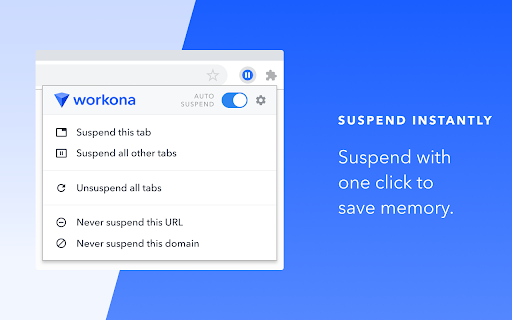


Suspend your browser tabs to save memory. Keep your computer running quickly with the Workona Tab Suspender. You can choose to suspend tabs automatically or on demand with one click. Either way, you’ll dramatically reduce your browser’s memory usage. Now you can keep all your tabs open without getting slowed down. 2/5/2021 UPDATE: Need to restore lost tabs from The Great Suspender? Workona Tab Suspender will automatically repair any broken Great Suspender tabs we find in order to restore the tabs you lost when the extension was disabled. Visit this article for instructions on how to restore these tabs: https://workona.com/pages/the-great-suspender-malicious-chrome-extension/ Save memory Dramatically reduce memory usage and keep your computer running quickly, just by adding the Workona Tab Suspender. Suspended tabs are just like normal tabs, except they don’t use memory. Keep more tabs open Tabs are where modern work gets done. Now you can work on multiple projects and keep those tabs open, all without impacting the performance of your computer. Auto-suspend tabs Choose automatic tab suspension based on how many active tabs you have or how much time has elapsed. You can rest easy knowing that suspension is working behind the scenes to free up resources. Never lose tabs Unlike other tab suspenders, you never have to worry about being locked into our system or losing your suspended tabs if you decide to stop using the Workona Tab Suspender. From a company you can trust More than 175,000 people trust Workona to keep their browser’s memory under control. Our company is venture-backed and built to last. Learn more at workona.com We believe that great software shouldn't come at a cost to privacy. Workona Tab Suspender does not store your browser data, use it for advertising, or share it with third parties. Your suspended tabs are 100% private to you, and we request the minimum permissions needed to suspend your tabs. If you ever have questions about Workona’s privacy practices, reach out to us at privacy@workona.com. Feel free to contact support at support@workona.com and we'll reply as soon as possible. By installing the extension, you agree to Workona’s Terms of Service (workona.com/policies/terms) and Privacy Policy (workona.com/policies/privacy).

Tiny Suspender
Unload / suspend / hibernate idle tabs to reduce memory and cpu usage. Unload idle tabs to free your precious memory and cpu resources! Tiny Suspender will automatically suspend/hibernate background tabs for you, greatly reducing overall system resource usage without you having to take any action. You can set how long to wait before suspending idle tabs and configure a whitelist to exclude certain pages from automatic suspension. - Form Detection: Tiny Suspender will try to detect active forms to avoid automatically suspending page with unsubmitted data - Audio Detection (optional): prevent autosuspending tabs that play music in the background. - Keyboard Shortcuts: Suspend tabs without moving your hand away from your keyboard. - Optionally use Chrome's native tab discard feature to save even more resources when your background tabs get suspended. Feedback is always welcome! - Source code and issue tracking are available at https://github.com/arifwn/TinySuspender - Due to limitation of Chrome Web Store developer portal, extension developers are not automatically notified every time a user leave a feedback to report an issue. Please use email or github issue report ( https://github.com/arifwn/TinySuspender/issues ) if you need fast response. Chrome Permissions used in this extension: - tabs & activeTab: allows various tab suspension/restore features and form detection feature. - contextMenus: allows adding "suspend tab" menu item and "open link in new suspended tab" in right click context menu. - storage: allows saving extension configuration - alarm: allows centralized and more reliable autosuspension timer - chrome://favicon/* : allows retrieving suspended page's favicon. - v2.1.0: - Added dimmed favicon in all suspended tabs; updated background tabs suspension behavior (Thanks Dsouravcom for the pull request on github!) - v2.0.4: - Added new keyboard shortcut actions that applied to all windows - Keyboard shortcuts are now only applied to the last active window - Misc. bug fixes and improvements to TinySuspender's internals - v1.3.0: - Added dark mode toggle (thanks Abdusco for the pull request on github!) - v1.2.0: - Happy new year! - Added an option to skip autosuspension when offline - Added support for keyboard shortcuts - Tiny Suspender will now try to restore tab scroll position - v1.1.0: - Added option to skip pinned tabs from automatic suspension - "Suspend All Tabs" and "Suspend Other Tabs" now will skip whitelisted pages. - Added experimental support for Chrome native tab discard feature. Enable it from the settings screen. - v1.0.0: We have reached version 1! - improved autosuspension timer by using Chrome's alarm api. Requires new permission. - UI improvements. Now you can always see tab suspension status from the popup. Status is also reflected as color-coded icon - improved form detection. - added an option to enable autorestore when a suspended tab is brought to foreground. - added an option to prevent autosuspending audible tabs. Useful for online music player. - v0.1.2: switching away from unloaded page willl trigger automatic suspend timer. - v0.1.1: fixed bug in whitelisting and auto-suspension feature.

Tab Suspender
Optimize browser performance with Tab Suspender. Tab Suspender - Save Memory and Speed Up Your Browser Stop tabs from slowing down your browser with Tab Suspender Chrome extension. This lightweight extension helps you save memory, improve performance, and increase your productivity by suspending tabs that you aren't actively using. >>Automatically suspends tabs: The Tab Suspender extension automatically suspends tabs after a specified time period, freeing up memory and improving performance. >>Quick suspend option: With just one click, you can quickly suspend any tab >>Whitelist important URLs and domains: The extension provides an option to whitelist important URLs and domains, ensuring that they never get suspended. >>Minimalistic design: Tab Suspender has a minimalistic design, with no distracting features, making it easy to use and efficient. >>Increasing productivity: By suspending tabs that you're not actively using, you can reduce distractions and increase your productivity. >>Saving battery life: Suspending tabs reduces the amount of memory and processing power used by your browser, which can help extend your laptop's battery life. >>Managing tab overload: If you frequently have many tabs open, the extension can help you manage the overload and reduce the amount of memory used by your browser. >>Improving browser performance: The extension can help improve the performance of your browser by freeing up memory and reducing the number of active tabs. Say goodbye to slow and unresponsive tabs, and experience a faster, smoother browsing experience with Tab Suspender.

TABLERONE tab manager
All-in-one tab manager to save tabs, restore sessions, and organize bookmarks. Having too many tabs open reduces your productivity. Your computer becomes slow, it takes you longer to find the right tab, and you often get distracted in the process. TABLERONE tab manager solves this problem by enabling you to close all tabs without losing them. It’s like a better History combined with bookmarks, except you won’t forget about them. It will make you faster, more organized, and focused. Free. No accounts. 100% privacy. 🗂 Save tabs as bookmarks with screenshot preview 🗄 Organize bookmarks with tags and notes 📚 Set up workspaces and switch between them 🔄 Reopen sessions exactly where you left them ♻️ Restore tabs after a browser crash 🔍 Search open and saved tabs 📦 Share multiple links with one link Whether you call it a tab manager, session manager, bookmarks organizer, bookmark manager, or something else, Tablerone will improve your focus, accelerate multitasking, and automate grunt copy-paste work. Stay in the flow and get more done from day one. Then watch your personal knowledge system effortlessly grow over time just by browsing the web. Why? So you can stop leaving tabs open. Instead, save tabs for later, safely close them and reopen them when needed. - Close tabs without losing them - Reopen closed tabs after a browser crash Save multiple tabs with one click. Organize them by topic and later recall them visually with generated screenshot previews. - Search bookmarks with screenshot preview - Organize bookmarks with tags and notes MULTITASK FASTER WITH WORKSPACES Organize accounts, projects, holidays, research,… the way it suits you. Quickly switch between sessions and pick up exactly where you left off. - Open multiple tabs with one click - Add sessions to favourites It does what you’d expect from a tab manager: - Save all tabs - Save multiple tabs - Save one tab - Automatically save tabs overnight - Save all tabs to file - Close all tabs - Close multiple tabs - Close one tab - Reopen all tabs (restore sessions) - Reopen multiple tabs (open multiple URLs) - Reopen one tab - Restore tabs you accidentally closed - Restore tabs after a browser crash - Organize bookmarks with tags - Organize bookmarks with notes - Organize bookmarks with favourites - Open bookmarks - Move bookmarks - Copy bookmarks - Search tabs - Switch between tabs Plus a few less-common things: - Preview tabs and bookmarks with automatic screenshots - Share multiple links with one link - Copy all URLs and metadata to clipboard - Copy selected URLs and metadata to clipboard Export tabs as: - .txt list - .txt table - Markdown list with thumbs - Markdown table - HTML list with thumbs - HTML table - JSON - CSV - Tablerone backup And also: - Import bookmarks - Import OneTab data - Import Session Buddy data - Suspend idle tabs manually to free memory and CPU - Discard idle tabs automatically to free memory and CPU - Support for selected 3rd party tab suspender extensions - Change appearance (light theme & dark theme) - Customize preferences and settings Tablerone’s 100% privacy guarantee means: 1. The extension stores your application data only locally 2. Usage analytics data is completely anonymous 3. We never share any data with third parties Please note that Tablerone has no control over the privacy settings of your browser, operating system, computer, or network. User manual and documentation: https://tabler.one/help-and-support/ Get involved and contribute: https://discord.gg/qSXjcBbczy As a company we: - We take pride in great product design and user experience - Built the extension as a free client app — our next goal is to build a premium SaaS solution and extend client support to other browsers and devices - Want to revive the old idea of social bookmarking and take it to the next level - Are dedicated to developing a business model around 100% private technology to ensure we never fail users on that promise

Tasks - To do & task list by Workona
The best task list for work in the browser. Workona Tasks are the best way to manage tasks in Chrome. Now it’s simple to jot down a task, check in with your most important todos, or create a task list for a project. Creating todo lists is easier than ever — just click the button in your browser bar. This extension lets you create and update tasks from any Chrome tab, and even attach tabs to your tasks so you have the full context. Learn more about Workona: https://workona.com ______________________________________________ FEATURES Create a task instantly Turn any tab or email into a task as soon as you think of it. Just click the extension button in your browser bar or use the keyboard shortcut Opt + Z (or Alt + Z). This lets you quickly add tasks while you work and attach a tab or resource. With your to-do list accessible from every page, it’s easier to stay on top of tasks. Top tasks at your fingertips Your task list is now just a click away in Chrome. Without leaving your current tab or interrupting your workflow, you can access your most important tasks and log any other to-dos that come to mind. Convenient task popup Workona’s task manager includes a popup that’s just a click away. This helps you capture to-dos without opening a separate app. It’s designed to cut down on context switching so you can maintain focus. Without breaking your workflow, you can create as many todo lists as you need. To-do lists for every project Want to separate your to-dos by project? Add them to workspaces, which can provide instant context for each task. To give even more context, attach relevant tabs and docs to the task. Fully featured task list Your task list includes a rich text editor for polished formatting, keyboard shortcuts to move faster, and intuitive drag-and-drop attachments. Plus, a due date email digest to let you know when deadlines are here (optional). Feel free to contact support at support@workona.com and we'll reply as soon as possible. By installing the extension, you agree to Workona’s Terms of Service (workona.com/policies/terms) and Privacy Policy (workona.com/policies/privacy).
