
andpjllgocabfacjlelkfpdemfklpfpo
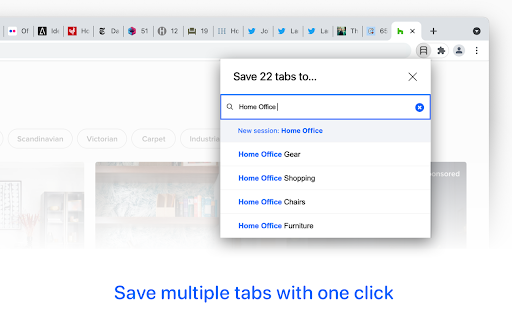


All-in-one tab manager to save tabs, restore sessions, and organize bookmarks. Having too many tabs open reduces your productivity. Your computer becomes slow, it takes you longer to find the right tab, and you often get distracted in the process. TABLERONE tab manager solves this problem by enabling you to close all tabs without losing them. It’s like a better History combined with bookmarks, except you won’t forget about them. It will make you faster, more organized, and focused. Free. No accounts. 100% privacy. 🗂 Save tabs as bookmarks with screenshot preview 🗄 Organize bookmarks with tags and notes 📚 Set up workspaces and switch between them 🔄 Reopen sessions exactly where you left them ♻️ Restore tabs after a browser crash 🔍 Search open and saved tabs 📦 Share multiple links with one link Whether you call it a tab manager, session manager, bookmarks organizer, bookmark manager, or something else, Tablerone will improve your focus, accelerate multitasking, and automate grunt copy-paste work. Stay in the flow and get more done from day one. Then watch your personal knowledge system effortlessly grow over time just by browsing the web. Why? So you can stop leaving tabs open. Instead, save tabs for later, safely close them and reopen them when needed. - Close tabs without losing them - Reopen closed tabs after a browser crash Save multiple tabs with one click. Organize them by topic and later recall them visually with generated screenshot previews. - Search bookmarks with screenshot preview - Organize bookmarks with tags and notes MULTITASK FASTER WITH WORKSPACES Organize accounts, projects, holidays, research,… the way it suits you. Quickly switch between sessions and pick up exactly where you left off. - Open multiple tabs with one click - Add sessions to favourites It does what you’d expect from a tab manager: - Save all tabs - Save multiple tabs - Save one tab - Automatically save tabs overnight - Save all tabs to file - Close all tabs - Close multiple tabs - Close one tab - Reopen all tabs (restore sessions) - Reopen multiple tabs (open multiple URLs) - Reopen one tab - Restore tabs you accidentally closed - Restore tabs after a browser crash - Organize bookmarks with tags - Organize bookmarks with notes - Organize bookmarks with favourites - Open bookmarks - Move bookmarks - Copy bookmarks - Search tabs - Switch between tabs Plus a few less-common things: - Preview tabs and bookmarks with automatic screenshots - Share multiple links with one link - Copy all URLs and metadata to clipboard - Copy selected URLs and metadata to clipboard Export tabs as: - .txt list - .txt table - Markdown list with thumbs - Markdown table - HTML list with thumbs - HTML table - JSON - CSV - Tablerone backup And also: - Import bookmarks - Import OneTab data - Import Session Buddy data - Suspend idle tabs manually to free memory and CPU - Discard idle tabs automatically to free memory and CPU - Support for selected 3rd party tab suspender extensions - Change appearance (light theme & dark theme) - Customize preferences and settings Tablerone’s 100% privacy guarantee means: 1. The extension stores your application data only locally 2. Usage analytics data is completely anonymous 3. We never share any data with third parties Please note that Tablerone has no control over the privacy settings of your browser, operating system, computer, or network. User manual and documentation: https://tabler.one/help-and-support/ Get involved and contribute: https://discord.gg/qSXjcBbczy As a company we: - We take pride in great product design and user experience - Built the extension as a free client app — our next goal is to build a premium SaaS solution and extend client support to other browsers and devices - Want to revive the old idea of social bookmarking and take it to the next level - Are dedicated to developing a business model around 100% private technology to ensure we never fail users on that promise

TabTabTab - All In One Tab Manager
Supports your browsing by improving tab management. Lost in a sea of tabs? Feel overwhelmed by their sheer number? TabTabTab is here to revolutionize the way you manage tabs. Experience a seamless, organized, and efficient browsing like never before. * Comprehensive Tab Overview: View all your windows and tabs, including those grouped, in one unified list. * Flexible Drag & Drop: Organize your tabs freely - be it pinned, grouped, or standalone. * Window and Group Save & Restore: Quickly save and restore your tab groups and window sessions, ensuring a seamless continuation of your work. * Automatic Tab Grouping: Tabs are automatically organized based on domain or subdomain, making it easier to manage and navigate your tabs. * Duplicate Tab Alert: Avoid clutter with automated alerts for duplicate tabs. Effortlessly close duplicates to streamline your browsing. * Window Merge: Combine multiple browser windows into one with a single click, organizing scattered tabs into a cohesive session. * Time Tracking: Keep track of how long it's been since you last accessed a tab. * Essential Tab Operations: URL copying, pinning, grouping, and more. * Screenshot Tool: Quickly capture the active tab's visible area. * Efficient Navigation & Search: Jump to or find your desired tabs in seconds. * Automatic Cleanup: Auto-remove tabs you haven't accessed based on your preferences. * Side Panel Tab Overview: Easily access a list of your tabs through a convenient side panel. * Dark Mode: Switch to a darker, more focused look whenever you wish. The source code for TabTabTab is public on GitHub at the following link.

Link Map
Link Map is a browser tab sidebar that is designed for heavy information consumers. With Link Map, even if you have a large number of tabs and windows, you can manage and classify them in a logical and clear way using the tree view structure, forming your own link collection. Have you used Tabs Outliner before? Now you can import your data to Link Map and start a new journey. **What can Link Map do?** 🌲 Tree-shaped vertical tab sidebar, but with more levels: you can use drag-and-drop to quickly complete more tab operations 💾 Close and save for later reading: clear your workspace and focus on current work, they will remain in the list 🔒 Backup/restore: backup and restore your data in a universal format (JSON) 🔧 Tabs Outliner import: supports importing data from Tabs Outliner We do need to operate more tabs and windows, but at the same time, we can also keep them organized. Install Link Map and start building your tag collection to make your information consumption more efficient.

TabStacks: tab and history search
View and search through open tabs and browser history. TabStacks is a vertical tab menu that helps you find the content you were looking for. Filter the tabs you have open and TabStacks will list the open tabs that match. If TabStacks can't find an open tab, it searches through your history to see if you had a tab open previously! TabStacks is designed to be keyboard and screen reader accessible. Press [CTRL]+[SHIFT]+[K] to open the menu, start typing to filter your tabs, and use the [DOWN] arrow key to navigate to the tab you want, and [ENTER] to open that tab. You can always use your mouse as well. You can search through your history during a tab search by pressing [CTRL+SHIFT+S]. You can close a tab by highlighting it in the list using the arrow keys or right-click and pressing [DELETE] or by clicking the close button on the tab. TabStacks is a high performance and secure extension for Chrome. TabStacks doesn't download external files, doesn't store any information about your activity. *** UPDATES *** Version 2.0.2 * Fixed bug where the popup doesn't close on tab change * Added a settings item to allow the option to hold the popup open Version 2.0.1 * The default keyboard shortcut for toggling the search is now CTRL+SHIFT+S due to the browser using nearly all possible combinations of CTRL+ a single key. * The keyboard shortcut key is now configurable, you can modify it in the settings page. Click the gear icon at upper right of the popup to access settings. * Minor cosmetic updates to the settings page. Version 2.0 * Tabs shown in the popup are synchronized with the state of the tabs in the browser: * Title updates are reflected in real-time. * New or deleted tabs are reflected in the tab list. * Close tabs using a button on the tab. Close buttons show on hover or focus. * Tabs display an audio icon if playing audio. * For audible tabs, clicking the icon will mute and unmute the tab. * Settings page has been added, click the gear icon top-right to access settings. Version 1.0.8 * Added lazy loading for site icons to speed up rendering * Reduced requested browser permissions Version 1.0.7 * Linux support for launching TabStacks from keyboard with [CTRL+SHIFT+K]. * PopupMenu now has a max-height instead of fixed height. * Fixed bug on Windows where the scroll bar was rendered even if the tabs would not scroll. Version 1.0.6 * Improved search algorithm for both tabs and history. * Searches much longer history time period. * Tabs in the current window always appear at top when popup is opened (User suggestion). * URLs for tabs appear on focus or mouseover (User suggestion). * Engineering improvements under the hood to use Web Components for rendering.

TabMate
TabMate helps you manage the tab clutter. Easily switch between tabs, save & restore set of tabs or windows, and more. TabMate helps you manage tab clutter and be more productive. Stash a set of tab/windows that you want to save for later and easily restore them when needed. Use quick switcher to search among open tabs and stashes and switch to them. Drag and drop the tabs to rearrange them with in windows or stashes. Name stashes so you can easily remember the purpose for each set of tabs. Easily send tabs to named stashes through right click context menu. Common usages: - Quickly search and switch between all the open tabs and stashes - Save the pages you've visited during your research session and restore all of them later. - Logically group all the pages you visit often and load each group when needed. - Easily manage existing open tabs by saving unnecessary tabs as a session.
