
jhnleheckmknfcgijgkadoemagpecfol

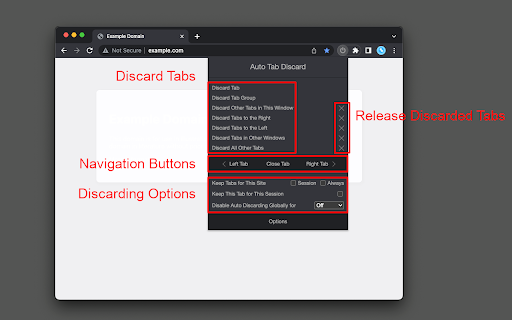

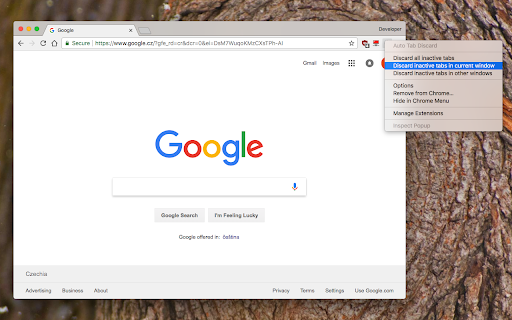
Increase browser speed and reduce memory load when you have numerous open tabs. "Auto Tab Discard" is a lightweight browser extension that automatically reduces the amount of memory used by open but inactive tabs, helping to conserve battery life on portable devices by disabling JavaScript code and DOM events on discarded tabs. There are two options on the extension's interface to either discard tabs or release discarding (the "x" buttons) The features of "Auto Tab Discard" are: * Improves browser performance and reduces memory usage by automatically or manually discarding inactive, idle, or forgotten tabs. * Includes a list of hostnames or regular expressions that can be excluded from auto-discarding. * Preserves the discarded state of tabs when the browser is closed and reopened. * Indicates the discarded state of a tab through the favicon or title. * Restores the state of a tab, including scroll position and text box content, after it is released from being discarded. * Allows for the forced discarding of specified hostnames. The options for configuring whether tabs should be discarded or not include: * Pinned tabs * Tabs that are playing media * The presence of a power source * Unsaved content or user input in a tab The available plugins for "Auto Tab Discard" are: * Release the discarded state of the next or previous tab. * Release the discarded state of all tabs in the active window. * Automatically discard all newly opened inactive tabs. * Store YouTube's timestamp before a tab is discarded. * Permanently delete (remove) old discarded tabs that are inactive. * Unlike the "The Great Suspender" extension, this extension uses the native method for discarding tabs, which means that even if the extension is removed or the browser crashes, your browser will automatically restore everything for you. https://webextension.org/privacy-policy/extension/tab-discard.html

The Great-er Tab Discarder
Compatible with latest Chrome! Helps your browser load and run faster by freeing up memory and resources used by old inactive tabs. Welcome to all users coming from "The Marvellous Suspender", "The Great Suspender (notrack)", "Tab Suspender", "Tiny Suspender" or other similar extensions! This extension can migrate your suspended tabs! Do not uninstall your existing extension(s) until you migrate to this one, or else Chrome will delete all your suspended tabs. Discarding a tab natively tells your browser it can free up memory and resources, and is the preferred way to keep your browser running fast and efficient. Tab Suspending is the old-school approach at saving memory, but allows for visual customization. Your browser will still assign some resources to the suspended "mini-pages" to allow for the customization. But you can also Discard a Suspended tab... perhaps getting the best of both worlds. Suspend Tabs Suspend tabs in addition to Discarding them, giving you some visual customization. You can Discard or Suspend or both! Suspended Tabs can have dimmed favicons and custom icons added to the title Discard all tabs at startup Prevents Chrome from loading all your tabs at startup, while preserving the tabs in your last session. Discard eligible tabs Same as "Discard other tabs" but observes the current auto-discard settings, like skipping Pinned and Audio tabs. Link to Chrome Discards page Adds a link on the context and popup menus to launch the built-in chrome://discards/ page. What does "Discarding" a tab mean? Discarding a tab does NOT close or remove or delete the tab. It natively tells your browser it can free up memory and resources, and is the preferred way to keep your browser running fast and efficient. What about "Suspending" tabs? Tab suspending is the old-school approach at saving memory, but allows for visual customization. Your browser will still assign some resources to the suspended "mini-pages" to allow for the customization. You can also Discard a Suspended tab... perhaps getting the best of both worlds. If you have suggestions or problems using the extension, please - Start a discussion if you have a question: https://github.com/rkodey/the-great-er-discarder-er/discussions - Submit a bug or feature request: https://github.com/rkodey/the-great-er-discarder-er/issues (This is a fork of the abandoned project deanoemcke/thegreatdiscarder.)

Lazy Tabs
Automatically discards all tabs at startup or on demand (on icon click) for reducing memory consumption and unnecessary bandwidth usage. Without tracking and any permissions. Source code: https://github.com/jman/lazy_tab

Tab Discard (Suspender)
Easily suspend inactive tabs and save up memory for your browser. Tab Discard (Suspender) is an extension that lets you easily suspend either all inactive tabs or just the active tab by clicking on the toolbar button. In principle, suspending tabs can reduce the browser memory and enhances your browsing experience. When you click on a suspended tab (make it active) it will be loaded with the previous content automatically. This addon is useful when you have several open tabs, you can suspend them all (free up the memory) with just one click and then visit them one-by-one to unsuspend. This way, your browser will use the least amount of memory and have a better performance. Please right-click on the toolbar button and then select the desired option for suspending tabs (i.e. active or inactive tabs). To report bugs, please visit the addon's homepage (https://mybrowseraddon.com/tab-discard.html) and fill the bug report form.

Tab Suspender 2.0
Increase browser speed and reduce memory load when you have numerous open tabs. 1. Download and install the extension. 2. That's it. You don’t have to do anything else. 3. The tabs that have been inactive, will sleep. 💤 4. Press the space key to restore an invisible tab. 1. Frees memory and CPU storage on the machine by killing all inactive tabs. 2. Your tabs won't get lost and they can be restored with a single mouse click/space key. 📌 Pin the Tab Suspender 2.0 extension to save you some time from keeping the tabs organized at all times.
