
plpkmjcnhhnpkblimgenmdhghfgghdpp


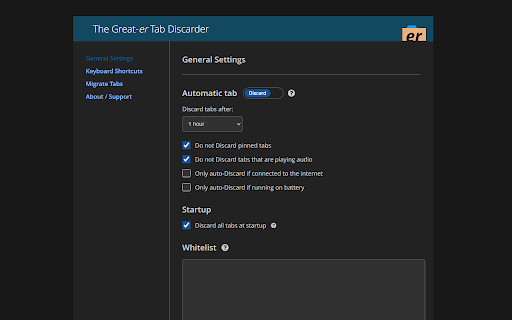
Compatible with latest Chrome! Helps your browser load and run faster by freeing up memory and resources used by old inactive tabs. Welcome to all users coming from "The Marvellous Suspender", "The Great Suspender (notrack)", "Tab Suspender", "Tiny Suspender" or other similar extensions! This extension can migrate your suspended tabs! Do not uninstall your existing extension(s) until you migrate to this one, or else Chrome will delete all your suspended tabs. Discarding a tab natively tells your browser it can free up memory and resources, and is the preferred way to keep your browser running fast and efficient. Tab Suspending is the old-school approach at saving memory, but allows for visual customization. Your browser will still assign some resources to the suspended "mini-pages" to allow for the customization. But you can also Discard a Suspended tab... perhaps getting the best of both worlds. Suspend Tabs Suspend tabs in addition to Discarding them, giving you some visual customization. You can Discard or Suspend or both! Suspended Tabs can have dimmed favicons and custom icons added to the title Discard all tabs at startup Prevents Chrome from loading all your tabs at startup, while preserving the tabs in your last session. Discard eligible tabs Same as "Discard other tabs" but observes the current auto-discard settings, like skipping Pinned and Audio tabs. Link to Chrome Discards page Adds a link on the context and popup menus to launch the built-in chrome://discards/ page. What does "Discarding" a tab mean? Discarding a tab does NOT close or remove or delete the tab. It natively tells your browser it can free up memory and resources, and is the preferred way to keep your browser running fast and efficient. What about "Suspending" tabs? Tab suspending is the old-school approach at saving memory, but allows for visual customization. Your browser will still assign some resources to the suspended "mini-pages" to allow for the customization. You can also Discard a Suspended tab... perhaps getting the best of both worlds. If you have suggestions or problems using the extension, please - Start a discussion if you have a question: https://github.com/rkodey/the-great-er-discarder-er/discussions - Submit a bug or feature request: https://github.com/rkodey/the-great-er-discarder-er/issues (This is a fork of the abandoned project deanoemcke/thegreatdiscarder.)

Sloth
Automatically discards all tabs at startup, before they load, reducing memory footprint and unnecessary bandwidth usage. An open-source and light-weight chrome / chromium extension which ensures that tabs are lazily loaded. This plugin uses the discard API available since Chrome 54. All tabs except new tabs or "special" tabs are discarded. Discarded tabs are visible in the tab bar, but not loaded from the network nor kept in memory. If a window doesn't have a new tab, it is created and activated. This prevents any tab from loading during startup, unless you explicitly select it. Special tabs are those with chrome:// URLs, for example. Note: Where there are hundreds of tabs open in the session, a couple of them sneak through and become active. This limitation is due to the design of the browser. See https://github.com/hrj/sloth/issues/1. I found an extension called Native Lazy Tabs here. It was distributed under the GPL license. I adapted it and added the "new tab" feature. The icon is by Jaime Serra, distributed under the CC license.

TabXpert - session and tab manager
Auto-saved browser sessions. Tab groups support. Sync with the cloud. - Session manager: auto-saved sessions, single- and multi-window modes, tag-based session management. - Tab manager: tab groups, vertical tabs, bookmarks, drag and drop, and powerful search. - Cloud sync: sync sessions across devices and profiles (optional). - Privacy-first: no content access, no data collected; local-first data storage. - Customizable interface: pop-up, tab, window, and side panel interfaces to your choice. - New tab page: most visited and recent tabs, history, bookmarks, and sessions. - Import from: OneTab, Session Buddy, Workona, Toby and other extensions. - And more: cloud backups, browser integration, keyboard shortcuts, tab suspending.

Tab Discard (Suspender)
Easily suspend inactive tabs and save up memory for your browser. Tab Discard (Suspender) is an extension that lets you easily suspend either all inactive tabs or just the active tab by clicking on the toolbar button. In principle, suspending tabs can reduce the browser memory and enhances your browsing experience. When you click on a suspended tab (make it active) it will be loaded with the previous content automatically. This addon is useful when you have several open tabs, you can suspend them all (free up the memory) with just one click and then visit them one-by-one to unsuspend. This way, your browser will use the least amount of memory and have a better performance. Please right-click on the toolbar button and then select the desired option for suspending tabs (i.e. active or inactive tabs). To report bugs, please visit the addon's homepage (https://mybrowseraddon.com/tab-discard.html) and fill the bug report form.

Tab Suspender
Automatically suspend, park, hibernate inactive tabs and save up to 80% of memory, reduce load on your device, battery and heat. Chrome Manifest V3 update now released again with some fixes! It can be buggy for first time, please be lenient), this required a complete rework of the extension), Please write error messages here https://github.com/sergey-drpa/Tab-Suspender/issues Thank you. If you like to use many open Tabs at once - this extension will help you and automatically accelerate your browser and purge the memory. Extension suspend, park, hibernate inactive tabs and save up to 80% of memory. Unloading tabs will free memory and reduce load on the device, saving battery and less heat. This extension catches inactive, idle or forgotten tabs and suspend / park them with the freeing 80% memory, device resources and battery life. Also you can enable auto-close tabs function, which close unused tabs and holds count of tabs at the selected level. Benefits: Speeds Up Chrome: Suspended tabs don't consuming processor resources. Minimize Memory Use: Chrome consumes in 3-5 times less memory with suspended tabs against normal. Automatic controls tab population: Do not need to close unused tabs manually. 2.0.9 Solved the biggest problem of the extension, restoring tabs after deleting the extension. On uninstalled page added ability to restore suspended tabs after Tab Suspender uninstalled Fix issue #44 Fix issue #27 2.0.8 Fix split page error Added Option: Immediately Suspend tabs opened with Ctrl/Cmd+Click OffscreanDocument heartbeat + replaced with TSKeeper Added option to Suspend/Unsuspend Tab Groups Localization 2.0.7 Made huge amount of fixes, improvements and etc. Added new options in setting: - Screenshots Enabled (yes/no) - Ignore Tabs in Group 1.4.11 Parked page performance improvements 1.8x. Interface improvements. Added video tutorial. Some bug fixes. 1.4.4, 1.4.5 Fixed bugs with corrupted settings. 1.4.3 Fixed bugs with mistakenly wizard opening. 1.4.3 Fixed bugs with freezes. Added ability to import/export settings. Added quick Session Preview on TS menu. Activated configuration synchronization between account browsers. 1.3.3 Fixed Menu JS error. Reworked History page. Added Session Manager. Fixed h2c screenshot Width/Height logic. 1.2.9.4 Fixed suspended screenshot size for Retina displays. Added new HOTKEYs: 'Suspend or Unsuspend Current Tab (in one HotKey)' and others. Reworked context menu with checkboxes, added separators. 1.2.9.3 Added ability to click anywhere to restore. Auto adjust Restore button size based on window height. 1.2.8 Fixed issue with all tabs icons doesn't load properly. Performance improvement. 1.2.7.2 Fixed empty screen without title. Fixed bug with 'The database connection is closing'. Prevent from suspend tabs with filled forms. Added new style of restore button: Top Menu (can be changed in settings) 1.2.7.1 Added setup wizard. Added reset settings button. Added settings for additional CSS styles of suspended page Screenshot. 1.2.7 Migration to IndexedDB. Bug with double capture on page loading, improved capture logic. Bug with icons do not loaded but page already discarded without icon. Bug with DB is not initialized. 1.2.6 Added settings related to battery level. Added new option "Open new tabs discarded". Fixed Whitelist lost focus. Fixed problem with Zoomed pages when preview screen was over zoomed. 1.2.5 Fixed bug with slow scrolling. Fixed bugs. 1.1.2 Fixed bug with auto-reload on tab activation. Rework open from history page logic. 1.1.0 Greatly improved memory savings and performance. Added support of native discard, if suspended tab not used for a long time - increased memory save! Reworked screens storage - improved memory usage, saves even more memory now! Reworked screens storage - screens not disappear after browser restart. Added option to start tabs discarded on browser startup. Added restore form data during unsuspend. Added settings allows to disable suspender based on charging status. 0.6.0 Menu reworked. Added new option "Auto-Suspend tabs only when working on battery". Added new settings for background color of suspended page. Bug on settings page slider fixed. Tried to fix chrome://invalid problem. 0.5.7 Settings page reload bug fixed. Disk writes issue improved. Suspend bug fixed. 0.5.5 Added menu tooltips. 0.5.4 Returned 'Ignore Current Tab' menu item. Added White List user interface (May ask for "notification" permission). Removed 'http' prefix from White List tester. 0.5.3 Removed 'Ignore Current Tab' menu item. Fixed recursive suspend from context menu. 0.4.9.2 Recycle button improved. 0.4.9.1 Issue with pages without favicon. Fine suspend interval slider on All Settings. 0.4.9 Suspend window menu item fix. Icon does not processed as well on some sites. Auto update for old version immediate updgrade absorber. 0.4.8.3 Added hotkeys. Added context menuon mouse right click(May ask for "contextMenus" permission). Fixed immediate extension update. Fixed cross OS font on popup. 0.4.8.2 Fixed pause issue. 0.4.8: Huge performance optimization. Added tab icons status animation. Added Recycle function control on popup page. Added history of suspended tabs. Added native tab URL info at the top of parked page. Added if user click refresh browser button on suspended tab - unsuspend tab. Fixed wrong weight calculation on tab close logic. Audiable exception logic improved. Restore tabs on startup only if according setting setted. Fixed: tabs playing music have more points opposite tab without music for 'tab close' case only. 0.4.7: Added audible option. Added auto restore tabs after auto-update extension on enable-disable action. (earlier lost all suspended tabs) Added popup with slider for fast access to suspend-interval settings. Improved auto-close tab logic. Performance improvements++. Added new functional buttons: "Suspend other tabs", "Restore All". Added Pause Suspender function. Added "Ignore current tab" option. Added option to reload a tab when restoring, instead of just displaying the cached version of the page. Added option to restore tab by mouse click instead of mouse hover. Fixed bug with unparked tab stuck in parked state. Reworked exception list, added * support, now supports 'subdomain.*' or '*.domain.com' patterns. Add test interface for exception list testing. 0.4.6: - Fixed bug with tab suspend stops after some time. - Added ability to suspend tab manually. - 'Very slow PC' options detects automatically - actual for ChromeOS. 0.4.5: - UI fixes. - Close tab logic improved. 0.4.4: - New option to exclude sites from being suspend. - Fixed orthographical errors. - Fixed Restore from History or OneTab plugin. - Fixed generated favicons injection. - Added mode for super-slow PC(for the case when the video slows down) 0.4.3: - Improved blinking of restore- button. - Added correct suspended favicons for pages without favicon.
