
kpoggabejgbenjahggloahnnaolmfock

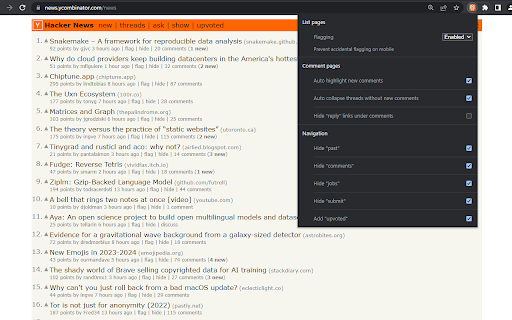
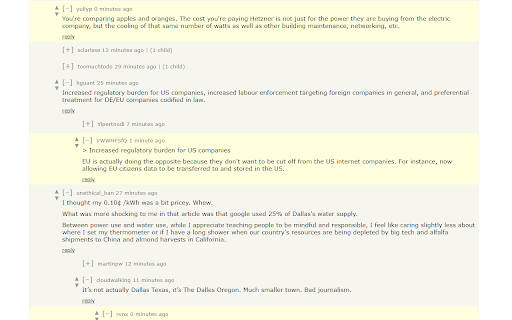


Highlight new comments, mute & note users, filter items, dark mode, custom CSS and other tweaks for Hacker News Browser extension which makes it easer to follow comment threads on Hacker News across multiple visits, showing which items have new comments, highlighting new comments and collapsing threads without new comments. It also adds the ability to annotate and mute other users, plus other UI and UX tweaks. • Show new comment counts since you last viewed each item - clicking on the "X new" link will highlight new comments and collapse comment trees which don't contain any new comments • Hide "AI" items on the main list pages • Prevent accidental flagging and hiding on mobile by making the "flag" and "hide" controls require confirmation, or hiding them • Highlight new comments and collapse comment trees which don't contain any new comments when you revisit an item's comments - you can configure whether or not this happens automatically when you revisit • Default comment folding controls are replaced with a Reddit-style left-aligned control, with a slightly larger hit target • Manually highlight the X most-recent comments using the new "highlight comments" link on an item • Mute users to hide their comments and replies to them - muted users can be managed on your own profile page • Logged out users get a new 'muted' link in the header they can use to manage their muted users • Add your own notes to other users on their profile page - the first line will be displayed next to their comments • Toggle display of "reply" links below comments to make more room for comments on the screen • Increased distance between the upvote and downvote arrows on mobile • Increase the contrast of submission text • Hide navigation items you don't use • Add an "upvoted" link to the header to make it easier to get back to previously visited items • Improves mobile navigation by display links below other header contents

Tanuki Utilities
Provide useful utilities for GitLab users. * Change the GitLab favicon to a project icon; you can easily distinguish many GitLab tabs. * Move "Copy reference" button on top bar; the button is always shown for your easy access. This extension tries to change favicons in the **all** sites by default. You can specify which GitLab site (e.g. gitlab.com or your self-hosted site) you would like to change favicons. #### Change the GitLab favicon to a project icon

PromptSync
Ask ChatGPT, Bard AI, and Bing Chat with one single prompt! Unlock the power of four dynamic chat platforms with a single prompt! Introducing PromptSync, your all-in-one solution for chatting with ChatGPT, Bard AI, and Bing Chat, through a convenient Chrome extension. Multi-Platform Chat Engage in conversations effortlessly with ChatGPT, Bard AI, and Bing Chat from a single prompt. Get diverse perspectives and responses to your queries. Customizable Experience Tailor your chat experience to your liking! Enable or disable individual chat platforms according to your preferences through the settings menu. Efficient Workflow Streamline your workflow by accessing multiple chat services without switching tabs. Save time and stay productive as you harness the combined intelligence of four powerful chat systems.

Discussions on HN, Reddit and Lobsters
See if the current page has been discussed on Hacker News, Lobsters and Reddit Find discussions on Hacker News, Reddit, Lobsters and others. Once installed a badge is shown with the number of discussions and comments for the pages you visit. Click the badge to see the list of all the discussions.

Trendcat
A new tab extension for GitHub and HackerNews feeds Simple new tab extension for Github Trending Repositories and Hacker News Stories. v2.2.0 - New Settings Modal - Digital Clock Splash Screen (Optional) - Request Delay (Optional)
