
efpdjmbhdeindmfegilaloknlpfloefd
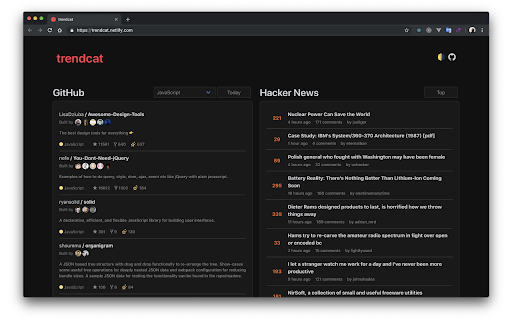
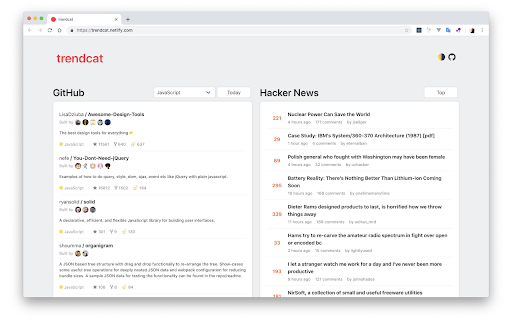
A new tab extension for GitHub and HackerNews feeds Simple new tab extension for Github Trending Repositories and Hacker News Stories. v2.2.0 - New Settings Modal - Digital Clock Splash Screen (Optional) - Request Delay (Optional)

InfoSE
Quickly access relevant information for selected word Introducing "InfoSE," the ultimate extension for lightning-fast access to relevant information right at your fingertips. With InfoSE, effortlessly explore top relevant results for selected word, neatly organized within accordion-style panels, each offering a concise summary for quick insights. Key Features: Effortless Access: Simply highlight any word or phrase on your browser, and InfoSE springs into action, fetching relevant information instantaneously. Accordion Interface: InfoSE presents search results in a sleek accordion format, allowing you to expand and collapse each panel effortlessly. This intuitive design enables efficient browsing without cluttering your screen. Comprehensive Summaries: Dive into succinct summaries within each accordion panel, providing essential details without overwhelming you with excessive information. Whether it's definitions, explanations, or background context, InfoSE delivers the highlights at a glance. Wikipedia Integration: Seamlessly explore Wikipedia entries directly within InfoSE. With a single click, delve into comprehensive articles, gaining in-depth understanding on your chosen topic without leaving your browsing session.

Kurrant.ai
Get access to Kurrant AI’s private and public company database directly from your Chrome browser. Unsurpassed Coverage for Superior Results: With millions of unique companies (and growing) in our proprietary database, get reliable, updated market coverage on the companies most relevant to your investment strategy. Identify your targets faster and stay ahead of the curve. Streamline Workflow for Maximum Efficiency: See key data such as funding history, employee counts, and financial data about companies directly as you browse their websites. Enrich Your Discovery Lists: If you are already a Kurrant AI user, add companies that catch your eye to your custom lists within the app and rate them to get AI-powered custom recommendations. Companies that are not yet in Kurrant AI will automatically be added to our database ready for your due diligence. Download the extension and sign up for Kurrant now—free. Lead and close deals before your competitors.

TweakSync
TweakSync lets you style web elements in real-time from Chrome and sync changes with VS Code for a smooth development experience. TweakSync is a powerful tool designed for front-end developers and web designers who want to streamline their styling workflow. This Chrome extension enables real-time styling of web elements directly within Chrome, allowing you to see changes instantly as you tweak styles. Real-Time Styling: Easily select any element on a webpage and adjust its styles on the fly. With live previews, you can see the impact of your changes immediately, making the styling process more efficient and intuitive. Seamless Integration with VS Code: TweakSync syncs your style changes directly with your VS Code environment. This integration allows you to apply and save your CSS changes effortlessly, ensuring that your development process remains smooth and uninterrupted. Efficient Workflow: By bridging the gap between your browser and your code editor, TweakSync eliminates the need to switch back and forth between tools. This results in a more streamlined workflow, saving you time and effort. Boost Your Efficiency: Save time with instant style updates and seamless integration with VS Code. TweakSync helps you make changes faster and more accurately. Improve Your Design Process: Experience a smoother design workflow with live previews and direct synchronization between Chrome and VS Code. Streamline Your Development: Minimize context-switching and keep your development process focused with TweakSync is real-time styling and VS Code integration.

Comments Owl for Hacker News
Highlight new comments, mute & note users, filter items, dark mode, custom CSS and other tweaks for Hacker News Browser extension which makes it easer to follow comment threads on Hacker News across multiple visits, showing which items have new comments, highlighting new comments and collapsing threads without new comments. It also adds the ability to annotate and mute other users, plus other UI and UX tweaks. • Show new comment counts since you last viewed each item - clicking on the "X new" link will highlight new comments and collapse comment trees which don't contain any new comments • Hide "AI" items on the main list pages • Prevent accidental flagging and hiding on mobile by making the "flag" and "hide" controls require confirmation, or hiding them • Highlight new comments and collapse comment trees which don't contain any new comments when you revisit an item's comments - you can configure whether or not this happens automatically when you revisit • Default comment folding controls are replaced with a Reddit-style left-aligned control, with a slightly larger hit target • Manually highlight the X most-recent comments using the new "highlight comments" link on an item • Mute users to hide their comments and replies to them - muted users can be managed on your own profile page • Logged out users get a new 'muted' link in the header they can use to manage their muted users • Add your own notes to other users on their profile page - the first line will be displayed next to their comments • Toggle display of "reply" links below comments to make more room for comments on the screen • Increased distance between the upvote and downvote arrows on mobile • Increase the contrast of submission text • Hide navigation items you don't use • Add an "upvoted" link to the header to make it easier to get back to previously visited items • Improves mobile navigation by display links below other header contents
