
mihejilgifecplfpdfhjghfmhbhajcke

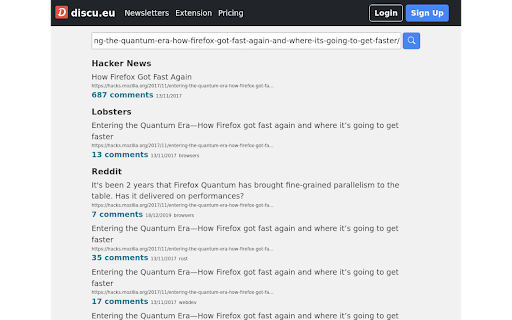
See if the current page has been discussed on Hacker News, Lobsters and Reddit Find discussions on Hacker News, Reddit, Lobsters and others. Once installed a badge is shown with the number of discussions and comments for the pages you visit. Click the badge to see the list of all the discussions.

Hacker News Tags
Smart tags for Hacker News stories This extension renders AI powered tags in Hacker News web pages. You can filter stories by tags to your liking.

Smart TOC & Scroll
Lightweight reading navigation for long articles and docs. Clean TOC, progress outline, smart skip, and smooth scroll to top. The format is based on [Keep a Changelog](https://keepachangelog.com/en/1.0.0/), and this project adheres to [Semantic Versioning](https://semver.org/spec/v2.0.0.html). Smart TOC & Scroll is a lightweight, non‑intrusive Table of Contents and back‑to‑top extension. It automatically detects the main content, builds a structured outline with active‑section highlighting, smooth scrolling, adaptive theming, and optional performance stats. The latest version adds an options page for customization, and smartly avoids pages that already provide their own TOC or back‑to‑top controls to reduce clutter. Auto‑generated TOC with active section highlight Hover‑to‑expand by default (also click/press) Back‑to‑top via icon or “Top” button Smart filtering for nav/sidebars Adaptive themes (light/dark/color) Performance stats panel (Ctrl + Shift + P) Options page: visibility rules, position, domain blacklist, force‑show What’s New (2.2) New options page: expand mode, visibility rules, position, disabled domains Smarter detection to avoid existing TOC/back‑to‑top widgets + force‑show toggle Hover‑expand is now default Only show when scroll + heading thresholds are met

What Hacker News Says
Easily find Hacker News threads about the page you're currently browsing. Dead-simple yet very useful extension that looks for threads on on popular social news aggregator Hacker News via HN Search API (powered by Algolia). For your privacy, this web extension fetches the API only when the popup is clicked and does not run any background script. It also requires minimum permissions (just "activeTab" actually).

Tabsets.net
Use tabsets.net to safely keep track of all your tabs and links in the Side Panel, stored locally on your browser With the Tabsets Extension, you'll have a new way to organise your Links, Tabs, and Bookmarks - store and find any website quickly. * It runs in the Side Panel :) * Your data is stored solely on your own computer * Integrates Bookmarks: simply use both * Organise your tabs using: tags, domains, folders, colours etc. The code is open source and available at GitHub. Do not navigate through multiple levels of folders of your browsers bookmark manager until you might find what you were looking for. This is what you can do instead: - Organise and Manage everything in your Browser's SidePanel - Utilise multiple windows and access them with inline window manager - Search for websites easily (by URL, title, or even content) - Quick access to your bookmarks (optional feature*) - Conveniently find and open an URL, or open all tabs of a set - Archive Tabsets (for later use) (optional feature*) - Quick access: newest tabs, most used tabs, tabs by domain Further Features: - Dark Mode - Import and export Tabsets as JSON - Use Color Markers for Organising (optional feature*) *) optional features need to be activated in the settings page
