
kolncengohadgaenemeaplfgamaneedl
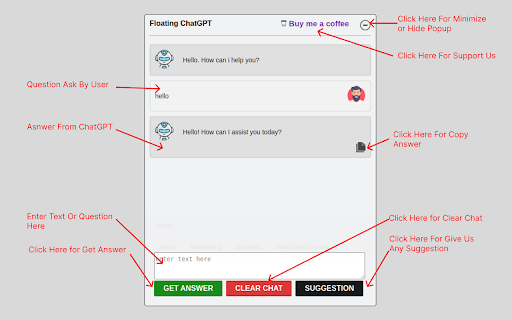
This extension for use ChatGPT in floating popup inside any website. Attention all ChatGPT users! AI-Based ChatGPT will be your best tool. For now, the Floating ChatGPT extension is available to assist you. The AI industry is booming, and ChatGPT's AI tools can be overwhelming due to the many options available. The Floating ChatGPT extension is your personal AI assistant, available with just one click, to help you get answers to your questions instantly. Check out these Floating ChatGPT extension features: *Easy-to-use interface *Quick response time *Efficient communication *Secure and private conversations *Instant access to information *AI-powered assistance *Multilingual support *Clear chat function *One-click copying to the clipboard Once installed, the extension appears as a small chat icon on your browser extension section. By clicking on the icon, users can open a chat window and interact with ChatGPT to ask questions or get help with various tasks. Easy-to-use extension users can change the position of the chat window. The chat window provides a direct line of communication with ChatGPT, allowing you to ask questions and get help with various tasks. Whether you need help with a specific task or just want to chat with a friendly AI, this extension is an excellent choice for anyone looking to enhance their online experience. Install our Floating ChatGPT extension in your web browser for an easy and optimal experience, an excellent way to simplify your online searches, and a hassle-free way to access ChatGPT and search for information quickly and easily.

OpenAI ChatGPT Mini
Access OpenAI ChatGPT in a mini window, perfect for multitasking devs to stay connected without leaving their workspace. Introducing OpenAI Chat Mini, a sleek Chrome extension that allows developers and AI enthusiasts to access chat.openai.com in a compact and convenient mini window. Stay connected with OpenAI Chat without switching tabs or leaving your current workspace. Ideal for multitasking, this extension makes it easy for devs to collaborate, learn, and explore while remaining focused on their projects. Built using manifest v3, OpenAI Chat Mini is compatible with the latest Chrome browser features, ensuring smooth performance and a seamless user experience.

ChatGPT Popup
Opens a ChatGPT window in the current page. ChatGPT Popup is a simple and easy-to-use Chrome extension that lets you quickly access the powerful AI chatbot from OpenAI, ChatGPT. With just a click of a button, you can open a popup window with ChatGPT, where you can ask it any question and get a human-like response in seconds. Whether you need help with homework, want to practice conversational skills, or just want to chat with an intelligent AI, ChatGPT Popup is the perfect tool for you. With its user-friendly interface, customizable settings, and powerful AI technology, ChatGPT Popup is a must-have for anyone who wants to learn, grow, and engage with the world in a new and exciting way. So why wait? Install ChatGPT Popup today and start exploring the endless possibilities of AI-powered chat!

Floating Web Notes
Floating Web Notes allows you to attach textual notes to web pages, providing just-in-time information as you browse. It's a simple yet powerful tool to make your online experience more productive and personalized. It enhances your browsing by keeping important information at your fingertips. ✨ New in 0.1.0: Reposition the notes panel Drag the window to fix it somewhere on the page (just like a sticky note) or keep it floating over it in it's original position. 📎 Seamless Note Attachment: Easily attach textual notes to any webpage. Your notes appear in a single, non-intrusive window, enhancing your browsing without cluttering your workspace. 📡 URL Pattern Matching: Customize which webpages your notes appear on using specific URL patterns. This feature is perfect for dynamic websites or when you need the same note across multiple pages or even domains. 😎 Minimalist Design: Floating Web Notes boasts a minimalist interface, focusing on functionality without unnecessary distractions. Editing URL patterns and accessing user options, like keyboard shortcuts, is straightforward and intuitive. 🔐 Local Data Storage: All notes are stored directly in your browser, ensuring that your information remains private and secure. Nothing is tracked. - Take personal notes over shared documents - Save discount codes for online stores - Highlight useful keyboard shortcuts - Set reminders for the next time you visit a website Look forward to exciting upcoming features, export and import notes, note searching, and themes/dark mode for a more custom experience.

TabFloater: Picture-in-Picture for any tab!
TabFloater allows you to multitask by moving browser tabs into floating windows, similar to “Picture-in-Picture” on TVs. At TabFloater, we're on a mission to empower users like you by simplifying multitasking and enhancing productivity through seamless tab management. TabFloater improves your productivity by providing "Picture-in-Picture" functionality to your tabs on any website, making it an indispensable tool in every digital workspace. - Coding in Visual Studio while referencing APIs on GitHub? - Designing in Figma with inspiration from Behance? - Juggling emails in Outlook alongside client briefs in Google Docs? - Trying to watch your favorite Netflix show while entering data in Excel? TabFloater allows you to keep important information, from any website, Always on Top and at your fingertips. To take advantage of all that TabFloater offers, you must install the companion software on your computer. Once you install TabFloater, we'll guide you through the process. (Don't worry, we're NOT selling your data. Check out our privacy policy at https://www.tabfloater.io/privacy if you don't believe us.) For more information, visit our website at https://www.tabfloater.io/ !
