
kohidmaedanhmmhkhkbeaonheneldfbi

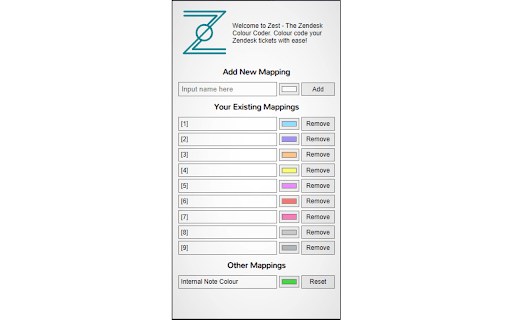
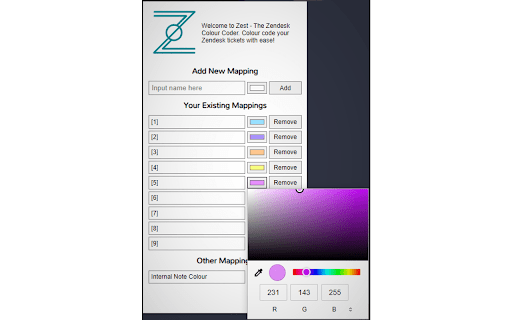
Colour code Zendesk tickets to help visualize and organise your workflow. Developed by Nevin George What is Zest? To put it simply, it’s an easy way to organise your Zendesk tickets! Zest will allow you to customize your ticket view by allowing you to personally colour code your tickets. Not only by the standard priority (low-high), but by any field/category. How do you use Zest? Simply click the icon on the top right of your chrome browser, type in the category you want coloured, choose a colour and click add. Refresh your Zendesk page to see the changes take effect. Changing the colour of a category is easy too, just click on the colour next to the category name, change it and refresh the Zendesk page. How does Zest work? It changes the styling of the page to add a background to each row to the colour that you choose. It does not modify the functionality of the site. Got more questions? Feel free to contact me for any questions or concerns for yourself or for your business. Enjoy using Zest? Please consider leaving a rating on the extension so it can reach out to more people. Also consider supporting me via https://paypal.me/NevinGeo

Zendesk All tab Closer
Zendesk Support Close All Tab Zendesk Support에 열려있는 탭을 닫기 위해서는 각각의 탭에 X 버튼을 클릭해 닫아야 하지만 해당 확장 프로그램을 통해서 한 번에 여러 개의 탭을 닫을 수 있습니다. 일정 수준을 넘은 많은 탭이 열린 경우에는 한 번에 모든 탭이 닫히지 않을 수 있습니다.

Zendesk Enhancer
Enhances Zendesk with auto-refresh, notifications, and integrated PDF opener. Adds to Zendesk the possibility to preview PDF, Documents and Spreadsheets with multiple pages and the ability to copy contents directly from the browser without it downloading, also with an additional download button if its needed to, furthermore adds a 15 sec view refresh interval with notification when a new ticket comes with the ticket name. For auto-refresh to work you need to be in a view. For notifications to work you need to make sure that notifications are allowed in google chrome for the page and in windows, as a recommendation you could place the browser's notification priority on high so you won't miss any notification. -= Update 1.3=- - Added Documents and Spreadsheets support. - Bug Fixes. -= Update 1.1 =- - Changed the PDF's rendering function, now you can copy contents from the PDF file - Improved UI. - Bug Fixes.

Zendesk Dark Mode
Free extension for Zendesk Dark Mode Take care your eyes day and night with a dark theme for Zendesk tools and services. Zendesk Dark Mode Pamper your eyes day and night with a dark theme for Zendesk tools and services. Set up this eye protection extension for your nighttime and daily browsing. This theme inverts bright colors into high-contrast ones, making it easy to read at night. Totally Free If it help you pls give me a 5 starts.

TypeGenie for Zendesk
AI-powered writing assistant for Zendesk with advanced suggestions TypeGenie helps Zendesk teams respond faster and more consistently with a suite of AI tools built directly into the agent workflow: ➤TypeGenie Smart Sentence Suggestions AI-powered sentence suggestions as you type—context-aware and designed to keep replies on-brand. ➤MessageGenie Generate or continue a full customer-ready reply using ticket context and your instructions—insert directly into the Zendesk Composer. ➤ArticleGenie Find relevant Help Center articles and insert clean clickable links into replies in seconds. ➤TicketGenie Surface proven solutions from your historical resolved tickets to help agents resolve repeat issues quickly. ➤ToneGenie Get tone guidance and sentiment awareness to keep replies professional, clear, and empathetic. The World’s top support teams use TypeGenie to: ➤ Respond at record speed ➤ Reduce average handling time ➤ Keep every sentence on consistent brand tone START SAVING TIME, TODAY ! ➤ CLICK “ADD TO CHROME” ➤ Pick your subscription and team size to start your trial ➤ Return to Zendesk and start replying with TypeGenie For more information or a demo, visit www.typegenie.net or email support@typegenie.net.
