
kofahhnmgobkidipanhejacffiigppcd


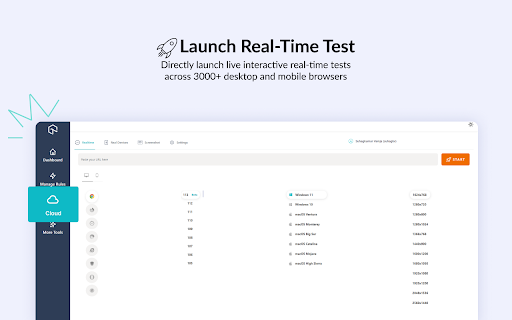
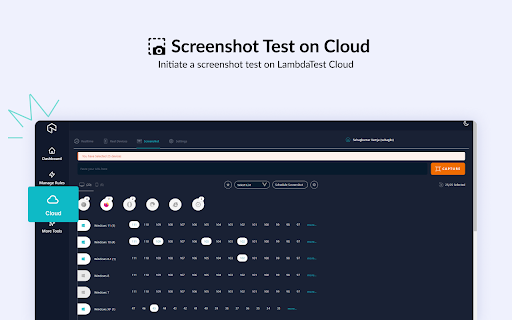
Best tool you can ask to debug and ship web based products faster! The best Chrome extension to debug web issues and accelerate your development 🔥🚀 LT Debug is a collection of free online web design, development, and debugging utilities enhanced with LambdaTest’s digital experience testing cloud to make your development efforts easier and faster. ⏺Replay on TestMu AI Cloud: Record user flow with Chrome Recorder panel (DevTools > More tools > Recorder), and replay or retest it as an automated test on 3000+ browser-os-resolution combinations on TestMu AI Cloud. 🚀Real Time Test: Directly launch live interactive real-time tests of your web apps or mobile pages, and test across 3000+ desktop and mobile browsers running on real devices. 🖼Screenshot Test: Initiate a screenshot test on TestMu AI Cloud. Take screenshots on up to 25 desktop or mobile browsers, resolution, and your preferred real or virtual devices. Access free useful utilities like Add/Remove/Modify HTTP(s) Header Requests, Block URL requests, Add/Remove Query Param, Throttle the Page Response, Inject Scripts, Change User Agent, Redirect URLs, and many more..!! 🔥 Best free tool you can ask to debug and ship web-based products faster! 🔥 📄 Modify Header - Add, modify, or remove an HTTP request header on a desired website or URL. It helps you test a particular header for a request on a website. 🚦 Block Requests - Blocks HTTP Requests based on your specified URL specific conditions. 📶 Throttler - Throttle network speed for all network requests. Choose any URL to slow down, leaving others at normal speed. Control delay (in milliseconds) for desired URL. ⚙️ Add/Remove Query Param - Change, and manipulate URL query parameters. It reads and organizes the key, and value pairs on the current web page. 🔀 Redirect Requests - Specify a page that should be automatically redirected to another page. E.g. you want http://lambdatest.com/111 to redirect to http://lambdatest.com/222. 💉 Insert script css/js - Simulate any web page's experience by injecting your own JavaScript or CSS script in console. 🟢 Allow CORS - Add (Access-Control-Allow-Origin: *) rule to the response header and easily perform cross-domain Ajax requests in web applications. 🛡️ Content Security Policy - Generate Content Security Policy headers on any website/web page of your choice 🎇Bonus🎇: Access 160+ free tools with a click of a button to help you with Tidying up code, Data Formatting, Random Data Generation, Hash Calculations, and Utilities

CodeceptJS Chrome Recorder
CodeceptJS Extension for Devtools that allows you to export tests directly from the Recorder panel. Records a user session and generates CodeceptJS code for automation and testing purposes. CodeceptJS Recorder CodeceptJS Recorder is a developer tool that records user interaction within a web application and generates CodeceptJS scripts to allow the developer to replicate that particular session. This will speed up your development cycle by facilitating the creation of unit and integration tests. Getting Started Click 'Add to Chrome'. That's it! Once you see our icon at the upper-right of your browser window, you are ready to start generating CodeceptJS scripts. Features This extension will allow you to: * Record clicks, typing, submits, and navigation in the browser. * See the scripts render live as they are generated. * Delete accidental actions. * Reorder actions as necessary. * Pause and resume recording within a single session. * Record navigation within a domain. * Copy the generated code to your clipboard. Usage * Open the extension and click 'Start Recording' to begin recording actions. * Click links, submit forms, etc. * Check your saved actions by opening the popup at any time. * Click 'Stop Recording' to stop recording. From there, you will have the option to resume recording, reset, or copy your generated code to your clipboard. We welcome contributions to this project! Check us out on Github: https://github.com/PeterNgTr/codeceptjs-recorder-extension

WebPageTest Recorder Extension
An extension for Chrome Recorder to export a recorder session as a WebPageTest Custom Script With Chrome Recorder and the WebPageTest Recorder Extension, you can start testing user flows in WebPageTest with just a few clicks and zero coding. Use the built-in Chrome Recorder functionality to quickly record different user journeys through your sites and applications, and then export them directly as WebPageTest Custom scripts so that you can test those same journeys in WebPageTest and get reproducible, reliable and actionable performance data. If you have any feedback, please file an issue on our extension repository: https://github.com/WebPageTest/recorder-to-webpagetest-chrome-extension/issues For more information about our recorder extension, Visit https://www.youtube.com/watch?v=zlm8KLttkx8 Github: https://github.com/WebPageTest/recorder-to-webpagetest-chrome-extension

daily.dev | Developer News Done Right, in Every New Tab
Developer news, personalized to your stack, in every new tab. Join 400,000+ developers. Free and open source. Open a new tab and your personalized developer feed is already there. Curated from 2,000+ trusted blogs and publications, including GitHub Blog, Hacker News, Dev.to, freeCodeCamp, and hundreds more. Personalized to your interests and tech stack. The more you read, the smarter it gets, because it learns from you and from what over a million other developers find worth reading. 🏆 Product Hunt, Product of the Year ⭐ 18,000+ GitHub stars, fully open source at github.com/dailydotdev WHAT HAPPENS WHEN YOU INSTALL 1️⃣ Open any new tab. Your personalized reading experience is there. Technical articles, tutorials, and community discussions from 2,000+ sources, matched to your stack. 2️⃣ It gets smarter every day. AI personalizes it, and over a million developers help surface what matters. When they upvote, discuss, and share articles, the best content rises and the noise disappears. 3️⃣ Read, upvote, discuss. Every article has a conversation. You're not reading alone. See what others think, add your take, learn from the discussion. 4️⃣ Build a reading streak. Come back tomorrow and the next day. Track your streak, unlock achievements, climb leaderboards, and build a profile that grows over time. 5️⃣ Find your people. Join a Squad around React, DevOps, AI, cloud, mobile, open source, or whatever you care about. Share links, start discussions, learn together. Public or private. Most tools in this space are glorified RSS readers or algorithm-only experiences. daily.dev is different because the community is built in. Developers upvote articles, which teaches the system what actually matters. Not just what's new, but what's good. Discussions add context you can't get from reading alone. The real insight is often in the comments. Squads create focused curation around every topic and language. And AI personalizes on top of all of this, matching content to your specific stack and interests. Think of it as a feed curated by a senior engineer who shares your exact interests. • Personalized reading from 2,000+ sources, powered by AI + community signals • Multiple views: Popular, Upvoted, Discussed, Following • Custom feeds for different interests and stacks • Squads, communities around any topic • Reading streaks, achievements, and leaderboards • DevCard, a shareable developer identity card • Bookmarks with folders • Search across millions of posts • Dark mode and light mode • Available on Chrome, Edge, web app, iOS, and Android 🎯 WHO IS THIS FOR? • Developers who want to stay current without opening 10 sites every morning • Engineers who learn better when they can see what peers think is worth reading • Anyone who wants a daily reading habit that builds over time • Teams that share and discuss technical articles together in private Squads ⚡ YOUR WORKFLOW STAYS INTACT • Open a blank tab anytime, one click, always available • Browse without signing up. Register when you're ready to upvote, comment, or join Squads • Uninstall in 10 seconds if it's not for you • Your data stays yours. Open source, no data selling, ever 🔒 PERMISSIONS AND TRANSPARENCY This extension only replaces your New Tab page. It does: • DON'T track your browsing on other websites • DON'T read or modify content on other pages • DON'T access your browsing history • DON'T inject scripts into any website We only request what's needed to show your reading experience. Fully open source. Verify the code yourself at github.com/dailydotdev Unlock premium features: • Presidential Briefing: a personal agent scans the landscape daily, analyzes 100+ posts, and delivers a concise briefing • Smart Titles: improves clickbait headlines so you know what you're clicking • Clickbait Shield: detects and replaces misleading titles automatically 🌐 OPEN SOURCE AND PRIVACY daily.dev requests only the permissions it needs and never sells your data. GitHub: github.com/dailydotdev Privacy: daily.dev/privacy

Quick source viewer
View current page sources: HTML + Javascript + CSS Displays HTML, Javascript and CSS sources of a page in a fast and compact way. Source code is syntax colorized and beautified for easy reading. Badge in the toolbar shows Javascript node counts. File size and cache header is displayed. Display onclick handlers with inline javascript. Look and feel can be modified with custom CSS. Selected urls can be hilighted in the list of source files.
