
jgdcobhagdbipacidhfnoaccgjooebam
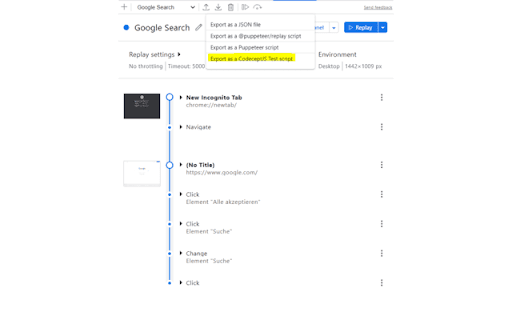
CodeceptJS Extension for Devtools that allows you to export tests directly from the Recorder panel. Records a user session and generates CodeceptJS code for automation and testing purposes. CodeceptJS Recorder CodeceptJS Recorder is a developer tool that records user interaction within a web application and generates CodeceptJS scripts to allow the developer to replicate that particular session. This will speed up your development cycle by facilitating the creation of unit and integration tests. Getting Started Click 'Add to Chrome'. That's it! Once you see our icon at the upper-right of your browser window, you are ready to start generating CodeceptJS scripts. Features This extension will allow you to: * Record clicks, typing, submits, and navigation in the browser. * See the scripts render live as they are generated. * Delete accidental actions. * Reorder actions as necessary. * Pause and resume recording within a single session. * Record navigation within a domain. * Copy the generated code to your clipboard. Usage * Open the extension and click 'Start Recording' to begin recording actions. * Click links, submit forms, etc. * Check your saved actions by opening the popup at any time. * Click 'Stop Recording' to stop recording. From there, you will have the option to resume recording, reset, or copy your generated code to your clipboard. We welcome contributions to this project! Check us out on Github: https://github.com/PeterNgTr/codeceptjs-recorder-extension

Playwright CRX
Playwright as a chrome extension. You can record using Playwright Record directly on your browser. Just attach the tabs you want to… Playwright as a chrome extension. You can record using Playwright Record directly on your browser. Just attach the tabs you want to record, by using the context menu or the action button. It's now possible to play your recorded script, and record assertions.

TestCase Studio - Selenium IDE
TestCase Studio record the user actions performed on a web application in English Sentences. Best alternative for Selenium IDE TestCase Studio is a platform to record and replay the user actions performed on a web application in English Sentences. This recorder plugin also records screenshots. It will also generate the XPath and Automation Code for every user action. User can save or copy these recorded steps as a Test case. Watch this video tutorial to make the best use of TestCase Studio. https://www.youtube.com/watch?v=Gcofn71bJdo New Features: Screen Recording, Customise Command, Record TestCase in any Language and BDD Format Support. Very simple steps to use the tool- 1. Click on the TestCase Studio logo in the tool bar. 2. It will open the TestCase Studio window. 3. Now keep performing your steps, it will automatically write english sentence for every user action. 4. You can download the written steps by clicking on download button. Upgrade to Pro version for more advanced features. Compare the Pro version features here- https://selectorshub.com/testcase-studio-pro/plans/

WebPageTest Recorder Extension
An extension for Chrome Recorder to export a recorder session as a WebPageTest Custom Script With Chrome Recorder and the WebPageTest Recorder Extension, you can start testing user flows in WebPageTest with just a few clicks and zero coding. Use the built-in Chrome Recorder functionality to quickly record different user journeys through your sites and applications, and then export them directly as WebPageTest Custom scripts so that you can test those same journeys in WebPageTest and get reproducible, reliable and actionable performance data. If you have any feedback, please file an issue on our extension repository: https://github.com/WebPageTest/recorder-to-webpagetest-chrome-extension/issues For more information about our recorder extension, Visit https://www.youtube.com/watch?v=zlm8KLttkx8 Github: https://github.com/WebPageTest/recorder-to-webpagetest-chrome-extension

LT Debug
Best tool you can ask to debug and ship web based products faster! The best Chrome extension to debug web issues and accelerate your development 🔥🚀 LT Debug is a collection of free online web design, development, and debugging utilities enhanced with LambdaTest’s digital experience testing cloud to make your development efforts easier and faster. ⏺Replay on TestMu AI Cloud: Record user flow with Chrome Recorder panel (DevTools > More tools > Recorder), and replay or retest it as an automated test on 3000+ browser-os-resolution combinations on TestMu AI Cloud. 🚀Real Time Test: Directly launch live interactive real-time tests of your web apps or mobile pages, and test across 3000+ desktop and mobile browsers running on real devices. 🖼Screenshot Test: Initiate a screenshot test on TestMu AI Cloud. Take screenshots on up to 25 desktop or mobile browsers, resolution, and your preferred real or virtual devices. Access free useful utilities like Add/Remove/Modify HTTP(s) Header Requests, Block URL requests, Add/Remove Query Param, Throttle the Page Response, Inject Scripts, Change User Agent, Redirect URLs, and many more..!! 🔥 Best free tool you can ask to debug and ship web-based products faster! 🔥 📄 Modify Header - Add, modify, or remove an HTTP request header on a desired website or URL. It helps you test a particular header for a request on a website. 🚦 Block Requests - Blocks HTTP Requests based on your specified URL specific conditions. 📶 Throttler - Throttle network speed for all network requests. Choose any URL to slow down, leaving others at normal speed. Control delay (in milliseconds) for desired URL. ⚙️ Add/Remove Query Param - Change, and manipulate URL query parameters. It reads and organizes the key, and value pairs on the current web page. 🔀 Redirect Requests - Specify a page that should be automatically redirected to another page. E.g. you want http://lambdatest.com/111 to redirect to http://lambdatest.com/222. 💉 Insert script css/js - Simulate any web page's experience by injecting your own JavaScript or CSS script in console. 🟢 Allow CORS - Add (Access-Control-Allow-Origin: *) rule to the response header and easily perform cross-domain Ajax requests in web applications. 🛡️ Content Security Policy - Generate Content Security Policy headers on any website/web page of your choice 🎇Bonus🎇: Access 160+ free tools with a click of a button to help you with Tidying up code, Data Formatting, Random Data Generation, Hash Calculations, and Utilities
