
knokghllfobbfaddkpdnhohpllljghjo

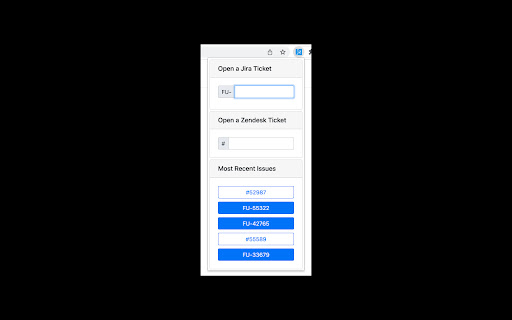
Quickly open either a Jira ticket or a Zendesk ticket in a new Chrome tab by entering the issue or ticket numerical ID.

TypeGenie for Zendesk
AI-powered writing assistant for Zendesk with advanced suggestions TypeGenie helps Zendesk teams respond faster and more consistently with a suite of AI tools built directly into the agent workflow: ➤TypeGenie Smart Sentence Suggestions AI-powered sentence suggestions as you type—context-aware and designed to keep replies on-brand. ➤MessageGenie Generate or continue a full customer-ready reply using ticket context and your instructions—insert directly into the Zendesk Composer. ➤ArticleGenie Find relevant Help Center articles and insert clean clickable links into replies in seconds. ➤TicketGenie Surface proven solutions from your historical resolved tickets to help agents resolve repeat issues quickly. ➤ToneGenie Get tone guidance and sentiment awareness to keep replies professional, clear, and empathetic. The World’s top support teams use TypeGenie to: ➤ Respond at record speed ➤ Reduce average handling time ➤ Keep every sentence on consistent brand tone START SAVING TIME, TODAY ! ➤ CLICK “ADD TO CHROME” ➤ Pick your subscription and team size to start your trial ➤ Return to Zendesk and start replying with TypeGenie For more information or a demo, visit www.typegenie.net or email support@typegenie.net.

Zendesk Dark Mode
Free extension for Zendesk Dark Mode Take care your eyes day and night with a dark theme for Zendesk tools and services. Zendesk Dark Mode Pamper your eyes day and night with a dark theme for Zendesk tools and services. Set up this eye protection extension for your nighttime and daily browsing. This theme inverts bright colors into high-contrast ones, making it easy to read at night. Totally Free If it help you pls give me a 5 starts.

Zest - The Zendesk Colour Coder
Colour code Zendesk tickets to help visualize and organise your workflow. Developed by Nevin George What is Zest? To put it simply, it’s an easy way to organise your Zendesk tickets! Zest will allow you to customize your ticket view by allowing you to personally colour code your tickets. Not only by the standard priority (low-high), but by any field/category. How do you use Zest? Simply click the icon on the top right of your chrome browser, type in the category you want coloured, choose a colour and click add. Refresh your Zendesk page to see the changes take effect. Changing the colour of a category is easy too, just click on the colour next to the category name, change it and refresh the Zendesk page. How does Zest work? It changes the styling of the page to add a background to each row to the colour that you choose. It does not modify the functionality of the site. Got more questions? Feel free to contact me for any questions or concerns for yourself or for your business. Enjoy using Zest? Please consider leaving a rating on the extension so it can reach out to more people. Also consider supporting me via https://paypal.me/NevinGeo

Oracle Guided Learning Editor
Oracle Guided Learning (OGL) is an enterprise cloud digital adoption platform that supports the creation of personalized and contextualized in-application guidance to simplify and accelerate user adoption of web-based applications. The Oracle Guided Learning Editor extension is required for OGL content developers and administrators to create, edit, and configure content from within the OGL console. Oracle Guided Learning helps organizations and product owners lower the cost of training and supporting users. It enables the creation of individualized and guided onboarding visualizations for end-users, serving as a learning and information interface embedded in a host application. The main purpose of Oracle Guided Learning is to accelerate the adoption of any web-based application, facilitating the process for both organizations and employees. By installing the Oracle Guided Learning extension software, you are agreeing to the following terms: 1. You may use the software subject to the following: (a) the software may be used solely for your internal business operation; (b) the software may not be modified or altered in any way; and (c) the software may not be redistributed. 2. The software is the intellectual property and copyrighted works of Oracle America, Inc. or a third party provider. All rights, title and interest not expressly granted with respect to the software are reserved. 3. You may not access, download, use or export the software in violation of U.S. export laws or regulations, or in violation of any other applicable laws or regulations. You agree to comply with all export laws, restrictions and regulations of any United States or applicable agency or authority, and to not directly or indirectly provide or otherwise make available any services and products of Oracle in violation of any such restrictions, laws or regulations, including, without limitation, laws, restrictions or regulations pertaining to the development, design, manufacture or production of nuclear, chemical or biological weapons or missile technology. 4. Disclaimer of Warranties. THE SOFTWARE IS PROVIDED ON AN "AS IS" BASIS. ORACLE EXPRESSLY DISCLAIMS ALL WARRANTIES OF ANY KIND, WHETHER EXPRESS OR IMPLIED, INCLUDING, BUT NOT LIMITED TO, THE IMPLIED WARRANTIES OF MERCHANTABILITY, FITNESS FOR A PARTICULAR PURPOSE AND NON-INFRINGEMENT. THE SOFTWARE IS USED AT YOUR OWN DISCRETION AND RISK. ORACLE SHALL HAVE NO RESPONSIBILITY FOR ANY DAMAGE TO YOUR COMPUTER SYSTEM OR LOSS OF DATA THAT RESULTS FROM THE DOWNLOAD OR USE OF THE SOFTWARE. 5. Limitation of Liability. IN NO EVENT SHALL ORACLE BE LIABLE FOR ANY DIRECT, INDIRECT, INCIDENTAL, SPECIAL OR CONSEQUENTIAL DAMAGES, OR DAMAGES FOR LOSS OF PROFITS, REVENUE, DATA OR DATA USE, INCURRED BY YOU OR ANY THIRD PARTY, WHETHER IN AN ACTION IN CONTRACT OR TORT, ARISING FROM YOUR ACCESS TO, OR USE OF, THE SOFTWARE. 6. Exclusions and Limitations. SOME JURISDICTIONS DO NOT ALLOW THE DISCLAIMER OR EXCLUSION OF CERTAIN WARRANTIES OR THE DISCLAIMER, EXCLUSION OR LIMITATION OF CERTAIN LIABILITIES. TO THE EXTENT THAT THEY ARE HELD TO BE LEGALLY INVALID, DISCLAIMERS, EXCLUSIONS AND LIMITATIONS SET FORTH ABOVE DO NOT APPLY AND ALL OTHER TERMS SHALL REMAIN IN FULL FORCE AND EFFECT. 7. All matters relating to your access to, and use of, the software shall be governed by U.S. federal law or the laws of the State of California. Any legal action or proceeding relating to your access to, or use of, the software shall be instituted in a state or federal court in San Francisco or Santa Clara County, California. You and Oracle agree to submit to the jurisdiction of, and agree that venue is proper in, these courts in any such legal action or proceeding.
