
knheggckgoiihginacbkhaalnibhilkk
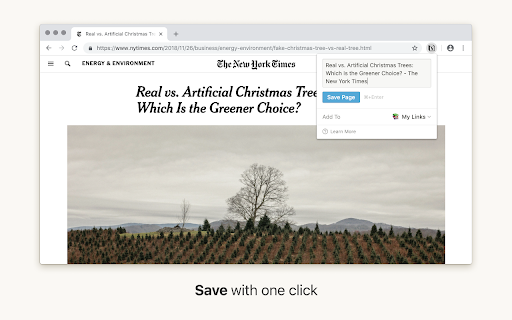


Notion is your all-in-one workspace, where you can write, plan, collaborate and get organized. Take notes, keep databases, build a wiki, project manage your team — all with one tool. We launched Notion Web Clipper so you can save any page on the web to your Notion workspace. Capture and organize all the articles, research and inspiration you want, and we’ll help you turn them into action. SAVE WITH ONE CLICK. If you come across something you want to keep, just hit the Notion button on the top right of your browser! Choose exactly where you want to save your web pages. Add research to projects, articles to reading lists, etc. Don't just store web pages and forget them. Notion makes it easy to turn them into action items, link them to projects, assign them to teammates, and more. You can read the pages you clip on any device, online or off. Happy clipping! ✂️

Matter
Save articles to your Matter account Finally, a better reading app. The internet is full of things you want to read – articles, newsletters, Twitter threads, PDFs. Matter brings them together in one place. “Matter improves vastly on earlier read-later apps like Pocket and Instapaper, letting you easily access news and other stories whenever you get the time” –The Wall Street Journal (2022) Save in 1-click: - Save full articles if you’re within the paywall (eg. Bloomberg, NYT, WSJ) - Rollup Twitter threads into a single article page - Save PDFs and YouTube 3 ways to save: - Click the Matter button in the toolbar - Or right-click a link and “Save to Matter” - Or use the keyboard shortcut ‘Control + M’ Unified inbox for your subscriptions: - Sync your newsletters by connecting Gmail - Follow individual writers for their latest - Add any RSS feed The most elegant reading experience: - Best-in-class article parsing - Gorgeous night mode - Human-like text-to-speech - Fluid highlighting Export your knowledge: - Sync your highlights to Notion, Obsidian, Roam, Readwise, and others

Copy To Notion: Clip anything to Notion
Easily capture, organize, and access all your online clips directly in Notion. Copy to Notion: The Ultimate Web Clipper and Organizer for Notion Save and organize web content seamlessly into Notion with Copy to Notion—the ultimate Chrome extension designed for Notion users. Transform how you collect, organize, and retrieve online content directly into your Notion workspace. ✅ Web Clipper for Notion: Easily save articles, text snippets, screenshots, images, bookmarks, notes, and any webpage elements directly to Notion, preserving original formatting. ✅ Multi-Select Functionality: Select multiple items—text, images, or any webpage elements—and save them to Notion in one go. ✅ Intuitive Notion Integration: Save web clips directly to specific Notion pages or databases, fitting seamlessly into your Notion workflow. ✅ Advanced Highlighting & Screenshots: Capture essential website highlights and full-page screenshots for thorough research documentation. ✅ CSS Selector Feature: Auto-fill your database fields dynamically with data such as images, text, and URLs from web pages using your preset CSS selectors. ✅ Personalized Notes: Add custom notes to your saved clips, capturing your insights and thoughts instantly. ✅ Automatic Link Saving: Each clip includes the source URL for quick reference and citation. ✅ Bookmarking & Embedding Made Simple: Bookmark URLs or embed them within Notion pages for organized access. ✅ Web Clips Manager Template: Utilize our exclusive ready-to-use Notion template to centralize and manage your clippings effectively. ✅ Flexible Saving Options: Choose exactly where in Notion you save your clips, allowing for customized organization. ✅ Right-Click Image Saving: Save images directly to Notion via right-click, streamlining your content gathering process. ✅ Full-Screen Capture: Easily capture and save entire webpage screenshots to Notion for comprehensive reference. ✅ Customizable Saving Options: Tailor how and where your clips are saved within Notion for personalized organization. ✅ Site-Specific Database Forms: Set up unique database forms for different websites, enhancing organization. ✅ Keyboard Shortcuts: Leverage shortcuts for rapid note-taking, bookmarking, and more, enhancing your productivity. ✅ Multi-Workspace Support: Easily switch between multiple Notion workspaces for diverse projects. 👥 Ideal For: ✅ Notion Users Seeking a Web Clipper: Save web content like articles, images, and text snippets directly into Notion. ✅ Researchers and Students: Build a personal knowledge base by capturing design assets, statistics, and research findings. ✅ Content Creators and Designers: Collect inspiration, visuals, and design elements for your projects. ✅ Professionals Tracking Competitive Intelligence: Gather competitor information, pricing, and marketing materials. ✅ Newsletter Curators: Compile content and resources effortlessly for upcoming issues. ✅ Project Managers: Develop project plans and roadmaps by gathering relevant information and resources. ✅ Social Media Managers: Clip quotes, articles, and images for future social media posts. ✅ Language Learners: Save vocabulary words, grammar rules, and learning resources into Notion. ✅ Recipe Collectors: Clip recipes and cooking tips from different websites. ✅ Travel Enthusiasts: Gather information on destinations, attractions, and accommodations. ✅ Anyone Streamlining Online Research: Efficiently collect and organize information from various sources. ✉️ We Value Your Input For assistance or feedback, reach out to us at support@copytonotion.com. We're committed to continually improving Copy to Notion based on your insights.

Obsidian Clipper
A small chrome plugin that let's you easily clip things to Obsidian This is an unofficial clipper for Obsidian that allows you to easily clip a selection to a note in Obsidian. Clip a selection in Chrome with or without markdown support to Obsidian.

Open in Notion
Open share links in your desktop app. Automaticaly opens all share links in the your desktop app (Mac OS, Windows). This is an unofficial extension. Usage: 1. Download desktop app: https://www.notion.so/desktop 2. Install extension 3. After the first redirect links to the Notion desktop, remember to check "Always open these types of links in the associated app" to not be asked again. Notice: Restore the "Always open these types of links in the associated app" >> https://superuser.com/a/1518982 4. Enable tab auto-close ONLY if you have activated "Always open these types of links in the associated app". Click on the extension icon to toggle on/off it. Right click and click on "Options" to access more settings.
