
kmmcaankjjonnggaemhgkofiblbjaakf

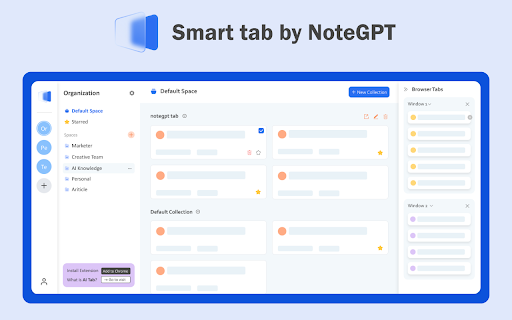
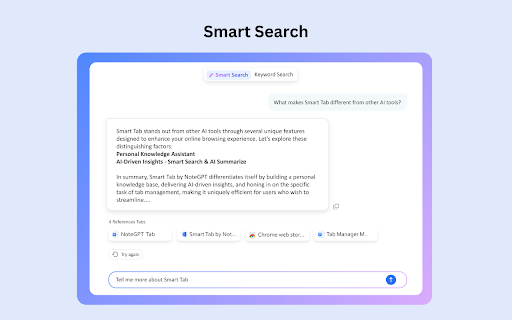

Tab fixed, open tabs and reopen closed tabs in a Click. Using AI chrome manager to summarize tabs, easily collect and manage tabs. Feeling exhausted from the inefficiency of switching between apps and tabs? Have a lot saved, but always struggling to find what you need? Knowledge base overloaded, making it difficult to read and in-depth comprehension? Smart tab by NoteGPT is your all-in-one bookmark manager, the best AI knowledge & tab manager! Effortlessly build a personal knowledge library, streamline information collection and management, and leveraging AI to uncover fresh insights. Features ● Save Browser Tabs:With one-click Smart tab by NoteGPT is able to save your browser links, or open it when you’re ready to resume your task. ● Sync Tabs:Sync your tabs between computers to keep your work organized, no matter how many devices you use or where they are. ● Manage Tabs:Suspend tabs, rearrange tabs/links with drag and drop, and rest easy knowing that every tab is automatically saved. And you can create spaces and collections limitlessly to effectively organize and manage tabs. ● AI Search(AI Q&A):Ask a direct question, our Smart Search gives you a concrete answer pulled from your saved tabs and browser tabs you are opening, and shows the references tabs. It understands what you tell it and help you connect, organize, and offer fresh insights. ● AI Summarize:Summarize your card and collection to extract key information, help you quicker comprehension and handling of information. 10X faster learning with AI! ● Your Personalized AI Knowledge Library:A space organizes everything. Say goodbye to information chaos and hello to organized knowledge! It doesn't just store your content—it understands it. Why choose Smart tab by NoteGPT? ● It's more than just a tab manager or a personal knowledge library, it's your AI-driven database. Utilize AI to extract, summarize, and analyze content for you. Provide key concepts and ideas, unearth fresh insights. A better way to build your AI knowledge management! Perfect for ● Teams that work in the cloud ● Students and teachers in need of knowledge management ● Anyone expecting AI and tab management capabilities How to Use ● Install our Smart tab by NoteGPT and create your account. ● Pin the extension! ● Click the extension icon in toolbar, select what space you would like to save the tab to, then you can easily collect it. ● Go to the workspace of Smart tab by NoteGPT to view all your saved tabs. Then you can read and manage them in your personal knowledge library. Privacy Policy We respect your privacy and therefore we never sell access to your data. That includes your searches, your browsing history and your personal information.

Tabius - Automatic Tab Grouping Assistant
An Automatic Tab Grouping Extension for Your Browser. Tabius is a customizable and easy to use Tab Grouping assistant for Chrome. It is also open source! If you use tab grouping or couldn't use it due to lack of options, Tabius is a must have extension for you. The extension is packed with useful features like: ✔️ Automatically create new tab groups when you open a link in a new tab. ✔️ Auto Collapse inactive tab groups. ✔️ Limit the browser to only create groups if the new tab matches the original tab's domain. ✔️ Create custom tab grouping rules: always create tab groups with a specific name and color from your favorite websites! ✔️ Save your favorite tab groups and restore them for later use! ✔️ Don't want to create tab groups from a specific site? Create a blacklist from the settings or add the site to the blacklist right from the toolbar! ✔️ Option to close an existing tab group when there is only 1 tab left in it. ✔️ Limit maximum number of tabs allowed in a group. ✔️ Automatically name tab groups based on domain/subdomain or the full URL. ✔️ View current tab groups and act upon them by clicking on the extension icon right from the toolbar. ✔️ Sync all your settings, tab groups, and custom lists with browser. ✔️ ..and many more features. I created this extension from my need. I use tab groups all the time and the extension helps enhance this feature. If you have any questions or feedback, feel free to email me: dev@faisalbin.com. This extension is made with ❤️ in Munich. What's new in v2.0.1 - You can now use the opener tab's title as the group name. To do so, select "Group Opener's title" from Settings>Group Naming Convention What's new in version 2.0 - Tabius has gone through a major redesign. - The extension has been rebuilt from the ground up. - You can now save your favorite tab groups for later. - Amend saved tab groups. - The popup is now more useful. - "nameless" group naming option. - Fixes scrolling issue if custom rules get too long. - Lots of bug fixes.

Translate and Speak Subtitles for YouTube
Extension convert text subtitles for YouTube into natural-sounding speech using AI technologies. Here is a solution that helps you read subtitles for YouTube videos. It utilizes a Text-to-Speech (TTS) engine to convert text subtitles into natural-sounding speech. This solution is powered by Google and Microsoft AI technologies, providing over 100 voices in multiple languages and variants. 🚀Features: ** Easy to use: Turn on/off with a single click. ** Multiple languages: Supports voices in many languages. ** Multiple subtitles: Supports multiple subtitle formats. 🚀How to use: *Pin the 'YouTube Subtitles Speaker and Translator' extension to the browser toolbar. Click on the extension icon in the Chrome toolbar and navigate to the YouTube video details page. *If the YouTube video has subtitles, a voice icon will appear. *You can then select the UI language and the voice language.

Tab Deck - Tab/Tab Group Manager
Your all-in-one tab/tab group manager that helps you effectively manage and organize your tabs/tab groups Tab Deck is a Chrome extension alternative to OneTab/Session Buddy, that allows you to manage your tabs & tab groups in one place. One click to aggregate all tabs & tab groups into one session. - ⚡️ Organise tabs & tab groups efficiently - 🖼️ Master Your Open Windows - ✨ See all your open windows at a glance - 💾 Save tabs into sessions for later access - 🗂️ Save/Restore/Reorganise tabs, even tab groups - in the current window - in a new window - restore and suspend tabs to save memory - 🔄 Synchronizes your browser tabs & tab groups - 🤏 Reorganize tab sessions use Drag & Drop with ease - ⌨️ Command `K` Interface - easily explore the all tabs & tab groups. - 🏷️ Visual Web Bookmark - Turn a link into a visual web bookmark with a beautiful QRCode, that you can share with others. - 💾 Session Backup Solution - 📑 Save your session as a JSON file - 📧 Send your session to your email (Sign-in) - 📥 Support migrating solution - 🔖 Support for migrating tabs data from `OneTab` to `One Tab Group` - 🔖 Support for migrating tabs data from `SessionBuddy` to `One Tab Group` - 🔍 Search all tabs quickly using fuzzy search - 🧹 Suspend open tabs to save memory - ☁️ Auto Cloud Sync with Sign in - ❤️ Bookmark your favorite sessions - ✨ Share Sessions as a link with anyone

Bookmanize - Advanced bookmark manager
Advanced bookmark manager provides tagging, instant sorting, and filtering among all bookmarks on a full list view. Bookmark manager with a clean user interface where all bookmarks can be easily accessed in one full list view with tagging, instant sorting, and filtering. Organize your bookmarks with custom tags and faster navigates between them. We are an independent team of developers who love what they do:) If you want to improve or expand anything - email us bookmanize@gmail.com Support us with a cup of coffee - https://www.buymeacoffee.com/bookmanize ★ All bookmarks on one screen ★ Fast access to all main functions ★ Instant searching, filtering, sorting, adding, deleting bookmarks ★ Drag n drop bookmarks and folders All the features that the default bookmarks have (add, delete, sort, drag and drop bookmarks) in a more user-friendly interface with high performance for a large number of bookmarks Note: Your data (history and bookmarks) is not saved or stored anywhere else but on your computer. Hotkeys: - ctrl+shift+f or command+shift+f — focus the search field
