
kmkdngajnjecnkdpiddmkongflkcojlg

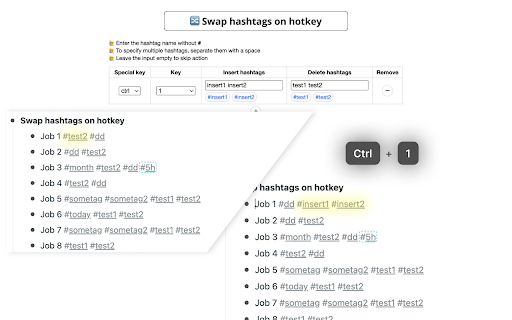
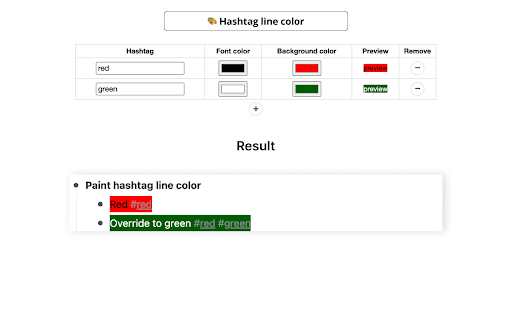
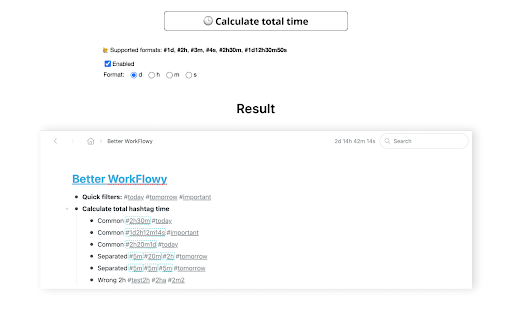
Extension for improvement workflowy. Source code and bug tracker https://github.com/nekitcorp/better-workflowy

Humble AI
Boost productivity by 30% with Humble — an AI tool for LinkedIn, CRMs, and more. Automate tasks, centralize data, and save time. Humble for Browser Stop switching tabs. Stay in flow. Constant tab switching kills focus. Humble brings everything you need into the page you're already on. Especially useful if you have ADHD, time blindness, or other neurodivergent traits that make context-switching costly. 🧠For individuals Sticky notes on any page Pin a note to any URL — it's there every time you come back. Humble changes colour so you never miss it. Great for instructions, reminders, or quick thoughts without breaking your flow. Add anyone to your CRM in one click Humble reads the page and fills the right fields automatically. One click, they're in — Notion, Airtable, HubSpot or Google Sheets. No copying, no pasting, no chasing people to update records. Stop losing your AI conversations All your ChatGPT, Claude, Perplexity and Gemini conversations in one place — with time spent, so you know where your focus went. "Previously I had a tedious process of copying info to Notion and keeping multiple browser tabs open. Humble streamlined the process — I can add or edit data in one click directly from a prospect website." — Founder, Staxel 🏢 For teams Eliminate duplicate outreach See who's already been contacted before you reach out. Humble checks your connected tools so your team stays coordinated — no overlap, no double-touches. Syncs with HubSpot, Notion, Airtable, Google Sheets and more "Humble has been a game-changer for our B2B marketing efforts, eliminating overlap with other sellers on my team and instantly qualifying new leads." — Dave Cavalier, Business Development

Notion Table of Contents (Outline)
Show table of contents (outline) in the sidebar for Notion pages Show table of contents (outline) in the sidebar for Notion pages Show a table of contents (outline) in the sidebar for Notion pages. You can quickly navigate through your long Notion pages. (When you visit to a page without headings, the table of contents is automatically hidden.)

Dive: AI Summarizer for YouTube, PDF & Web — Interactive & Privacy-First
Consume content 10x faster with an AI summarizer that lets you skim where you want, then deep dive where it matters. 🤓 Interactive summary with sections, line references, adjustable lengths, highlighted key terms & more ✅ For YouTube videos, PDFs, & webpages 💬 Q&A chat — ask anything with line references 🦘 Line/timestamp references — for every summary bullet, chat reply, & more 🌐 Multilingual — 60+ languages supported 🧠 Uses the latest models from OpenAI GPT-5.4 / ChatGPT, Anthropic Claude, & Google Gemini 🔒 Privacy-first — Extension can't access your browser data except when you use it on a webpage Dive can't read your browser data except when it's used. Unlike most extensions, we DON'T request permission to "Read and change your data on all websites." We believe great tools put privacy first. - Blogs - YouTube videos - PDFs - Long articles - Academic papers - Financial/legal documents - and more!

WorkFlowy Plus
Workflowy Plus will bring some exciting features for your favorite Workflowy application. Feature 1: Reminders Feature 2: Day Highlighter Feature 3: Encrypt Decryption your workflow items Feature 4: Support multiple fonts for workflowy Feature 5: Ability to change background colors Feature 6: Day Highlighter Made Optional Feature 7: Added word count option in Right Click Context Menu Feature 8: Ability to change main Text Color Feature 9: Support for Inline Images this script credit goes to Original Developer https://gist.github.com/Wizmann/605ff2a609348b6ec3a3#file-workflowy-with-image-js Feature 10: Quick add button Feature 11:Workflowy date format age calculator Feature 12: Workflowy date formate Date Incrementor/Decrementor Update Log: Feature 3: Encrypt Decryption your workflow items Select and right click in menu click workflowy plus-> encrypt then press control+V To decyrpt select encrypted text right click in menu click workflowy plus-> encrypt then press control+V DISCAILMER: I am not responsible for any damage to your data in any way. This is an experimental feature use it at your own risk. Major Updates 1. Format is simplied @r,message,date time this will help you to see all reminders by clicking @r 2. Removed limitation of removing zero in minutes remember last note "If you are going to set reminder for 19:03 please write 19:3 starting zeros must be ommited for now" this is fixed now you can use 19:03 that is more natural 3. Take out time for your health Daily. Added feature of Daily Reminders @rd,Walk,21:44 no need to add date 4. Always Pay your monthly Bill on Time. Added feature of Monthly Reminders @rm,Credit Card Bill,15 21:44 no need to specify month and year 5. Never Miss Any Birhday or Aniversary. Added feature of Yearly Reminder @ry,Wasim Birthday,15-04 21:54 no need to specify year. IMPORTANT NOTE: AFTER INSTALLATION YOU HAVE TO REFRESH PAGE OF WORKFLOWY. IN ORDER TO GET THIS EXTENSION WORKING. PLEASE DO KEEP WORKFLOWY OPEN IN TAB OTHERWISE IT WILL NOT WORK AT ALL Feature 1: Reminders It is simple as workflowy please follow syntax properly otherwise reminders will not work. Modify your item Meeting with David to @r,Meeting With David,26-03-2017 22:25 Current Supported format only dd-mm-yyyy hh:mm Now if time will arrive you will see message box automatically. Known Limitations. Your workflow account must be logged in and open in some tab for code to run.It does not have to be currently open tab code will work on other tabs as well. Again I repeat,Please follow syntax otherwise you can miss you important reminders Feature 2: Day Highlighter You may have used color coding using some extension but those are static. I have create a Day Highlighter. This will automatically color selected day. Like if you have list for different days. You can focus on current day as it color will automatically turn Red. You can see screenshot for this. For more details please visit http://wasimdev.blogspot.com/ Updated to v3
