
kmeggnehaninleodkobioidpmlaodamd

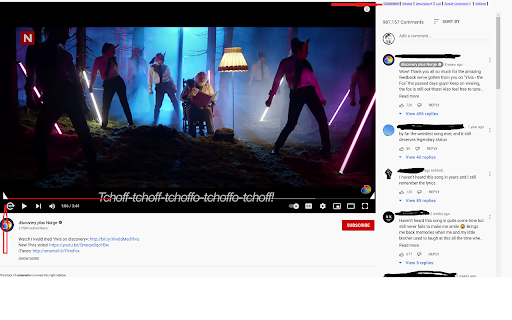


Reorgnize the layout of youtube, tablize the comments/recommendation/... The ui modual of youtube is reorganized. * For the Style Tight, the Comments, the Related and the List are tabulated into right sidebar. So you can watch video while watching the comments,related video or list. * Automatically click the "Skip" button when it appears for advertisements. * Add Loop button near the play button.

'Improve YouTube!' 🎧 (for YouTube & Videos)
YouTube, tidy & smart? Supercharge YouTube! Give it strong features, filter only the videos you want & exactly the look you like Set your YouTube Video Player; YouTube Content Categories & Filter-rules; Tweaks; Layout, Theme & Style all at once today & enjoy that for years to come! With our enhancer you have 175+ useful / unique features🧰🔧. To make your video experience & content discovery a whole lot better & save you a lot of clicks & time. ✔️ Open-source ✔️ Applies most settings with no reload⌛ (unlike other YouTube-Extensions; draggable icon on YT) 🍃 lightweight: You can expect everything to work as expected. ✓ Non-profit & no income since 2012. (Bear with us when YouTube changes. it's been an uphill race and only gets better.) ✓ Video playback features for embedded videos (+ preparing mobile m.youtube, Facebook, Netflix, Twitch, Vimeo too) (Offline / privacy🔒: We can't care about what video you watch, just that you have a better time). 🏅Press Reviews: We are Recommended by FireFox!🦊(🏆Only 98 extensions) "Enhances YouTube in meaningful ways" - (5/5⭐ gHacks.net/2021/03/26/improved-youtube-enhances-youtube-in-meaningful-ways) "Might be the best YouTube Extension Ever" - (https://LifeHacker.com/this-might-be-the-only-youtube-browser-extension-youll-1846575110) ⋮⚙️175+ features⋮ (many can only be found here /we pioneered) 💡 Expand always: Video Description, Transcript, Chapters 🛩️ "Virtual Travel" (Switch your content-country) ✨ Dim pages until hovered ("Zen mode" ) 🤖 Auto-Pause Tabs ➕ Auto-fullscreen ➕ Pip Picture 📈 Analyse your activity 🚫 Block Videos, Channels, Tags, Category ➕ Video tabs volume Mixer🎛️🔊 🗑️ Remove Related Videos 🗑️ Remove Shorts Reel 🗑️ Hide distraction declutter attention (teaching / screenshare / presentation) ➕ "Up Next": Off (Reset YT's "Autoplay" after every video ) ♻️ Undo the new Sidebar (Description, details, comments) 🚫 adblocker (adblock & adskip or white-list ads your channel subscriptions) ➕ Channel: don't play trailer 🎨☕ Themes 🌈🌄🌇 Disable Ambient lightning (cinematics) 📅 Dark mode Schedule (also Black theme for oLed) ✓ Display dim ✓ Blue-light filter (Preserve sleepiness. Relax eyes) 📺 Video Player & Playback Features: 📷 Screenshot (save copy download any video Frame) ⏯️🔁🔀 Extra Player Buttons (optional): ➰Loop / Repeat (looper / repeater) ➕ Rotate Video 💡 Subtitles, captions & transcript Options 🔍 watch videos frame by frame. 🔄 reverse Playlist, Shuffle Playlist 🎞️ Expand videos to your full window (expander) 🎞️ theater mode 🎞️ cinema mode (turn off the lights) 🎞️ Resize videos (player Size) ➕ Default/fixed Video Quality to match your Display 720p 1080p 4k 8k or bandwidth 480p 240p 144p, auto hd, automatic 4K ➕ avoid 60 frames vs. 30 fps ➕ HDR vs. SDR ➕ Player Auto-Play: Off 💨 "Speed-watching" (Fixed Default Playback Speed) (smart video speed controller excluding music or education) 🔊 Fixed Volume or Loudness normalization ➕ Popup Player ➕ Custom Mini-Player ➕ Pop-out Player ( "always-on-top (floating popout) needs OS setting / app) ➕ Deny AV1 codec to speed up Player /save CPU electricity⚡🔌. [Old] GPUs can do [H.264] VP8 VP9 encoding (fast) (H264 h264ify Flash) 🧩⌘+⇧ Youtube Shortcuts: Set any Shortcuts / Hotkeys (mouse scroll for volume, etc. ) 🗑️ Overwrite YT's Shortcuts 🧹🧽🧼 🗑️ Hide YT Comments / fold / collapse 🗑️ Transparent Header 🗑️ Hide Annotations 🗑️ Hide live stream chat 🗑️Hide video's details ➕Toggle YT Player Controls ➕ set YT language ➕Tweak YT's "Scroll for details" ✓ Mimic retro classic Theme Style Layout ✓ Mini Player scrolling ✓ Search inside ✓ Legacy List style ➕ Channel Video counter ➕ Thumbnails .gif animation: OFF, Thumbnails: HD ⓘ https://github.com/code-charity/youtub (Twitter @ImprovedTube) (🌱👪 Community / 140+ Volunteers) 🌎 translated to 40+ languages We'd like to team with Developers for Web-Video & YT Extensions and listed some unique, friendly, cool, smart work on: https://github.com/code-charity/youtub/discussions/1881 & https://improvedtube.com ) 🔎Found a bug❓🐞🐛 - If you notice any issue, need help or wish for a new feature🌟🧚, please post on Github: https://github.com/code-charity/youtub/issues We work hard 🏋️👩💻 to make your experience a 5/5 Stars experience. (We might even read mail & "Support", next to "Reviews". Please don't complain in the Reviews immediately!) ( bugs@improvedtube.com 📧 ideas@improvedtube.com 📧 ) Compatiblity: While you might not lack features for YT with our extension (and some others copy our code), You can usually just run all else you need, i.e. sponsorblock, pockettube or extra adblocker / adskipper. (ⓘ YT Extensions work with one permission to access YT, you dont need to accept 'alerts', 'change privacy settings', 'browser history') ⓘ Not affiliated with YT. Independently developed.

YT Focus - Learning Made Easy
YouTube Without The Distractions | Focus Homepage, Hide Shorts/Comments/Recommendations and more... It's always hard to learn in the same place you relax. YouTube Focus fixes that problem: - Hide homepage recommendations - Blur or Hide Recommendations - Video Brightness - Video Blue Light Filter (Sepia) - Hide Comments - Hide Shorts - Shorts Timer - lowercase titles combat (CLICK BAIT) - Power Button to toggle on & off YT Focus About: YouTube Focus improves productivity by combatting distractions on YouTube. This means getting rid of flashy click-bait thumbnails, and titles THAT LOOK LIKE THIS, hiding shorts, and so much more. YouTube Focus, well, wants you to focus! With this app, you can laser focus on whatever you need to do, stopping impulsive clicks or searches. Then when you're done, toggle it off, kick-back and relax. Open Source (Learn How to Make a Chrome Extension): YouTube Focus is open source, meaning that all the code for this extension is visible on our github page! If you've been looking to contribute or want to learn how to make your own chrome extension like this, it's all available on our repository! We have both our chrome extension and website code public, so there's a lot to learn or add to. Open for Feedback: YouTube Focus is committed to providing a distraction free learning experience on YouTube. If you find any bugs or have a feature suggestion, let us know on GitHub! Report Bugs: If you encounter any bugs while using YouTube Focus, please leave an issue on our GitHub page. Additionally, most bugs are fixed by refreshing the page. Personal Data: YouTube Focus respects the privacy of its users and is committed to protecting their personal information. We do not collect or retain any personal data, browsing history or other identifying information. Third Party Services: YouTube Focus uses Chrome (Chromium) or WebExtensions Storage Sync API to store user settings, and browser's Web Storage API (localStorage) to store Developer Tools fixes. Donations to YouTube Focus are processed by Open Collective and their chosen payment processors, Stripe and PayPal. Do yourself a favor and get focused!

YouShield - Remove YouTube Recommendations
Clear YouTube recommendations, suggestions, shorts and homepage A chrome extension to hide distractions in YouTube and help you focus. - It removes the ability to scroll in YouTube shorts - It replaces the cluttered homepage with a clean homepage, with only 3 options, Search, 'Subscribed Channels' and 'Consume'. - Consume mode gives you the normal YouTube but has a limit on the time you watch videos for, you set the limit every day. - 'Subscribed Channels' takes you to the subscriptions while removing any distractions. - It removes the video recommendations on the side that appear while watching videos. - The homepage shows you how much time you spent on YouTube.

RYS — Remove YouTube Suggestions
Hide recommended videos, Shorts, comments, and more. Customize YouTube's interface with 80+ options including scheduling when the extension is active. Free features: - Hide homepage suggestions - Hide Shorts - Hide sidebar recommendations - Hide end-of-video suggestions - Hide comments - Hide search suggestions - Skip and close ads - Redirect Shorts to default viewer Sign in (no payment required) to enable any 2 premium features for free. Premium unlocks 60+ advanced settings: - Autoplay and ambient mode control - Homepage redirects (Subscriptions, Watch Later, Library) - Comment filtering (timestamps only, hide usernames, hide replies) - Nav bar and sidebar customization - Theater mode, grayscale mode, search engine mode - Settings lock (timer and code entry) - Schedule when RYS is active - And more Open-source and privacy-focused — no data collection or sharing. Regularly updated since 2018.
