
cdhdichomdnlaadbndgmagohccgpejae


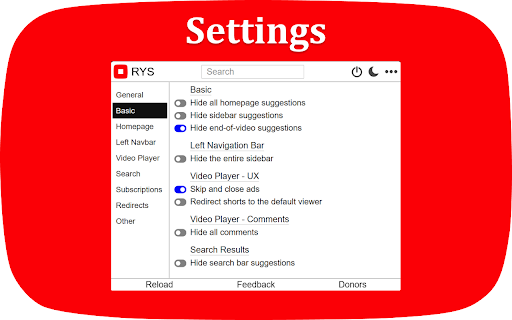

Hide recommended videos, Shorts, comments, and more. Customize YouTube's interface with 80+ options including scheduling when the extension is active. Free features: - Hide homepage suggestions - Hide Shorts - Hide sidebar recommendations - Hide end-of-video suggestions - Hide comments - Hide search suggestions - Skip and close ads - Redirect Shorts to default viewer Sign in (no payment required) to enable any 2 premium features for free. Premium unlocks 60+ advanced settings: - Autoplay and ambient mode control - Homepage redirects (Subscriptions, Watch Later, Library) - Comment filtering (timestamps only, hide usernames, hide replies) - Nav bar and sidebar customization - Theater mode, grayscale mode, search engine mode - Settings lock (timer and code entry) - Schedule when RYS is active - And more Open-source and privacy-focused — no data collection or sharing. Regularly updated since 2018.

UnTrap for YouTube — Block YouTube Shorts & Remove Recommendations
Make YouTube more focused and distraction-free. UnTrap turns YouTube into a clean, focused, and intentional space. It removes distractions like Shorts, visual noise, and attention-grabbing UI elements, so you can watch content without endless scrolling or interruptions. UnTrap offers 250+ powerful features that let you fully customize how YouTube looks and behaves — from layout and content filters to automation, focus tools, and AI-powered summaries. Short videos are one of the biggest attention traps. UnTrap lets you remove Shorts entirely or treat them as regular videos, so you stay in control without breaking your workflow. You can disable Shorts, open them in the standard player, or keep them hidden for a cleaner interface. Decide what stays and what goes. Remove related videos, comments, suggestions, live chat, notifications, buttons, sidebars, and trending sections when they pull attention away. Reduce visual noise by hiding thumbnails, overlays, promotions, and ad banners, or even the Home feed entirely. Get instant AI video summaries with key insights, timestamps, and enhanced transcripts. Jump directly to important moments, expand transcripts or descriptions, and save summaries for later — with multilingual support across content types. A calm interface and mindful controls help reduce overstimulation and support healthier viewing habits. Whether you’re building productivity habits or simply trying to stay focused, UnTrap adapts to your workflow. Enjoy a distraction-free player with full-window viewing, resizable layout, and precise playback controls. Personalize YouTube with themes, cinema mode, or full-size theater mode. Restore the old YouTube layout, use legacy list views, or switch to a minimal interface. Small tweaks like disabling ambient lighting or improving in-page search refine everyday use. Filter content, block unwanted videos or channels, mute topics, and apply keyword-based rules to shape your feed. UnTrap supports advanced content filtering and parental control tools to help build a safer, distraction-free environment. Save time with smart automation. Disable autoplay, auto-skip video promotions, add intentional opening delays, set default playback speed, enable fullscreen automatically, redirect the Home page, and control YouTube with custom keyboard shortcuts. YouTube adapts to you — not the other way around. UnTrap works across desktop, mobile, and embedded YouTube players, making it a reliable YouTube enhancement wherever you watch.

YTBlock - Block any content from YouTube™
Block videos, comments, channels and much more! With this extension you can block any type of content in Youtube™. ✨ Features: • Blacklist words and phrases (regex supported). • Block channels, videos, comments, posts, and playlists. • Block videos by title, categories*, tags*, description*, duration, link, ID, views*, date* and published time*. • Block members only videos. • Block already watched videos. • Block video by language*. • Block shorts, live, premiere, and age-restricted videos. • Block channels and whitelist channels. • Block comments and posts by their content or by channel. • Block playlists by channel, title, and even mix playlists. • Toggleable block overlays. • Password protection. • Many more! ⚠️* Note: A Google API key is necessary to get information that are not visible in the YouTube™ page about videos and channels, such as tags, categories and descriptions. Within the extension there's instructions on how to get one.

YouTube Liberation: Anti-Distraction Skin
Chrome extension to liberate you from the infinite distraction cycle of YouTube. Like other social media platforms, YouTube is very good at showing you content that you want to watch but weren't planning to or looking for, making it super easy to get distracted and get sucked into one video after another and suddenly lose an hour of your day. Yet there are so many valuable resources and videos that you can't find elsewhere: tutorials, event coverage, specific creators you subscribe to who you know always publish high-quality content worth watching. For many of us, the value of YouTube makes it worth the sacrifice of even its most distracting possibilities, and it's impossible to just cut away. What if it didn't have to be this way? What if you could have the good of YouTube, see the content you want to see, without the platform constantly trying to drag your attention through an endless stream of productivity-draining drudgery? This is the philosophy behind YouTube Liberation. It's time to rise up, lose your chains, and join us as we march our way towards a better YouTube! YouTube Liberation works by hiding elements that lead you towards new content you don't intend to see, without compromising any core viewing features. These elements include: - The entire home page of alg-generated recommendations - Video recommendations on watch pages - Comments sections on watch pages - Extraneous UI elements, replacing the full sidebar with a much more minimal one and removing most topbar buttons YouTube liberation does not at all compromise: - Subscriptions and trending pages - Channel pages - Playlists - Video stats, description, etc. What are considered vital core features and what are considered distracting elements varies from use case to use case and person to person. For certain kinds of videos, comments might be more constructive than distracting. For creators, notifications and easy access to uploading might be important (though that's why YouTube Studio exists...). Thus, one feature I'm working on adding right now is the ability to customize what gets hidden and what is shown, with a recommended configuration as it is right now.

Youtube-shorts block
Play the Youtube shorts video as if it were a normal video. A extension allows youtube shorts videos to play on a regular page. Features - Redirect shorts - Hide "shorts" tab - Hide shorts - Extended GUI for shorts player *** "Hide shorts video" is now enabled by default!!!! If you don't want to do that, please disable in option page! *** The UI of Youtube-shorts is not very well optimized for PCs and has poor functionality. This extension aims to improve the user experience by displaying short videos in the regular video player. ...utube.com/shorts/"video-id" ↓↓ ...utube.com/watch?v="video-id" Change the URL to something like. v1.5.5 features - Fix: Extension Breaks YouTube's New Replies UI #64 v1.5.2 features # Changed - Fix block the entire News(and other) page v1.5.1 features # Changed - Fix where opening in a new tab redirected to the wrong video v1.5.0 features # Changed - refactoring codebase - Fixed an issue where the hide shorts feature might not work depending on the environment (specifications). - Fixed the "open in new tab" feature on the shorts screen. - Updated to comply with YouTube's latest specifications (blocking ytd-rich-shelf-renderer). v1.4.2 features # Added - Russian translation from @jooblex # Changed - Support for Youtube specification changes v1.4.1 features # Added - German translation from @golgorath # Changed - Support new subscription page(Hide shorts video) v1.3.1 features # Changed - Fixed a bug that redirected links that were not short videos containing the string "shorts" v1.3.0 features # Added - Added "Open in regular player" button in the Shorts player - Block Shorts-related feeds (if Hide shorts video is enabled) - Add a Release notes # Changed - Fixed the problem that the load spinner does not disappear when "Hide Shorts video" is selected - Optimize "hide shorts video" v1.5.4 features - Additional selector for Shorts shelf elements by @HardyHeron2008 in #62 - Fix timing issue for richShelfFilter by @seporterfield in #63
