
akmmhbokbfhghenajahbcmogcbghiamg
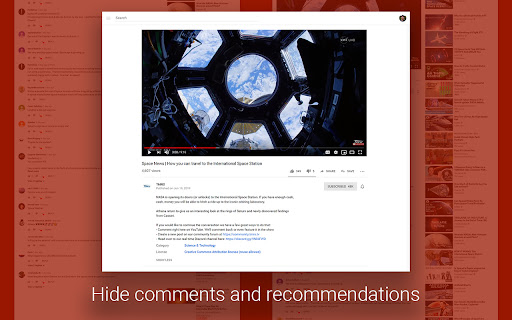


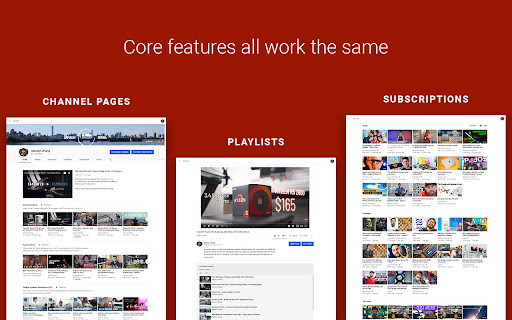
Chrome extension to liberate you from the infinite distraction cycle of YouTube. Like other social media platforms, YouTube is very good at showing you content that you want to watch but weren't planning to or looking for, making it super easy to get distracted and get sucked into one video after another and suddenly lose an hour of your day. Yet there are so many valuable resources and videos that you can't find elsewhere: tutorials, event coverage, specific creators you subscribe to who you know always publish high-quality content worth watching. For many of us, the value of YouTube makes it worth the sacrifice of even its most distracting possibilities, and it's impossible to just cut away. What if it didn't have to be this way? What if you could have the good of YouTube, see the content you want to see, without the platform constantly trying to drag your attention through an endless stream of productivity-draining drudgery? This is the philosophy behind YouTube Liberation. It's time to rise up, lose your chains, and join us as we march our way towards a better YouTube! YouTube Liberation works by hiding elements that lead you towards new content you don't intend to see, without compromising any core viewing features. These elements include: - The entire home page of alg-generated recommendations - Video recommendations on watch pages - Comments sections on watch pages - Extraneous UI elements, replacing the full sidebar with a much more minimal one and removing most topbar buttons YouTube liberation does not at all compromise: - Subscriptions and trending pages - Channel pages - Playlists - Video stats, description, etc. What are considered vital core features and what are considered distracting elements varies from use case to use case and person to person. For certain kinds of videos, comments might be more constructive than distracting. For creators, notifications and easy access to uploading might be important (though that's why YouTube Studio exists...). Thus, one feature I'm working on adding right now is the ability to customize what gets hidden and what is shown, with a recommended configuration as it is right now.

RYS — Remove YouTube Suggestions
Hide recommended videos, Shorts, comments, and more. Customize YouTube's interface with 80+ options including scheduling when the extension is active. Free features: - Hide homepage suggestions - Hide Shorts - Hide sidebar recommendations - Hide end-of-video suggestions - Hide comments - Hide search suggestions - Skip and close ads - Redirect Shorts to default viewer Sign in (no payment required) to enable any 2 premium features for free. Premium unlocks 60+ advanced settings: - Autoplay and ambient mode control - Homepage redirects (Subscriptions, Watch Later, Library) - Comment filtering (timestamps only, hide usernames, hide replies) - Nav bar and sidebar customization - Theater mode, grayscale mode, search engine mode - Settings lock (timer and code entry) - Schedule when RYS is active - And more Open-source and privacy-focused — no data collection or sharing. Regularly updated since 2018.

Focused Youtube
Open source extension that removes comments/recommendations from Youtube: https://github.com/makaroni4/focused_youtube This is an open-source extension that changes homepage of Youtube (only search bar) and drops recommendations/comments from other pages. Extension requires access to Youtube website to change its outlook. Extension icon opens a popup with an option to show/hide the comments section of a video (to check timestamps in comments, for example). In the latest version, an option to temporarily disable the extension was added. You can hover over the YouTube logo to access the navigation menu – playlists, liked videos, watch history, etc. Enjoy

Clickbait Remover for Youtube
Replaces thumbnails and modifies titles of videos on youtube.com This extension replaces thumbnails with a frame from the video, effectively removing any clickbait while still showing a high quality thumbnail so you can still get a good idea of what the video is about. It can also modify titles to stop partial or all caps titles. It works everywhere on Youtube including the homepage, trending page, subscription page and channel pages. All functionality of the extension is customizable by clicking the extension icon on the top right, you can see the effect that different options have right away if you have a youtube tab open, no need to reload the page. And also on mobile. This extension might help people who have a Youtube addiction or anyone who just doesn't want to be distracted by flashy thumbnails and all caps titles while trying to find some quality content. Source code: https://github.com/pietervanheijningen/clickbait-remover-for-youtube Firefox version: https://addons.mozilla.org/firefox/addon/clickbait-remover-for-youtube

Zen YouTube: Distraction free youtube
Block YouTube Shorts, feed, recommendations, and comments to stay focused and reduce distractions. This open-source Chrome extension helps you block YouTube distractions by allowing you to remove shorts from your feed and block shorts in recommended videos. You can also hide shorts, along with blocking YouTube feed, recommendations, and comments for a cleaner, more focused viewing experience. Take control of your online time by filtering out unwanted short videos and distracting content across the platform. Perfect for boosting productivity, reducing screen time, and enjoying a distraction-free browsing experience. Customize your settings easily to stay focused whenever you watch videos or browse YouTube. The source code is available on GitHub: https://github.com/vishnugt/Zen-Youtube.
