
fdekaebckbnpgafknooinjcnelmlhiip

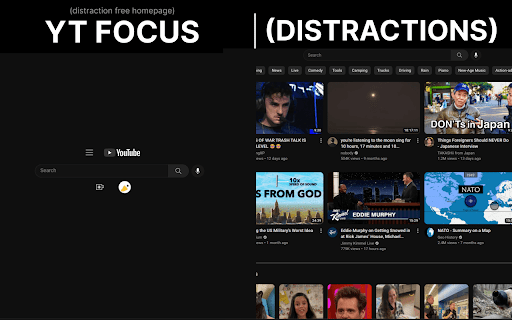

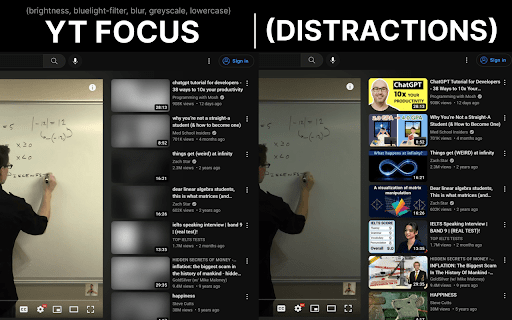

YouTube Without The Distractions | Focus Homepage, Hide Shorts/Comments/Recommendations and more... It's always hard to learn in the same place you relax. YouTube Focus fixes that problem: - Hide homepage recommendations - Blur or Hide Recommendations - Video Brightness - Video Blue Light Filter (Sepia) - Hide Comments - Hide Shorts - Shorts Timer - lowercase titles combat (CLICK BAIT) - Power Button to toggle on & off YT Focus About: YouTube Focus improves productivity by combatting distractions on YouTube. This means getting rid of flashy click-bait thumbnails, and titles THAT LOOK LIKE THIS, hiding shorts, and so much more. YouTube Focus, well, wants you to focus! With this app, you can laser focus on whatever you need to do, stopping impulsive clicks or searches. Then when you're done, toggle it off, kick-back and relax. Open Source (Learn How to Make a Chrome Extension): YouTube Focus is open source, meaning that all the code for this extension is visible on our github page! If you've been looking to contribute or want to learn how to make your own chrome extension like this, it's all available on our repository! We have both our chrome extension and website code public, so there's a lot to learn or add to. Open for Feedback: YouTube Focus is committed to providing a distraction free learning experience on YouTube. If you find any bugs or have a feature suggestion, let us know on GitHub! Report Bugs: If you encounter any bugs while using YouTube Focus, please leave an issue on our GitHub page. Additionally, most bugs are fixed by refreshing the page. Personal Data: YouTube Focus respects the privacy of its users and is committed to protecting their personal information. We do not collect or retain any personal data, browsing history or other identifying information. Third Party Services: YouTube Focus uses Chrome (Chromium) or WebExtensions Storage Sync API to store user settings, and browser's Web Storage API (localStorage) to store Developer Tools fixes. Donations to YouTube Focus are processed by Open Collective and their chosen payment processors, Stripe and PayPal. Do yourself a favor and get focused!

UnTrap for YouTube — Block YouTube Shorts & Remove Recommendations
Make YouTube more focused and distraction-free. UnTrap turns YouTube into a clean, focused, and intentional space. It removes distractions like Shorts, visual noise, and attention-grabbing UI elements, so you can watch content without endless scrolling or interruptions. UnTrap offers 250+ powerful features that let you fully customize how YouTube looks and behaves — from layout and content filters to automation, focus tools, and AI-powered summaries. Short videos are one of the biggest attention traps. UnTrap lets you remove Shorts entirely or treat them as regular videos, so you stay in control without breaking your workflow. You can disable Shorts, open them in the standard player, or keep them hidden for a cleaner interface. Decide what stays and what goes. Remove related videos, comments, suggestions, live chat, notifications, buttons, sidebars, and trending sections when they pull attention away. Reduce visual noise by hiding thumbnails, overlays, promotions, and ad banners, or even the Home feed entirely. Get instant AI video summaries with key insights, timestamps, and enhanced transcripts. Jump directly to important moments, expand transcripts or descriptions, and save summaries for later — with multilingual support across content types. A calm interface and mindful controls help reduce overstimulation and support healthier viewing habits. Whether you’re building productivity habits or simply trying to stay focused, UnTrap adapts to your workflow. Enjoy a distraction-free player with full-window viewing, resizable layout, and precise playback controls. Personalize YouTube with themes, cinema mode, or full-size theater mode. Restore the old YouTube layout, use legacy list views, or switch to a minimal interface. Small tweaks like disabling ambient lighting or improving in-page search refine everyday use. Filter content, block unwanted videos or channels, mute topics, and apply keyword-based rules to shape your feed. UnTrap supports advanced content filtering and parental control tools to help build a safer, distraction-free environment. Save time with smart automation. Disable autoplay, auto-skip video promotions, add intentional opening delays, set default playback speed, enable fullscreen automatically, redirect the Home page, and control YouTube with custom keyboard shortcuts. YouTube adapts to you — not the other way around. UnTrap works across desktop, mobile, and embedded YouTube players, making it a reliable YouTube enhancement wherever you watch.

FocusTube: Remove All Distractions from YouTube
Stay focused on YouTube by hiding distractions: thumbnails, Shorts and more. 🎯 FocusTube: Remove Distractions and Reclaim Your Attention from YouTube's Algorithm 🛠️ Built by Benjamin Floyd Rubin (ex-Amazon) YouTube's algorithm decides what you see. FocusTube lets you take that control back. Hide or show exactly what you want on every page: Shorts, recommendations, comments, thumbnails, feeds. Use YouTube without distraction. ✦ CUSTOMIZE EVERY PAGE ✦ 🏠 Home / 🔔 Subscriptions / 🔍 Search / 🎬 Video / 👤 Channel / 📋 Playlists Toggle what appears on each page independently. Hide or show: navigation, sidebar, Shorts, thumbnails, video feeds, comments, recommendations, live chat, video end cards, view counts, like/dislike buttons, breaking news, YouTube Playables, and more. Lock any control so "hide/show all" skips it. Fine-grained control without the chaos. ✦ BLOCK YOUTUBE WHEN YOU NEED IT ✦ 🚫 Enable hard block mode to stop browsing entirely. Choose to block all open tabs or new tabs only. YouTube redirects to a focus screen. One toggle to unblock. Your block settings remember your preference, no need to reconfigure every time. ✦ MINIMAL, FOCUSED HOMEPAGE ✦ 🔍 Enable Google-style homepage layout for a distraction-free, search-first YouTube. Cleaner interface, fewer engagement traps, more control over what you see. ✦ YOUR SETTINGS, YOUR ACCOUNT ✦ ☁ All preferences sync to your Google account via Chrome Sync. Dark mode extension popup. Per-page visual preview so you know exactly what each toggle does before you enable it. Toggle groups let you hide or show all unlocked elements at once. ✦ LIGHTWEIGHT & PRIVATE ✦ 🔒 No tracking. No ads. No analytics. Your preferences stay on your device and sync to your Google account. Runs silently in the background with minimal overhead. ✦ FINE-TUNED CONTROLS ✦ ✶ HOME PAGE: Hide navigation, sidebar, video feeds, Shorts, thumbnails, breaking news, YouTube Playables ✶ SUBSCRIPTIONS: Hide navigation, sidebar, subscription videos, Shorts, thumbnails ✶ SEARCH: Hide navigation, sidebar, search results, Shorts, thumbnails ✶ VIDEO (WATCH PAGE): Hide navigation, player controls, title, description, comments, recommendations, thumbnails, Shorts, like/dislike buttons, view counts, post time, end cards, live chat ✶ CHANNEL: Hide navigation, sidebar, channel content, thumbnails ✶ PLAYLISTS: Hide navigation, sidebar, playlist content, thumbnails ✦ COMING SOON ✦ ⭐ FocusMode (watch ad-free, cookie-free YouTube) ⭐ Lock Settings (schedule or lock your FocusTube settings while on YouTube) ✦ SUPPORT & FEEDBACK ✦ 💬 Submit support tickets, feature requests, and bug reports at getfocustube.com/support

Youtube Ultra Focus Mode
This YouTube Ultra Focus Mode extension removes unrelated suggestions and filter videos with provided keywords on YouTube. YouTube Ultra Focus Mode is a must-have productivity extension for YouTube viewers who wants distraction free experience. This extension saves your valuable time by condensing your YouTube suggestion videos as per your focus keyword mentioned as part of focus mode. It eliminate distractions from YouTube suggestion list. Generally YouTube viewers searched videos to learn some topic, but YouTube started giving tempting suggestions on the basis of your previous search history and your watching pattern. Most of the time viewers end up watching videos which are not related to their initial plan when they started and loose so much time. When ultra focus mode started then this extension eliminates your unrelated suggestions from suggestion list generated by YouTube which are main reason of distraction and always shows you suggestions which are mostly related to your focus keyword. This extension is applied focus keyword to suggestion list to all the YouTube tabs. Focus can be stopped by clicking on stop focus button on extension and it immediately stops hiding unrelated suggestions and viewers can start getting all the suggestions in the suggestion list by YouTube.

focusmode - Stay Focused, Be Present
Pause and decide mindfully how long you want to spend on distracting sites. FocusMode makes you think before you ended up mindlessly scrolling when browsing the web. Only access distracting websites with an informed decision, no more wasting time without you realised. Features: ✅ Very customizable website blocked list and allowed list. ✅ Customized text and duration of animation when intervention happens. ✅ Schedule the on/off based on days and time. ✅ Strict session for a certain period. Browsing analytics are stored locally in your browser, we do not store your browsing data in our server. We take privacy very seriously.
