
ogbodhhmdhhbfoidbgafnnikkangfebe

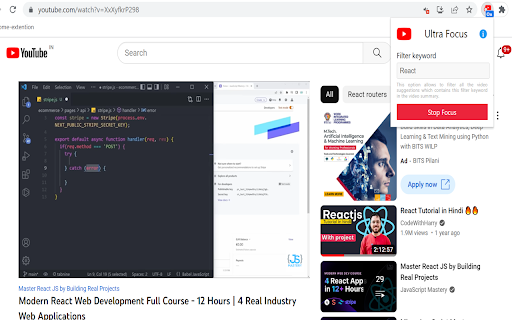
This YouTube Ultra Focus Mode extension removes unrelated suggestions and filter videos with provided keywords on YouTube. YouTube Ultra Focus Mode is a must-have productivity extension for YouTube viewers who wants distraction free experience. This extension saves your valuable time by condensing your YouTube suggestion videos as per your focus keyword mentioned as part of focus mode. It eliminate distractions from YouTube suggestion list. Generally YouTube viewers searched videos to learn some topic, but YouTube started giving tempting suggestions on the basis of your previous search history and your watching pattern. Most of the time viewers end up watching videos which are not related to their initial plan when they started and loose so much time. When ultra focus mode started then this extension eliminates your unrelated suggestions from suggestion list generated by YouTube which are main reason of distraction and always shows you suggestions which are mostly related to your focus keyword. This extension is applied focus keyword to suggestion list to all the YouTube tabs. Focus can be stopped by clicking on stop focus button on extension and it immediately stops hiding unrelated suggestions and viewers can start getting all the suggestions in the suggestion list by YouTube.

Study Mode: YouTube
Remove distractions from your YouTube sessions. Custom word-filters to remove videos and channels, remove shorts, and more! Study and increase focus during on YouTube by removing distractions such as homepage videos, Shorts, Autoplay, sidebar recommended videos, and even individual videos + channels with custom word filters! Increase productivity and never get lost in the endless sea of videos again! Current Features: -Hide the notification bell -Hide the left sidebar -Hide YouTube Shorts -A custom word filter to remove all specified videos and channels -Hide all Home Page videos -Turn Autoplay off -Hide all recommended sidebar videos -Hide endscreen video wall -Hide all comments Open this extension in Chrome's browser's toolbar (same icon you see on this page) and select as many options as you want to apply to the current tab + all future YouTube tabs, until the option(s) are deselected. Unchecking any option will refresh the page you are on in order to restore the content that was originally there. This extension is created to be used only with YouTube. It will not work with any other website. User data is not maliciously accessed by this extension; I am a user of this extension too, and believe heavily in the protection of users' privacy and personal data. Below is an explanation of permissions in Study Mode: YouTube, with definitions copied from Mozilla's developer page. activeTab: If an extension has the activeTab permission, then when the user interacts with the extension, the extension is granted extra privileges for the active tab only. activeTab is used in order to apply user-input changes to the current tab of YouTube. localStorage is also used in this extension and is used to store the options you have selected in the extension for future access - both in current tabs, and in any future tabs/windows. The custom word filter list is also stored to localStorage. Access and retrieval of only these customization options are used. I have put a lot of effort into this extension, however, you may encounter a bug or issue. If you do, please email me at EMDHdev "at" gmail.com with the browser that you are using Study Mode: YouTube in, as well as a description of what is happening (and screenshot, if applicable). My goal is to make this extension as useful as possible for every user, and your feedback will help greatly! Feel free to email me about any desired features you have and feedback about this extension - I'll be reading them all!

YouTube Focus Mode
Remove distracting elements from YouTube for better focus YouTube Focus Mode is a Chrome extension that helps you stay focused by removing distracting elements from YouTube. Whether you're studying, working, or just want a cleaner viewing experience, this extension provides customizable options to suit your needs. Features: Focus Mode Toggle: Easily switch focus mode on or off with a simple toggle. Blur Intensity Control: Adjust the blur intensity of distracting elements to your preference. Focus Levels: Choose from different focus levels, including Deep Focus for study sessions and Light Focus for casual viewing. Undo Functionality: Quickly undo the last removed element with a compact undo button. Keyboard Shortcuts: Use convenient shortcuts to manage focus mode and element removal. Session Stats: Track the number of elements hidden and the most frequently hidden element during your session. Support the Developer: If you find the extension helpful, consider supporting the developer through the integrated Buy Me a Coffee link. How It Works: The extension dynamically blurs or hides elements like comments, related videos, and recommendations, allowing you to concentrate on the content that matters. Customize your experience with adjustable settings and enjoy a distraction-free YouTube. Get Started: Install the extension, open YouTube, and activate Focus Mode to begin your distraction-free journey.

Youtube Study Mode
No distractions on Youtube when studying. Click the icon of the extension to enter or exit study mode. What’s New (v3.1.3): Amazon affiliate tag feature added to support sustainability nonprofits. You may need to re-enable the extension due to new required permissions — this is normal. Finish your work faster by being less distracted on Youtube. Instead of the Youtube home page being filled with distracting videos, it's only a search bar. When watching a video the recommendations are also hidden. This way you won't accidentally get distracted and spend hours watching videos. Instead, this will help you quickly finish work so you can enjoy free time.

Mono for YouTube
A distraction-free YouTube extension. Meet Mono - the tired little robot who tidied up your YouTube so you didn't have to. Don't bother thanking him. He'll probably ignore you. This is a lightweight browser extension that strips YouTube down to the essentials by hiding recommendations, distractions, and dark patterns with pure CSS. No JavaScript, no tracking, no background processes. Features: - Blocks YouTube homepage recommendations - Removes sidebar and navigation menus - Hides notification and create buttons - Hides YouTube Shorts shelves - Hides individual Shorts search results - Hides channel cards and channel search links - Hides search result shelves and filter clutter - Removes end cards and end-of-video autoplay recommendations - Removes fullscreen recommendation overlays - Removes subscribe, join, download, save, and more buttons - Removes comment input (comments remain readable) - Removes comment engagement bars and creator reply indicators - Removes live chat replay clutter and sidebar carousels - Removes info cards under video descriptions - Disables channel links - Centres the video player Lightweight CSS-only extension - no JavaScript, no tracking, no background processes. Works on all YouTube pages including watch, search, and homepage. 💻 Source code: https://github.com/Aadam-Gafar/Mono-for-YouTube
