
klffcomidfmikbjjkhfclfiegclldnhb
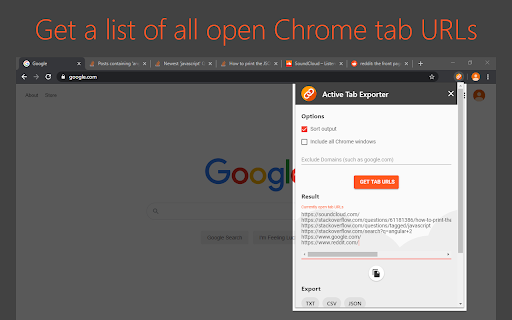


Export currently open Chrome tab URLs to the clipboard or download the list as a file. Active Tab Exporter for Chrome gives you the ability to quickly export all of your open Chrome tab URLs to clipboard or to a file. This saves you all the effort of having to go through each tab you have open and click into the URL bar, copy the URL, and finally paste it wherever you need it to go. With this extension, you can do everything with a single button click. • Option to include all open Chrome windows or just the tabs in the currently active window • Option to sort the output (enabled by default) • Copy the list of URLs to your clipboard with 1 button • Export the list of URLs to a file (TXT, CSV, JSON). * This extension requests the 'tabs' permission - which it needs in order to fetch all of your open tab URLs so it can export them to you.

TabFern tab manager and backup tool
Save and restore your tabs and windows, and navigate tabs in a vertical view. -------------------------------------------------------------------------- NOTE TF has been updated to Manifest V3 --- please report any issues at https://github.com/cxw42/TabFern/issues . As always, back up early and often! Thanks! -------------------------------------------------------------------------- TabFern organizes your browsing life. It shows all your open windows and tabs in one place, for immediate access. With one click, you can close a window, and then bring it back any time with one more click. With two clicks, you can backup all those URLs to a text file, or restore a backup. No need to login to copy browsing sessions between computers! With TabFern, switching between projects is a breeze, and you can leave a task behind without worrying about losing the pages. TabFern is perfect for researchers, the perpetually curious, and anyone who winds up with way too many tabs open at once! TabFern is under active development, so please do not hesitate to report bugs or provide feedback via GitHub. TabFern is offered AS-IS, and with NO WARRANTY — see the license on the Web site for full details. However, the primary author uses TabFern almost 365 days a year, so bug reports should receive a quick response :) . If you would like to contribute to TabFern's development, feel free — we welcome pull requests and would be happy to help you get started. Permissions: The "Read your browsing history" permission permits TabFern to access the URLs and titles of pages you visit, so that it can help you manage your tabs. TabFern stores that data only on your computer, and does not send it anywhere. TabFern is inspired by the Tabs Outliner extension by Vladyslav Volovyk. However, TabFern is a completely separate extension, and is not affiliated with Tabs Outliner or with Vladyslav in any way.

TabStacks: tab and history search
View and search through open tabs and browser history. TabStacks is a vertical tab menu that helps you find the content you were looking for. Filter the tabs you have open and TabStacks will list the open tabs that match. If TabStacks can't find an open tab, it searches through your history to see if you had a tab open previously! TabStacks is designed to be keyboard and screen reader accessible. Press [CTRL]+[SHIFT]+[K] to open the menu, start typing to filter your tabs, and use the [DOWN] arrow key to navigate to the tab you want, and [ENTER] to open that tab. You can always use your mouse as well. You can search through your history during a tab search by pressing [CTRL+SHIFT+S]. You can close a tab by highlighting it in the list using the arrow keys or right-click and pressing [DELETE] or by clicking the close button on the tab. TabStacks is a high performance and secure extension for Chrome. TabStacks doesn't download external files, doesn't store any information about your activity. *** UPDATES *** Version 2.0.2 * Fixed bug where the popup doesn't close on tab change * Added a settings item to allow the option to hold the popup open Version 2.0.1 * The default keyboard shortcut for toggling the search is now CTRL+SHIFT+S due to the browser using nearly all possible combinations of CTRL+ a single key. * The keyboard shortcut key is now configurable, you can modify it in the settings page. Click the gear icon at upper right of the popup to access settings. * Minor cosmetic updates to the settings page. Version 2.0 * Tabs shown in the popup are synchronized with the state of the tabs in the browser: * Title updates are reflected in real-time. * New or deleted tabs are reflected in the tab list. * Close tabs using a button on the tab. Close buttons show on hover or focus. * Tabs display an audio icon if playing audio. * For audible tabs, clicking the icon will mute and unmute the tab. * Settings page has been added, click the gear icon top-right to access settings. Version 1.0.8 * Added lazy loading for site icons to speed up rendering * Reduced requested browser permissions Version 1.0.7 * Linux support for launching TabStacks from keyboard with [CTRL+SHIFT+K]. * PopupMenu now has a max-height instead of fixed height. * Fixed bug on Windows where the scroll bar was rendered even if the tabs would not scroll. Version 1.0.6 * Improved search algorithm for both tabs and history. * Searches much longer history time period. * Tabs in the current window always appear at top when popup is opened (User suggestion). * URLs for tabs appear on focus or mouseover (User suggestion). * Engineering improvements under the hood to use Web Components for rendering.

Export Tabs
Export all open tabs in the current window to a .txt text file. "Export Tabs" is a productivity-focused Chrome extension that enables users to export all open tabs in their current browser window into a convenient `.txt` file. Designed to streamline your browsing experience, "Export Tabs" is perfect for saving your browsing sessions, managing large numbers of tabs, and keeping track of important information. It's as simple as clicking the extension's icon - instantly, you'll have a text file with the URLs of all your open tabs. Download "Export Tabs" today and revolutionize the way you manage your browsing sessions. This utility is a must-have for researchers, multitaskers, and anyone who values organization and time management. "Export Tabs" - keeping your browsing organized with just a click.

Save All Tab URLs
Get the raw URLs of all your open tabs! When clicked, this extension shows all the URLs of your open tabs in a convenient way for you to copy/paste and save wherever you want, allowing you to re-visit all the open tabs you had the last time you used your browser!
