
bgjfbcjoaghcfdhnnnnaofkjbnelkkcm
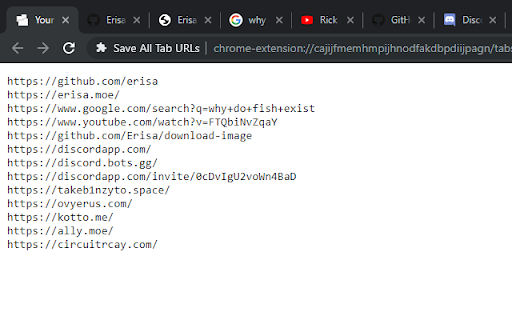
Get the raw URLs of all your open tabs! When clicked, this extension shows all the URLs of your open tabs in a convenient way for you to copy/paste and save wherever you want, allowing you to re-visit all the open tabs you had the last time you used your browser!

Export Tabs
Export the URLs of All Open Tabs to Text This extension allows you to generate a text list of the URLs from all open tabs, which you can easily copy and paste, send by email or save to a text file. You can reopen the tabs later by pasting the saved text into the input box. Comments, bug reports, and suggestions are always welcome!

Export Tabs as Text File
Save all tab URLs with one click and exports to a text file. Import URLs to reopen tabs in normal or incognito mode. The "Export Tabs as Text File" Chrome extension lets you quickly save the URLs of all tabs in your current Chrome window with a single click. Now with version 1.1.1, you can also import those URLs back and reopen them in normal or incognito mode. Just click the extension icon and choose: • Export Tabs as Text File — instantly saves all open tab URLs to a .txt file. • Import text file — Choose a previously saved file and reopen the tabs in the current browser or incognito mode. Important Notes: • Some tabs may not reopen such as internal or local pages • Reopened websites from text file may require you to log in again if your session has expired or the site needs you to sign in again for security reasons. What's New in Version 1.1.1: • New Feature: Import a .txt file of URLs and reopen them as tabs in the current browser or in incognito mode. • UI Enhancement. ☕ Buy Me a Coffee If you enjoy this extension, please consider buying me a coffee. Thanks! https://www.buymeacoffee.com/bethesk

Save Tabs
Save and restore all tabs from toolbar popup! Save Tabs is an extension that helps you save and close all tabs with just one click from your browser's toolbar popup. Simply open the toolbar popup and click on the - Close tabs - button on the top-left corner. To open all closed tabs please click on the - Open tabs - button on the top toolbar. Within the toolbar popup UI, you will also see the list of tabs. You can easily reorder the items in this list to your desired order (drag & drop). All open tabs will be adapted automatically to the new order. Besides, you can click on the close button in the toolbar popup to close a single tab (and remove it from the list). Once you make any changes in the toolbar popup UI, the exact change will appear for all open tabs in your browser; vice versa, once you make any change on the open tabs, the toolbar popup will be updated accordingly. Note: The extension interface supports dark mode. To switch the interface theme to dark, please press the moon icon on the top-right toolbar. To report bugs, please fill out the bug report form on the addon's homepage (https://mybrowseraddon.com/save-tabs.html).

Save my Tabs
The Save my Tabs is an extension that with one click can save all open tabs in your browser. After the click, you have the option of: - Select the tab you want to save - Save to Favorites choosing the directory to be saved or creating a new directory. - Copy to clipboard, which allows it to where you want to paste the links and can send it by email, message, etc.. In addition to saving the tabs that are open in your browser, Save my Tabs has the capability to open multiple tabs content from a list of URL's. You can select a list of URL's and with the right mouse button to choose "Open links in new tabs." by SG Web and Monteverde.
