
efgdadcghookjdehffdbmoofpfcmgoaa
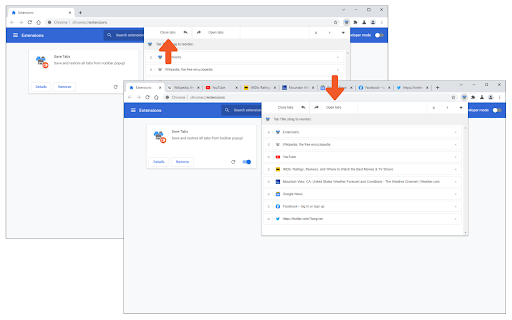
Save and restore all tabs from toolbar popup! Save Tabs is an extension that helps you save and close all tabs with just one click from your browser's toolbar popup. Simply open the toolbar popup and click on the - Close tabs - button on the top-left corner. To open all closed tabs please click on the - Open tabs - button on the top toolbar. Within the toolbar popup UI, you will also see the list of tabs. You can easily reorder the items in this list to your desired order (drag & drop). All open tabs will be adapted automatically to the new order. Besides, you can click on the close button in the toolbar popup to close a single tab (and remove it from the list). Once you make any changes in the toolbar popup UI, the exact change will appear for all open tabs in your browser; vice versa, once you make any change on the open tabs, the toolbar popup will be updated accordingly. Note: The extension interface supports dark mode. To switch the interface theme to dark, please press the moon icon on the top-right toolbar. To report bugs, please fill out the bug report form on the addon's homepage (https://mybrowseraddon.com/save-tabs.html).

Toast - Bookmark and Tab Manager
Save, organize, and restore tabs anytime. The best tab manager, session saver, and bookmark organizer for productivity! The Ultimate Tab & Bookmark Manager – Organize, Save, and Restore Your Tabs Too many tabs cluttering your browser? Toast is the ultimate bookmark manager for tabs and links, letting you save, organize, and restore them effortlessly. Whether you're working, researching, or collecting inspiration, Toast helps you manage browser sessions, save tabs, and organize your bookmarks without the clutter. Close tabs without losing them—Toast keeps everything you need accessible and organized across devices. ⚡ Powerful Features for Seamless Tab, Bookmark, and Session Management: ✅ Save & Bookmark Tabs – Save individual tabs or entire browser sessions with one click. ✅ Instant Restore – Open your saved tabs or entire sessions anytime, with just one click. ✅ Organize Bookmarks & Tabs – Group your saved pages and tabs by project, topic, or research. ✅ Cross-Browser Sync – Works with Chrome, Safari, Firefox, Edge, and Opera, syncing your tabs and bookmarks seamlessly. Available for iPhone. ✅ Cloud Backup – Your bookmarks and tabs are safely stored, ensuring they’re never lost. ✅ Real-Time Tab Sync – Instantly access saved tabs and bookmarks across all your devices. ✅ Easy Sharing – Share your organized tabs and bookmarks with a single link. 🔍 How Toast Tackles Tab Clutter & Boosts Productivity: 📌 Save & organize research – Easily bookmark pages from Google Docs, YouTube, Quora, and more. 📌 Declutter your browser – Keep tabs and bookmarks neatly organized into categorized collections. 📌 Effortlessly manage sessions – Save entire browser sessions, switching between them smoothly with no hassle. 📌 Focus on what matters – Close unneeded tabs without losing important ones, keeping your browser fast and organized. 📌 Sync across browsers and devices – Access all your saved tabs and bookmarks wherever you go. 🚀 Why Choose Toast as Your Session Manager and Bookmark Organizer? ➤ Organize your tabs and sessions – Toast helps you easily manage and switch between saved sessions, keeping your workflow smooth. ➤ Efficient tab and bookmark management – No more searching through tabs or bookmarks—everything is organized for you. ➤ Boost your browser’s speed – Reduce tab clutter and improve browser performance. ➤ Perfect for professionals and creatives – Save ideas, research, and inspiration, all while staying organized and productive. 🧠 Our Journey & Insights: Since 2019, we’ve been meticulously crafting Toast, launching four major releases and earning the “Product of the Day” award on ProductHunt. Throughout development, we learned the power of simplicity. Toast’s native, minimalistic design ensures effortless tab management while offering robust functionality across various browsers. ⚡️Toast Crust: Introducing a new way to communicate with Toast. With two always-present buttons—Save Current Tab and Save All Tabs—you can instantly save your tabs without interrupting your research process. 🎉 Toast V4.0: Elevating Your Browsing Experience After a series of minor yet crucial updates and the successful launch of our new iPhone app over the past year, we are thrilled to unveil a significant update amplifying your browsing experience with our browser extension. Here’s what’s new: 📑 New Saving Flow: Revamped saving options! Now, save all tabs, single tab, or highlighted tabs into a new or existing folders. Plus, the “Last Used” feature intelligently remembers your last save location for quick access. 🔄 Sorting Capabilities: Take control! Rearrange your items on home page by name, creation date, or manually. Easily reorder them by drag-and-drop directly on the Toast home page. 🔍 Enhanced Search: Effortless navigation! Find folders or links instantly using the search icon in the navigation bar on the home page. 📁 Details Page Refinement: Refined Details page for better usability. Clearer buttons and the ability to rename it directly from the navigation bar. 🌟 And More: Several additional updates and enhancements await your exploration in the new extension version. Discover the improved Toast experience yourself!

Tab-Save
Save, export, and import your open tabs in different formats. Easily save all your open tab links, or open a list of links in new tabs with one click.

Tab Manager
Easily organize all your open tabs in multiple windows from toolbar popup! This extension is designed to organize tabs from the toolbar popup. The UI for the extension can also be opened in a standalone popup window or a new tab (choose an item from the toolbar button context-menu). Tab Manager add-on supports multi-window and incognito mode. To work with this addon, just open the extension UI and start managing your tabs. Within the UI you can see a search bar at the bottom. Above that, there is the list of open tabs for window #1 (a new section is added for each new window). Within each row (tab item) in the list, there are several buttons. The first is the pin button which can be used to pin a desired tab(s). Next is the HTTP/HTTPS sign which shows if a website supports SSL protocol or not. The third icon is the tab icon which updates automatically depending on the tab URL. You can see the tab title right after the tab icon. There are also two buttons on the right side for editing or removing the current item. Please note that within the extension interface, all tab items are draggable. Once you drag an item, the actual tab will be re-positioned as well. Note: The extension interface supports dark mode. To switch the interface theme to dark, please press the moon icon in the bottom-right toolbar. To report bugs, please fill out the bug report form on the addon's homepage (https://mybrowseraddon.com/tab-manager.html).

TabPlus
The most feature-packed tab manager. Save & organize your tabs, sync across devices! Tab++ allows you to save your tabs for later. You can organize, categorize, and name them, then restore individual tabs or tab groups at any time. You can even sync them across devices! Tab++ is inspired by similar extensions like OneTab, only with WAY more features... Like folders, cloud-syncing, easy backup and restore, and more! # Note: Usage help can be found in the options page. # NEW IN v1.7.3 - Dark mode, woot! - Implemented more settings in the options page - Confirmation prompt before clearing all data - Don't save pinned tabs by default (configurable) - Bug fixes & improvements to automatic corruption recovery
