
klemgpioamgcfcdnipmglnbpliaodbne


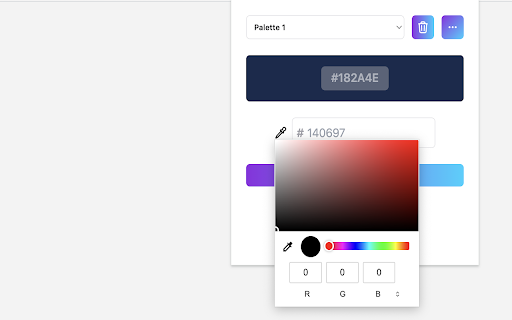

Select and preserve your colors with ease in custom, well-organized color palettes. Color Keeper: Your Ultimate Color Palette Tool. This user-friendly extension empowers you to create, organize, and manage custom color palettes right from your browser, making your design process seamless and inspirational. With Color Keeper, you can start by crafting unique color palettes that capture your creative vision. Whether you're working on a web project, graphic design, or even interior decorating, having the right color palette at your fingertips is essential. The extension allows you to capture and save any color that catches your eye on the web, helping you to build a color collection that resonates with your personal style or project needs. One of the standout features of Color Keeper is its export and import capabilities. This feature is perfect for sharing your color discoveries with colleagues or clients, ensuring everyone is aligned with the project's color vision. You can export your palettes in various formats, making them compatible with other design tools, or import them to continue working on existing projects. This flexibility facilitates collaboration and idea sharing, making the design process more inclusive and accessible. Moreover, Color Keeper excels with its ability to import palettes directly from specialized sites like colorhunt. This feature allows you to draw inspiration from current color trends and incorporate them directly into your projects. Whether you're looking to replicate the aesthetic of a particular image or explore popular palettes within the design community, Color Keeper makes this process effortless.

Simple Color Picker
A Simple Color Picker extension to pick colors and copy them to clipboard A Simple Color Picker extension is a tool that allows users to easily select and copy colors from any part of their computer screen. This can be useful for a variety of tasks, such as web design, graphic design, and digital art. How to use ? 1. Add the Simple Color Picker to chrome through Chrome Web Store 2. Pin the extension 3. Click on the extension and click the Pick a color button 4. Now you can move the eyedropper to and select any color on any screen 5. The selected color will be stored and user can easily copy the HEX code by clicking on it and paste it anywhere 6. User can store multiple colors 7. When Clear All is clicked all the colors stored will be deleted Highlighted Features - Select colors from any part of the screen - Store multiple colors - Can easily copy and paste - Clear All the colors in a click Overall, A Simple Color Picker extension is a convenient and easy-to-use tool for anyone who needs to work with colors on their computer. It can save time and effort by eliminating the need to manually enter color values and can be helpful in any industry where color is important. IMPORTANT We don't collect any user data and we don't display any ads

ColorScape
Experience the Color Picker Extension: Capture, save, and organize captivating colors effortlessly from any webpage. A simple color picker for easy and fast usage. Our color picker tool offers a straightforward and user-friendly way to choose colors. With a simple click on the hex code, you can copy your selected color. Plus, if you decide to start over, you can easily delete all your picked colors by clicking the "Clear All" button. It's designed to simplify your color selection process and make it more convenient for your design needs.

Calendar Color
Customize your Google Calendar colors with ease. Choose from Google's palette or create your own custom colors. Now with a built-in Focus Timer to boost productivity during calendar events. 🎨 Google Calendar Color Categorization: Assign categories to Google Calendar's existing color palette, making it easier to remember the purpose of each color. For example, red could represent "Critical," blue "Learning," and green "Finances." 🖌️ Custom Color Groups: Add custom color groups that appear in the color picker on calendar events. Each color in the group can be customized with a unique color and label. ⏱️ Focus Timer: Start a productivity timer directly from any calendar event. Track your focus time, get completion sounds, and build better work habits. 🔍 Eyedropper Tool: Pick any color from the screen to use in your custom palette. 🔄 Reset and Disable Options: Clear all custom colors or disable them to use only categorization with Google's default colors. 🧩 Templates for Easy Setup: Pre-made templates including Time Blocking, Priority, Energy Levels, Schedule Type, Projects, Focus Mode, Mood, and Value. 🛠️ Dependency on Google Calendar Layout: This extension relies on Google Calendar's current layout. Changes by Google may temporarily break features. If this happens, reach out via email: ali@humanquest.net or visit: https://humanquest.net 💻 Desktop-Only: Chrome extensions don't work on mobile. For mobile, use Google's core colors. 🙏 Free Extension: This is completely free. Please reach out with issues rather than leaving a negative review. 🆕 v0.2.4 - Gmail Sidebar Support • Custom colors now appear in Gmail's sidebar calendar — click the Calendar icon in Gmail and your event colors should show up v0.2.3 - Storage & Color Reliability • Fixed custom colors reverting on page refresh — The local storage fallback now correctly reads chunked data, so your colors persist even when sync storage is temporarily unavailable. • Fixed potential infinite loop in storage sync — When Chrome's sync state changes (e.g. signing in/out), the extension no longer risks getting stuck in a recursive loop. • Fixed event viewer dialog coloring — The event detail popup no longer gets incorrectly painted with the event's custom color; only the color dot indicator is updated. v0.2.2 - Storage Health Warnings • Storage Health Warnings - Get notified when storage is running low, blocked, or when using incognito mode. Helpful tooltip explains what's happening and how to fix it. • Focus History now syncs across devices - Your timer sessions are now stored in synced storage, so your focus history follows you across computers. Last 50 sessions are kept. • Expandable Focus History - Click to see all your tracked events, not just the top 5. • Clear History confirmation - Prevents accidental deletion with a two-step confirmation. v0.2.1 - Focus Timer ⏱️ NEW: Built-in productivity timer for calendar events • Start a timer from any event's right-click menu • Timer adapts to remaining event time, full duration, or custom minutes • 7 pleasant completion sounds • Preview sounds and adjust volume in settings • Track focus sessions with history and statistics • Optional break suggestions after completing sessions • Focus mode dimming to reduce distractions • Beautiful floating widget with event color theming v0.1.0 - Task Color Support ✨ Customize colors for Google Tasks • Right-click any task and choose from your custom color palette • Works with timed tasks. DOES NOT WORK for all-day tasks since Google Calendar does not have colors for these v0.0.8 - Stability & Sync • Improved stability - addresses issues with lost colors and stuck dialogs • Better handling of Chrome sync on/off/changing states • Support for larger collections of colored events (smart chunking) • Enhanced cross-device synchronization reliability

Color Bookmarker (Your Ultimate Color Picker for Capturing Colors Anywhere)
Color Bookmarker is your essential tool for organizing and managing colors while browsing the web. Color Bookmarker is your essential tool for organizing and managing colors while browsing the web. This intuitive Chrome extension allows you to capture, and save colors from any webpage with ease. Detailed step-by-step description for your Chrome extension, emphasizing the "color picker" functionality: 1. Color Capture: Instantly grab colors from any element on a webpage with the built-in color picker tool. Simply hover over the desired color and click to capture it effortlessly. 2. Color Change: Easily change the color of any element on a webpage in real-time using the color picker feature. Instantly see how different color options will look before making your selection. 3. Color Copy: Copy the hexadecimal, color codes with just a click, allowing you to quickly transfer colors to your design or development projects. 4. Color Delete: Remove unwanted colors from your saved palette with the color delete function. Keep your color library organized and clutter-free by removing obsolete or duplicate colors with ease. 1. Install Color Picker Plus from the Chrome Web Store. 2. Navigate to any webpage containing colors you want to capture or manipulate. 3. Click on the Color Picker Plus icon in your Chrome toolbar to activate the color picker tool. 4. Hover over any color on the webpage and click to capture it. 5. Click on color preview box to change the color by picking new color or changing the color from color palate. 6. Click on color code to copy the color on your clip board for further use in your design. 7. Delete unwanted colors from your palette to keep it clean and organized by click on cross icon that appear on hover on color code. 8. Click on "Clear all" button to clear all the colors that listed. Transform your browsing experience with Color Picker Plus and take control of your color management tasks with precision and ease. Enhance your design workflow, boost productivity, and unleash your creativity with this essential Chrome extension.
