
kkmahjgakdpepelanmbgdcabbffoomlo


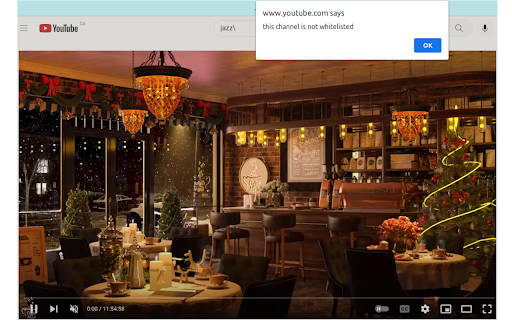
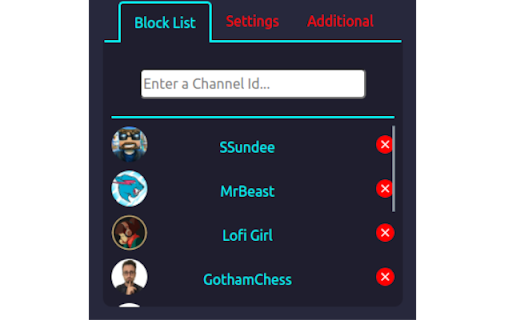

Add Youtube Channels to a list by channel id or by channel handle - Add as many as you like! Choose how you want to block: - Blacklist mode blocks videos from channels on the list - Whitelist mode blocks videos from channels NOT on the list Hide the videos and channels from your recommended feed, searches, shorts, and more! Comes with password authentication to change settings. Update v1.3 - Recreated the blocked video boxes - Elminated the glitchy displays on the homepage Update v1.4 - Fixed the occasional block failure on videos Update v1.7 - Added channels by id -> Go on a Youtube channel page and click on the button "Add channel to block list" - Added a tutorial on how to use the extension Update v1.92 - Blocked search results and Youtube shorts - Fixed image url issues Update v2.00 - New User Interface - Added Upload and Download features for lists - Added Blocking for channel page, and channel elements in general - Removed channel names permanently; channel ids will be used exclusively from now on - Bug Fixes Update v2.01 - Can add channels to the list by channel handles (youtube.com/@...) - Bug Fixes Update v2.1.1 - Bug fixes for adding channels Update v2.1.2 - Added visual setting to remove blocked elements - Doubled checking time for faster blocks Update v2.1.5 - Fixed major bug with blocklist not working. Update v2.1.6 - Blocked Explore Panel on Home page side bar - Blocked "youtube.com/feed" content - Fixed bug where authorized channel pages were hidden Update v2.1.7 - Fixed Shorts panel still showing on home page when blockShorts is on Update v2.1.8 - Fixed Problem with adding channels Updates for the Future: - Add Timer to "unblock" videos at particular times in the day

Youtube Channel Filter
Become more productive by only allowing channels you want to see! Both in the homepage and in recommendations! ### What is Youtube Channel Filter Youtube Channel Filter is a chrome extension designed to make youtube a *more productive* platform. This is done by letting the user select channels they think would be productive to their lives. ### What does the filter do? The filter blocks out all recommendations from channels that are not approved(this can be reversed as well to hide channels you do not like) from the home page and video recommendations. However searching manually does not filter any videos. ### How Do I use it? To add a channel to the filter, navigate to the channel's page and you'll see a gray button that says ***Add Channel***. *(if you do not see this, refresh the page)* To remove a channel you can do two things. Either navigate to the chrome extension at the top right of your browser, click on it, and click on the channel you want to remove. Or you can navigate back to the channel's page and click the gray button that says ***Remove Channel*** *(Again if you do not see this, refresh the page)*

Smart YouTube Blocker
Block channels and keywords on YouTube and limit their allowed watch time === Features === ✓ Custom schedule exactly when certain lists of channels/title keywords should be blocked and their videos not show/be able to be watched on YouTube™ (e.g. permanently 24/7, only on weekdays, only during work hours, etc) ✓ Limit the number of videos you're able to watch from certain channels/keywords per day/per week ✓ Password protection (so you can hide you password or add it to a lockbox on lockbox.pluckeye.net so you don’t give in/change settings in a moment of weakness) ✓ Right click on any video to block the channel ✓ Easily add keywords/channels through clicking on the extension icon in the icon toolbar === Bonus Features === ✓ Option to automatically redirect the homepage of YouTube.com to something more productive (i.e. a productive playlist, search term, etc) ✓ Option to remove endscreen cards and recommended videos (Trademark Disclaimer: Please note that this extension is not affiliated with, sponsored by, or endorsed by YouTube or Alphabet Inc. Any trademarks used in connection with YouTube and Alphabet are the property of their respective owners.)

YouTube Channels Whitelist
Would you like to see only some specific content in your YouTube searches or recommendations? With this extension you can just type the name of the channel you would like to appear and everything else will be filtered out. Important! You can always activate or deactivate the filter by turning on/off the toggle switch icon.

Channel Blocker
Allows you to block YouTube™ videos and comments by blacklisting users and/or by using regular expressions. About this extension Our Add-on enables the function of blocking anything you'd like. Block separate videos, users or whole channels with only one click! Naturally, the add-on supports regular expressions to ensure you the best customisation possible. And another thing: no user information is collected. Do you like what we do? Do you want to support us and our work? A subscription on Patreon would help a lot at developing this tool as well as realising our future projects. Do you want to support us even more? Please donate and buy us a drink to stay hydrated (Hydration is important, though!).. New features: - Fixed duplicate block buttons displayed on comments - We have completely reworked Channel Blocker from scratch. - Channel Blocker is now Open Source find the code here: https://github.com/Time-Machine-Development/Channel-Blocker-Manifest-v3 - Channel block now works with the new manifest v3
