
fgoljeficnldfieaifdoplonkjbmfple
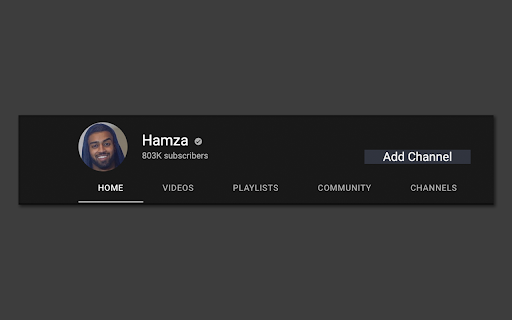


Become more productive by only allowing channels you want to see! Both in the homepage and in recommendations! ### What is Youtube Channel Filter Youtube Channel Filter is a chrome extension designed to make youtube a *more productive* platform. This is done by letting the user select channels they think would be productive to their lives. ### What does the filter do? The filter blocks out all recommendations from channels that are not approved(this can be reversed as well to hide channels you do not like) from the home page and video recommendations. However searching manually does not filter any videos. ### How Do I use it? To add a channel to the filter, navigate to the channel's page and you'll see a gray button that says ***Add Channel***. *(if you do not see this, refresh the page)* To remove a channel you can do two things. Either navigate to the chrome extension at the top right of your browser, click on it, and click on the channel you want to remove. Or you can navigate back to the channel's page and click the gray button that says ***Remove Channel*** *(Again if you do not see this, refresh the page)*

'Improve YouTube!' 🎧 (for YouTube & Videos)
YouTube, tidy & smart? Supercharge YouTube! Give it strong features, filter only the videos you want & exactly the look you like Set your YouTube Video Player; YouTube Content Categories & Filter-rules; Tweaks; Layout, Theme & Style all at once today & enjoy that for years to come! With our enhancer you have 175+ useful / unique features🧰🔧. To make your video experience & content discovery a whole lot better & save you a lot of clicks & time. ✔️ Open-source ✔️ Applies most settings with no reload⌛ (unlike other YouTube-Extensions; draggable icon on YT) 🍃 lightweight: You can expect everything to work as expected. ✓ Non-profit & no income since 2012. (Bear with us when YouTube changes. it's been an uphill race and only gets better.) ✓ Video playback features for embedded videos (+ preparing mobile m.youtube, Facebook, Netflix, Twitch, Vimeo too) (Offline / privacy🔒: We can't care about what video you watch, just that you have a better time). 🏅Press Reviews: We are Recommended by FireFox!🦊(🏆Only 98 extensions) "Enhances YouTube in meaningful ways" - (5/5⭐ gHacks.net/2021/03/26/improved-youtube-enhances-youtube-in-meaningful-ways) "Might be the best YouTube Extension Ever" - (https://LifeHacker.com/this-might-be-the-only-youtube-browser-extension-youll-1846575110) ⋮⚙️175+ features⋮ (many can only be found here /we pioneered) 💡 Expand always: Video Description, Transcript, Chapters 🛩️ "Virtual Travel" (Switch your content-country) ✨ Dim pages until hovered ("Zen mode" ) 🤖 Auto-Pause Tabs ➕ Auto-fullscreen ➕ Pip Picture 📈 Analyse your activity 🚫 Block Videos, Channels, Tags, Category ➕ Video tabs volume Mixer🎛️🔊 🗑️ Remove Related Videos 🗑️ Remove Shorts Reel 🗑️ Hide distraction declutter attention (teaching / screenshare / presentation) ➕ "Up Next": Off (Reset YT's "Autoplay" after every video ) ♻️ Undo the new Sidebar (Description, details, comments) 🚫 adblocker (adblock & adskip or white-list ads your channel subscriptions) ➕ Channel: don't play trailer 🎨☕ Themes 🌈🌄🌇 Disable Ambient lightning (cinematics) 📅 Dark mode Schedule (also Black theme for oLed) ✓ Display dim ✓ Blue-light filter (Preserve sleepiness. Relax eyes) 📺 Video Player & Playback Features: 📷 Screenshot (save copy download any video Frame) ⏯️🔁🔀 Extra Player Buttons (optional): ➰Loop / Repeat (looper / repeater) ➕ Rotate Video 💡 Subtitles, captions & transcript Options 🔍 watch videos frame by frame. 🔄 reverse Playlist, Shuffle Playlist 🎞️ Expand videos to your full window (expander) 🎞️ theater mode 🎞️ cinema mode (turn off the lights) 🎞️ Resize videos (player Size) ➕ Default/fixed Video Quality to match your Display 720p 1080p 4k 8k or bandwidth 480p 240p 144p, auto hd, automatic 4K ➕ avoid 60 frames vs. 30 fps ➕ HDR vs. SDR ➕ Player Auto-Play: Off 💨 "Speed-watching" (Fixed Default Playback Speed) (smart video speed controller excluding music or education) 🔊 Fixed Volume or Loudness normalization ➕ Popup Player ➕ Custom Mini-Player ➕ Pop-out Player ( "always-on-top (floating popout) needs OS setting / app) ➕ Deny AV1 codec to speed up Player /save CPU electricity⚡🔌. [Old] GPUs can do [H.264] VP8 VP9 encoding (fast) (H264 h264ify Flash) 🧩⌘+⇧ Youtube Shortcuts: Set any Shortcuts / Hotkeys (mouse scroll for volume, etc. ) 🗑️ Overwrite YT's Shortcuts 🧹🧽🧼 🗑️ Hide YT Comments / fold / collapse 🗑️ Transparent Header 🗑️ Hide Annotations 🗑️ Hide live stream chat 🗑️Hide video's details ➕Toggle YT Player Controls ➕ set YT language ➕Tweak YT's "Scroll for details" ✓ Mimic retro classic Theme Style Layout ✓ Mini Player scrolling ✓ Search inside ✓ Legacy List style ➕ Channel Video counter ➕ Thumbnails .gif animation: OFF, Thumbnails: HD ⓘ https://github.com/code-charity/youtub (Twitter @ImprovedTube) (🌱👪 Community / 140+ Volunteers) 🌎 translated to 40+ languages We'd like to team with Developers for Web-Video & YT Extensions and listed some unique, friendly, cool, smart work on: https://github.com/code-charity/youtub/discussions/1881 & https://improvedtube.com ) 🔎Found a bug❓🐞🐛 - If you notice any issue, need help or wish for a new feature🌟🧚, please post on Github: https://github.com/code-charity/youtub/issues We work hard 🏋️👩💻 to make your experience a 5/5 Stars experience. (We might even read mail & "Support", next to "Reviews". Please don't complain in the Reviews immediately!) ( bugs@improvedtube.com 📧 ideas@improvedtube.com 📧 ) Compatiblity: While you might not lack features for YT with our extension (and some others copy our code), You can usually just run all else you need, i.e. sponsorblock, pockettube or extra adblocker / adskipper. (ⓘ YT Extensions work with one permission to access YT, you dont need to accept 'alerts', 'change privacy settings', 'browser history') ⓘ Not affiliated with YT. Independently developed.

YouTube Only What You Search
Youtube rendered only with the search results without any suggestions on home or sidebar. Shorts are also not shown in Search Mode. The productivity extension works on Youtube and helps users to view only the video they searched for. Any recommendations on home page or on the side bar are removed from the page so that user can only focus on what he is searching or currently watching. However, no impact is made on the search results of a keyword entered by the user and only Youtube recommendations are blocked to prevent the endless scrolling and return to work. The extension blocks all shorts as well..

Productive YouTube
Productive YouTube: Hide videos on main page & sidebar + search focused content. Increase productivity on YouTube. Productive YouTube is a browser extension that has been developed to help you increase your productivity while using YouTube. With this extension installed, you will be able to hide all videos and sidebar on the main page of YouTube. If you often find yourself getting distracted by irrelevant videos while visiting YouTube and struggle to focus on the content that you actually need, then this extension is perfect for you. It can help you stay on track by removing all the unnecessary content from the main page of YouTube. In addition, Productive YouTube has a unique feature that sets it apart from other productivity extensions. This extension only searches for content that is focused, which means that without searching, you will not be able to find any content on YouTube. By focusing your searches, you can avoid distractions and save time, enabling you to be more productive throughout your day. The extension is easy to use and can be installed in just a few clicks. Once installed, you will notice an immediate increase in your productivity while using YouTube. This extension is particularly useful for students, professionals, and anyone who wants to make the most of their time online. By sharing this extension publicly, the developer aims to help others who struggle with distractions while using YouTube. With Productive YouTube, you can take control of your online experience and focus on the content that matters to you.

Extend Youtube | Ads Block | Focus Mode
It will give you more control on youtube ! Do you love watching videos on YouTube but hate the annoying ads that interrupt your experience? YouExtend is the solution you've been waiting for! Our powerful YouTube ads blocker extension improves your video watching experience by eliminating distractions and interruptions. With YouExtend, you can enjoy seamless, interruption-free video streaming on YouTube. Our extension is easy to install and use, with customizable ad blocking options that allow you to tailor your experience to your preferences. You can choose to block specific types of ads or entire ad categories, and even whitelist channels and creators you want to support. Here are some of the key features that make YouExtend the best YouTube ads blocker out there: Easy Installation and User-Friendly Design: YouExtend is incredibly easy to install and use, with no complicated settings or options to navigate. Our user-friendly design makes it easy to customize your ad blocking preferences and whitelist your favorite channels or creators. Customizable Blocking for Better User Experience: YouExtend offers a range of customizable blocking options, so you can choose to block specific types of ads or entire ad categories, depending on your preferences. You can also whitelist channels and creators that you want to support, while still blocking ads on other videos. Improved Browsing Speed for Faster Video Streaming: By blocking ads, YouExtend can help to speed up your browsing experience on YouTube, giving you more time to enjoy your videos. You'll also notice that pages load faster, making it easier to find the videos you want to watch. And because YouExtend is lightweight and designed to work seamlessly with your browser, it won't slow down your device or affect your browsing speed. Regular Updates and Optimization for Best Performance: At YouExtend, we're constantly updating and optimizing our extension to ensure that it works seamlessly with the latest versions of YouTube and popular web browsers. We're committed to providing our users with the best possible experience, and we're always looking for ways to improve and enhance our extension. Free of Charge with No Hidden Fees or Advertisements: YouExtend is completely free of charge, with no hidden fees or advertisements. We believe that everyone should have access to a better YouTube experience, which is why we offer YouExtend completely free of charge. And because we don't display any ads or collect any user data, you can use YouExtend with complete peace of mind. But YouExtend offers much more than just ad blocking. It's designed to enhance your YouTube experience in every way possible. By eliminating distractions and interruptions, YouExtend allows you to focus on what really matters - the videos you want to watch. Here are some of the benefits you can enjoy with YouExtend: Improved Productivity: With YouExtend, you can watch videos on YouTube without getting distracted by ads, allowing you to stay focused and productive. More Time to Enjoy Your Videos: With faster page loading times, you can find and watch videos on YouTube more quickly and easily. Seamless Video Streaming: YouExtend ensures that your video watching experience on YouTube is seamless and uninterrupted, allowing you to immerse yourself in the content you love. Better User Experience: YouExtend is designed to provide you with the best possible YouTube experience, with customizable ad blocking options and regular updates to ensure optimal performance. At YouExtend, we're committed to providing our users with the best possible experience. That's why we offer YouExtend completely free of charge, with no hidden fees or advertisements. And with our user-friendly design and customizable blocking options, YouExtend is easy to use for everyone. So why wait? Download YouExtend today and start enjoying a cleaner, more streamlined YouTube experience without any annoying interruptions. Join the millions of users who have already downloaded YouExtend and see the difference for yourself!
