
dljpdencpenokgdjiemdejjiohjoopaj


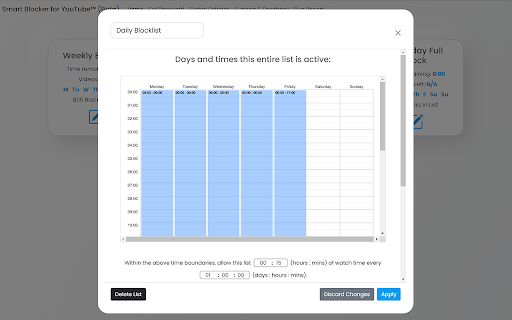
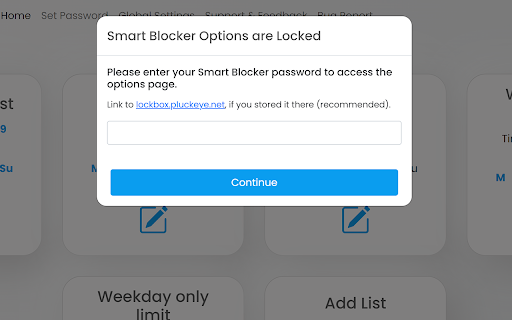
Block channels and keywords on YouTube and limit their allowed watch time === Features === ✓ Custom schedule exactly when certain lists of channels/title keywords should be blocked and their videos not show/be able to be watched on YouTube™ (e.g. permanently 24/7, only on weekdays, only during work hours, etc) ✓ Limit the number of videos you're able to watch from certain channels/keywords per day/per week ✓ Password protection (so you can hide you password or add it to a lockbox on lockbox.pluckeye.net so you don’t give in/change settings in a moment of weakness) ✓ Right click on any video to block the channel ✓ Easily add keywords/channels through clicking on the extension icon in the icon toolbar === Bonus Features === ✓ Option to automatically redirect the homepage of YouTube.com to something more productive (i.e. a productive playlist, search term, etc) ✓ Option to remove endscreen cards and recommended videos (Trademark Disclaimer: Please note that this extension is not affiliated with, sponsored by, or endorsed by YouTube or Alphabet Inc. Any trademarks used in connection with YouTube and Alphabet are the property of their respective owners.)

Adblock for YouTube Block Ads Skip Video Sponsored
YouTube ad blocker – blocks banners and pop-ups. Enjoy ad-free, faster browsing and protect your privacy effortlessly! Annoying ads interrupting your favorite YouTube videos? Block them with Adblock for YouTube — a fast and lightweight Chrome extension designed to give you back your viewing time. Block All Types of YouTube Ads: Instantly remove video ads, banners, pop-ups, and overlays. Enjoy Faster Browsing: Reduce data usage and load videos faster by preventing heavy ad scripts from running. Protect Your Privacy: Block trackers and malicious scripts to safeguard your information. Lightweight and Efficient: Works in the background without slowing down your browser. Customizable Settings: Adjust blocking preferences easily via the extension popup. Why Choose Adblock for YouTube: Seamless Experience: Save bandwidth and enjoy smooth, uninterrupted streaming. How It Works: The extension detects and filters ad-related requests and cleans the page layout using optimized CSS rules. It is designed to be a "set and forget" solution, ensuring a clean interface every time you open a video. Affiliate Program Disclosure: To support the ongoing development and maintenance of this extension, Adblock for YouTube uses affiliate programs. This means that some links on the websites you visit may be automatically replaced with affiliate links. This process does not collect or share any of your personal data. It does not add any extra cost to your purchases. You can easily disable all affiliate redirects at any time using the ON/OFF switch in the extension's popup menu. We aim to offer a premium ad-free experience while providing a transparent way to support the project.

TimeOff YouTube
Hide video lengths, progress bar, and comments for select channels on YouTube. Toggle the progress bar and comments back on to review plays or partake in discussions. Enjoy watching your favorite sports- and esports channels on YouTube spoiler free. Don't forget to turn of video previews in your YouTube playback settings. If the extension stops working correctly it's likely due to YouTube receiving an update. I'll try to get it up to date as soon as possible. But due to the review process it will take a couple of days to update at minimum. Latest update: Fixed compatibility issue with buttons disappearing when resizing window. Version 1.1: Updated compatibility with YouTube. Version 1.2: Added settings. Added thumbnail progress obscuration. Updated compatibility with YouTube.

YT Ad Blocker & Ad Skip YouTube
YT Ad AdBlock & Auto Ad Skip YouTube blocks ads and trackers to make your web surfing faster and safer. App skips Ads automatically. Automatically skips ads in 5 seconds, Hides Ad Banner. Locks Pre-roll. Say goodbye to annoying ads and distractions with our powerful ad blocker. Enjoy a faster, clutter-free browsing experience. + Block the most annoying ads, including: autoplay video ads, youtube ads, expanding ads, interstitial page ads, overlay ads. Pro Adblock is an adblocker for youtube made for Chrome browser to block all ads that are appearing on start when watching tube videos. provides an uninterrupted and smooth web surfing experience with a robust ad-blocking engine that blocks all disrupting ads. Enjoy watching videos, connecting with friends through social media, and checking out your favorite news website without being interrupted by unskippable video promotions, pop-ups, and other distracting ads. Without the extension: Before or during the playback of the youtube video, video ads can be shown.

Youtube shorts blocker
Hide YouTube Shorts is a powerful YouTube Shorts blocker that helps you block distracting short-form videos and stay focused while using YouTube. 🚀 If you want to remove Shorts, clean up your feed, and stop endless scrolling — this extension is built for you. • Remove Shorts from Home, Subscriptions, and Trending pages for a cleaner YouTube experience. 🧹 • Use a reliable blocker for YouTube Shorts to hide Shorts from Recommended videos, Search results, and Notifications. 🚫 • Disable the Shorts tab and block Shorts videos on Channel pages to avoid accidental clicks. 📺 • Convert Shorts into regular YouTube videos to eliminate the addictive vertical format. 🔄 This YouTube Shorts blocker is designed for productivity and attention control. By helping you block Shorts and reduce algorithm-driven distractions, it allows you to stay focused on long-form content and intentional viewing. ⚙️ Whether you want to fully remove Shorts or limit where they appear, this blocker for YouTube Shorts gives you flexible control over your YouTube interface and viewing habits. ✨ Perfect for users who want to: ■ stop YouTube Shorts ■ hide YouTube Shorts ■ block short videos ■ reduce distractions ■ improve focus and productivity
