
kkkofomlfhbepmpiplggmfpomdnkljoh

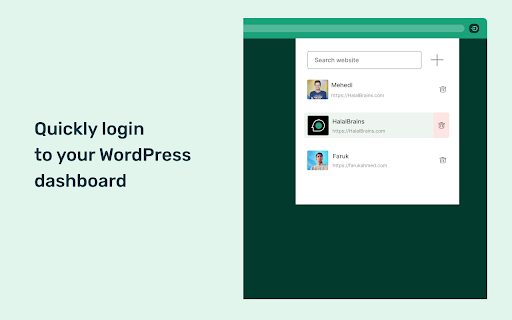

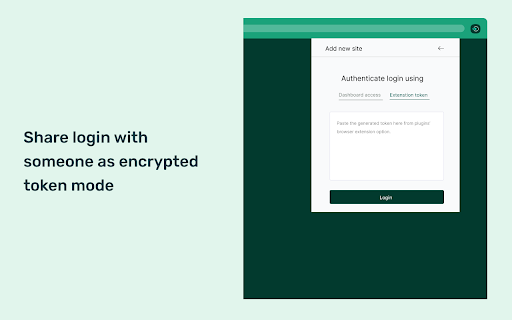
A time saver instant login app for WordPress Websites This extension saves you time, especially if you frequently log in to multiple WordPress website dashboards throughout the day. With this extension, a secure dashboard login is just one click away. Say goodbye to the hassle of navigating to the login panel and entering your username/email and password. The login process is secure, fast, and smooth! How does it work? --- To use this extension, you need to have the Login Me Now WordPress plugin installed on your WordPress website. Make sure to enable the "Browser Extension" module. Now you can access your website's login in three ways: --- 1) Save login access directly from the dashboard popup bar. 2) Save login access by generating an encrypted token from the plugin's "Browser Extension" module settings panel. 3) Save login access by entering your username and password in the browser extension. PS: The browser extension never tracks or saves any of your website data or login credentials. When it comes to dashboard login access, it is securely stored in an encrypted format within the browser extension using an industry-standard JWT token. The generated token cannot be compressed to encrypt login credentials.

Oli - Web Assistant
I'm a digital assistant for professionals, focused on website building Hi, I'm Oli Web Assistant, a life-changing assistant for WordPress and Elementor website creators. I can help you to - Reduce manual work - Reduce time spending on reparative tasks - Keep you from mistakes - Keep you from feeling frustrated I'm currently in the very beginning stage. In the last couple of months I just learned to help you setup a new WordPress website with few clicks. I call it "Easy Setup", I will create automatically a list of recommended tasks that should be completed in order to start building your new WordPress website, then you can edit it, add, remove and change the tasks. The big news is that I will do all of them for you 😃 I learned to do a lot of your tasks, for example: - Cleanup unnecessary default themes, plugins and content ("Hello World", etc.) - Set the permalink to Post Name for better SEO - Hide the website from Search Engines while building the website - Install your favorite plugins - Create some initial pages like Home and About pages If you use Elementor, I can also install Elementor Pro for you, turn on recommended features, create Theme Builder empty parts (Header, Footer, Single, and other parts) and more. Feedback and feature requests are welcome, just ask me! --- New: WordPress - Create a category/tag New: Elementor - Set global fonts New: Elementor - Set global colors New: Elementor - Enable/disable SVG uploads New: Elementor - Open global style New: Easy Setup - Set Elementor global colors and fonts Tweak: Elementor - Suggest to save page before check a form Fix: Answers should not saved to commands history Fix: CSS for dark mode Fix: WordPress - Can't install some plugins Fix: Elementor - Remove the suggestion to `Check Form` on page load New: Check Elementor Forms: - Test your forms and validate whether the server can send email notifications. - Preview the notification email. - Check the email spam score and view other debug information. New: `Create a Child Theme` task for generating a child theme based on current theme New: `Set Elementor Maintenance Mode` task Tweak: Better UI/UX for Easy Setup app Tweak: Added `Create Menu` task after create pages Tweak: Save setup progress to user account Tweak: Allow mark a task as completed Tweak: Don't run completed tasks again Tweak: Better flow for uninstall an active plugin Fix: Assistant not loaded when wp-admin is in a sub folder Fix: Easy Setup - Upload a SVG logo with no permission fails without a message Fix: Login and auto save your tasks Fix: Login and auto save your tasks Tweak: Added `Set Home Page` task after create pages Tweak: Clarify where to answer for questions Fix: Can't get your saved tasks Fix: On install a plugin/theme the tasks are empty New: Login and auto save your tasks Tweak: On click extension icon - open the assistant Tweak: A notice where to find the assistant in extension popup New: Easy Setup - Automate your tasks on setup a new WordPress website

Open in WordPress playground
Browser extension to add playground button on wordpress.org plugins and themes. Playground button on page help to quickly launch plugin or theme for quick test drive.

PDF Drop
All the PDF Tools you Need in One Place. Manage your PDF files from your browser and boost your online productivity in just one click! - Compress PDF (reduce their size by up to 90%) - Convert PDF to Word documents (by keeping content formatting) - Convert Word documents to PDF - Extract Images from your PDF files Sell your PDF files (ebooks or any other PDF) on EDP at https://easy-digital-products.com.

Best WordPress Tools
Different tools useful for WordPress developers and users Set of WordPress tools, urls and other options of interest for WordPress users and developers. This extension has eight sections with several subsections and a lot of utils, forms and links.
