
alappidnfcfbjnanmcbdiahkpfkfmjja

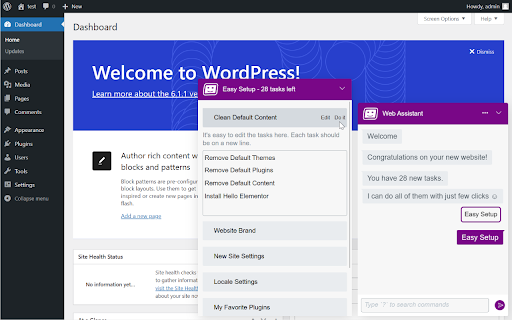

I'm a digital assistant for professionals, focused on website building Hi, I'm Oli Web Assistant, a life-changing assistant for WordPress and Elementor website creators. I can help you to - Reduce manual work - Reduce time spending on reparative tasks - Keep you from mistakes - Keep you from feeling frustrated I'm currently in the very beginning stage. In the last couple of months I just learned to help you setup a new WordPress website with few clicks. I call it "Easy Setup", I will create automatically a list of recommended tasks that should be completed in order to start building your new WordPress website, then you can edit it, add, remove and change the tasks. The big news is that I will do all of them for you 😃 I learned to do a lot of your tasks, for example: - Cleanup unnecessary default themes, plugins and content ("Hello World", etc.) - Set the permalink to Post Name for better SEO - Hide the website from Search Engines while building the website - Install your favorite plugins - Create some initial pages like Home and About pages If you use Elementor, I can also install Elementor Pro for you, turn on recommended features, create Theme Builder empty parts (Header, Footer, Single, and other parts) and more. Feedback and feature requests are welcome, just ask me! --- New: WordPress - Create a category/tag New: Elementor - Set global fonts New: Elementor - Set global colors New: Elementor - Enable/disable SVG uploads New: Elementor - Open global style New: Easy Setup - Set Elementor global colors and fonts Tweak: Elementor - Suggest to save page before check a form Fix: Answers should not saved to commands history Fix: CSS for dark mode Fix: WordPress - Can't install some plugins Fix: Elementor - Remove the suggestion to `Check Form` on page load New: Check Elementor Forms: - Test your forms and validate whether the server can send email notifications. - Preview the notification email. - Check the email spam score and view other debug information. New: `Create a Child Theme` task for generating a child theme based on current theme New: `Set Elementor Maintenance Mode` task Tweak: Better UI/UX for Easy Setup app Tweak: Added `Create Menu` task after create pages Tweak: Save setup progress to user account Tweak: Allow mark a task as completed Tweak: Don't run completed tasks again Tweak: Better flow for uninstall an active plugin Fix: Assistant not loaded when wp-admin is in a sub folder Fix: Easy Setup - Upload a SVG logo with no permission fails without a message Fix: Login and auto save your tasks Fix: Login and auto save your tasks Tweak: Added `Set Home Page` task after create pages Tweak: Clarify where to answer for questions Fix: Can't get your saved tasks Fix: On install a plugin/theme the tasks are empty New: Login and auto save your tasks Tweak: On click extension icon - open the assistant Tweak: A notice where to find the assistant in extension popup New: Easy Setup - Automate your tasks on setup a new WordPress website

ChatGPT for Wordpress
Make your WordPress blogging easier and faster with the ChatGPT. ChatGPT extension for WordPress - the ultimate tool for streamlining your blogging process! With this innovative extension, you'll be able to harness the power of OpenAI right within your WordPress editor. The ChatGPT extension for WordPress allows you to generate text responses in real-time, so you can quickly and easily write blog posts, articles, and other content without the need to stop and research. With this extension, you can easily generate high-quality content that's optimized for SEO and tailored to your specific audience. ChatGPT for WordPress: Streamlined Content Creation With ChatGPT for WordPress, you can streamline your content creation process and improve your online presence. From keyword-driven posts to e-commerce SEO optimization, this tool provides a wide range of features to support your content creation. Plus, with its SEO optimization tools, including FAQ generation and blog outline creation, you can enhance your online visibility and reputation. With ChatGPT extension for WordPress, you'll be able to create high-quality, engaging content faster and more efficiently than ever before. It will help you to save time and effort, allowing you to focus on other important tasks. Whether you're a blogger, content creator, or marketer, this extension is the perfect tool for streamlining your workflow and boosting your productivity.

Scopic HUB
Get access to the 2000+ plugins and themes. Get instant access to the 1000+ premium WordPress plugins and themes free with Scopic HUB. SAY BYE TO NULLED PLUGINS ------------------------------------------------ All plugins are 100% original and genuine. Scopic HUB provides pre-activated plugins and themes so you don’t need to stick with one license to one domain. Now, you can install plugins to any number of domains easily. UNLIMITED DOWNLOADS ------------------------------------------------ Scopic HUB allows you to download plugins and themes unlimited times. No hurdle to your development. Keep your creativity up. FAST AND SECURED ------------------------------------------------ Scopic HUB 2.1 is now faster and more secure. Widely supports Windows, iOS & Android. HELLO DEVELOPERS ------------------------------------------------ Cut your developing cost to 60% with Scopic HUB. Start developing a WordPress website for your client or treat yourself. REGULAR UPDATES ------------------------------------------------ We keep updating plugins and themes to the newest available version. To know more visit - scopic.me/faq#regular_updates ✅ 1000+ Premium WordPress plugins and themes ✅ Unlimited download ✅ Use in any domains ✅ 2x Fast and Secured downloads ✅ Pre-activated plugins and themes ✅ Dark Mode ✅ Use in any supported devices Just click the 'Add to Chrome’ button to run Scopic HUB and get instant access to WordPress premium plugins smart and easy way.

Ultimate WordPress Admin Bar Manager
This Chrome extension hides the WordPress admin bar and adds tools & links to the right-click context menu. This extension hides the WordPress admin bar and when logged into the WordPress site adds an option to the right click context menu to edit the page. If you click on the extension icon you will see addition options to add links so you can quickly jump into the different sections of your site. You can also right click on any link in your WordPress front end menu and click the "Edit Page" link to jump right to that specific page for editing. If you have custom post types in your front end menu, you will need to add that custom post type slug so that when you right click on a custom post type link in the menu, you can also jump to that specific post's edit page. If you have any problems with the extension, please DO NOT jump right into giving me a 1 star review. I plan on updating this extension when time permits. Please remember this is a FREE extension and should be given a chance to improve before giving 1 star reviews. I made this extension for my co-workers and I as we use sticky menu's in our websites we develop.

GDocs to Wordpress markup cleaner
It strips the HTML resulting from a google docs copy paste from all the unnecessary… It strips the HTML resulting from a google docs copy paste from all the unnecessary tags and styles added to tags It also comes with a few options for proper link tag management: - Open internal links in a new tab (target="_blank;") - Add a specific class to all internal links - Make internal links relative (strip the domain name from the href attribute) - Open external links in a new tab (target="_blank;") - Add a specific class to all external links
