
gdlgbgmegnkhaefefkpahmkbmbjfdpmj
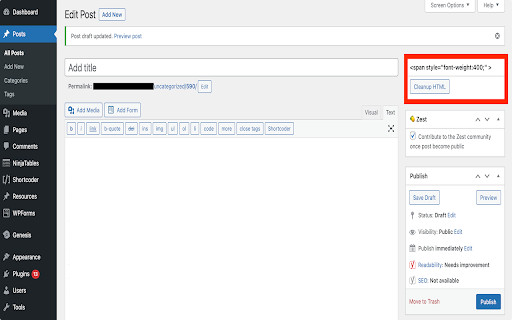

It strips the HTML resulting from a google docs copy paste from all the unnecessary… It strips the HTML resulting from a google docs copy paste from all the unnecessary tags and styles added to tags It also comes with a few options for proper link tag management: - Open internal links in a new tab (target="_blank;") - Add a specific class to all internal links - Make internal links relative (strip the domain name from the href attribute) - Open external links in a new tab (target="_blank;") - Add a specific class to all external links

Ultimate WordPress Admin Bar Manager
This Chrome extension hides the WordPress admin bar and adds tools & links to the right-click context menu. This extension hides the WordPress admin bar and when logged into the WordPress site adds an option to the right click context menu to edit the page. If you click on the extension icon you will see addition options to add links so you can quickly jump into the different sections of your site. You can also right click on any link in your WordPress front end menu and click the "Edit Page" link to jump right to that specific page for editing. If you have custom post types in your front end menu, you will need to add that custom post type slug so that when you right click on a custom post type link in the menu, you can also jump to that specific post's edit page. If you have any problems with the extension, please DO NOT jump right into giving me a 1 star review. I plan on updating this extension when time permits. Please remember this is a FREE extension and should be given a chance to improve before giving 1 star reviews. I made this extension for my co-workers and I as we use sticky menu's in our websites we develop.

Integrator
Clean, simplify HTML copied from Google Docs. Quickly convert text into SEO-friendly & CMS-ready markup with placeholders for images Integrator is a Chrome Extension designed for content creators, SEO specialists, and web editors who need to quickly clean and simplify HTML copied from Google Docs before pasting it into a CMS (WordPress, Shopify, or any other). The extension is designed to be your ultimate Google Docs to HTML converter ! Google Docs often generates messy markup with unnecessary , inline styles, or formatting that bloats your HTML. Integrator solves this problem by automatically: Cleaning up HTML – removes unnecessary tags, comments, and attributes. Image placeholders – replaces images with the text INSERT IMAGE HERE, so you can manually insert them later in your CMS. Safe links – keeps only the link (href) and visible text, removing unnecessary attributes. Lightweight tables & headings – keeps only essential attributes (rowspan, colspan) and ensures only one . How It Works (for the user) Copy your content from Google Docs (Ctrl+C or ⌘C). Click the extension icon and press the “Clean” button. The extension will: Detect the HTML from your clipboard. Clean and convert it into a simplified HTML version. Display the result in a preview box. Copy the cleaned code (with one click or manually) and paste it directly into your CMS in text/code editor mode. Write your blog post in Google Docs. Copy the text. Open Integrator, click Clean. Instantly get a simplified, semantic HTML version. Paste it into WordPress, Shopify, or any CMS without worrying about broken markup or bloated code. ✔ SEO-Friendly HTML – better structure for search engines. ✔ Time-Saving – no more manual cleanup of spans, empty tags, or inline styles. ✔ Consistent Output – reliable formatting every time. ✔ Lightweight & Simple – focused only on HTML cleanup, no tracking, no ads. Clipboard access – only used to read your copied Google Docs content and to allow copying back the cleaned HTML. Nothing else is stored or tracked. ⚡ Perfect for SEO agencies, editors, and anyone who works with CMS platforms and wants clean, minimal, and semantic HTML.

GPT3-slack
GPT-3 for slack web There is an extension for Slack web to check the grammar of your messages. 1.Get your API key from OpenAI's website: https://openai.com/api/ 2.Click on the extension icon. 3.Paste your key and save. 4.Open Slack in your browser. In the input box, the trencher cap icon is for correcting grammar and the light bulb Icon is for text generation. 5. Enjoy! Updated: - We are now utilizing the chatGPT model from OpenAI in order to reduce costs. - There has been an update to the OpenAI policy, and as a result, data cannot be used for model training. For more information on this policy change, please refer to https://platform.openai.com/docs/guides/chat/do-you-store-the-data-that-is-passed-into-the-api.

ChatGPT Soliloquy
ChatGPT-Soliloquy is a Chrome extension that allows ChatGPT to engage in a conversation with itself. ChatGPT-Soliloquy is a Chrome extension that allows ChatGPT to engage in a conversation with itself.
