
plmkkgafodoiojjbomacihcdipjidico
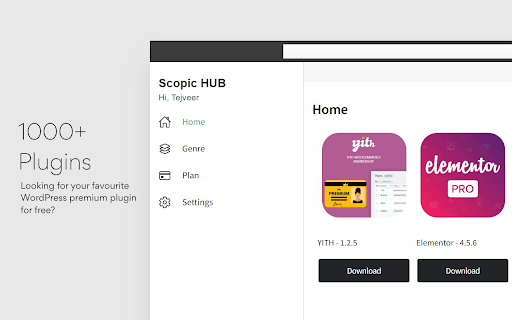


Get access to the 2000+ plugins and themes. Get instant access to the 1000+ premium WordPress plugins and themes free with Scopic HUB. SAY BYE TO NULLED PLUGINS ------------------------------------------------ All plugins are 100% original and genuine. Scopic HUB provides pre-activated plugins and themes so you don’t need to stick with one license to one domain. Now, you can install plugins to any number of domains easily. UNLIMITED DOWNLOADS ------------------------------------------------ Scopic HUB allows you to download plugins and themes unlimited times. No hurdle to your development. Keep your creativity up. FAST AND SECURED ------------------------------------------------ Scopic HUB 2.1 is now faster and more secure. Widely supports Windows, iOS & Android. HELLO DEVELOPERS ------------------------------------------------ Cut your developing cost to 60% with Scopic HUB. Start developing a WordPress website for your client or treat yourself. REGULAR UPDATES ------------------------------------------------ We keep updating plugins and themes to the newest available version. To know more visit - scopic.me/faq#regular_updates ✅ 1000+ Premium WordPress plugins and themes ✅ Unlimited download ✅ Use in any domains ✅ 2x Fast and Secured downloads ✅ Pre-activated plugins and themes ✅ Dark Mode ✅ Use in any supported devices Just click the 'Add to Chrome’ button to run Scopic HUB and get instant access to WordPress premium plugins smart and easy way.

Empler AI | AI Workflows with GPT & More
Next-Generation AI Tool For Better Outcomes. Empler AI is a powerful AI extension designed to revolutionize the professional and business world, available in the Chrome Web Store. It is equipped with a user-friendly interface and various AI-powered features. Empler AI helps you in your business in the best way with ready-made AI templates. There are currently LinkedIn-specific templates and templates for all sites. AI templates for other platforms will be added soon. Ready-made templates for the whole Web: Rewriter, Summarizer, Simply explainer, Translator, Grammar Checker, Paragraph Merger, Text Shortener, and Sentence Expender. Ready-made templates for LinkedIn: We offer many ready-made templates for production, reply, research, etc. in the areas of posts, articles, profiles, and messages. - Make sure you are in the LinkedIn post-related workflows with the link to the post as you are not in the stream. - When drafting a reply to all comments, do not forget to make all comments open by pressing the Load More button in the comments. - DM only works when you are in a Message Box. - In all Workflows, the option to add Brand Voice for more relevant AI outputs is optional. - Artificial Intelligence Powered Content Generation: Create any text quickly and efficiently using GPT, Claude, and Mixtral AI models. - Multi-Platform Compatibility: We offer ready-made templates for many platforms other than LinkedIn. Automate your workflows on these platforms too. - User-Friendly Interface: Empler AI provides an easy and intuitive experience for users of all levels. Although not through Chrome, we make it possible to create workflows from https://empler.ai. The workflows you create are automatically added to the Recent field in our Chrome Plugin. - Form Fields: These are fields for you to enter information. You can create form fields for reference information, language, tone of voice, etc. You can pass this information to one or more elements in the workflow. - Workflow elements: Models like GPT and Mixtral AI can also be added to workflows according to the needs of many web scrapers. You can change the prompts for models and Agents. We offer more than 50 ready-to-use prompts. The output from each element can be passed to another element via curly brackets. Thus, multiple AI tasks can be completed in an endless chain. - You can share the workflows they create with others. - Workflows can run instantly or time-based. It can be run regularly in the background at specified times every day. - Time Savings: Speed up your content creation, response, and engagement processes with Empler AI. - Increased Productivity: Automating your workflows allows you to get more done in less time. - Strengthening Engagement: Expand your network and strengthen your brand with quality content and engagement. 🛡️ Privacy and Security - We Care About Your Privacy: Protecting your data is a priority for us. Empler AI respects user privacy and will never share your data with third parties. It does not show advertisements to its users. Our privacy policy is available on our website (https://empler.ai/legal/privacy-policy) - Disclaimer: Empler AI is not affiliated with LinkedIn, OpenAI, Claude AI Model (trademark of Anthropic), and Mixtral (trademark of Mistral AI). We do not accept any responsibility for the answers provided. With the motto "Less AI Talk, More AI Work", Empler AI is designed for AI assistants to create real value in your work life. With Empler AI, professionals and companies can use their time more efficiently, automate their business processes, and increase their interactions. Empler AI is ready to transform your work life. Download it now from the Chrome Web Store and meet your AI-powered assistant. Empler AI gives you everything you need to start a new era in your business. - Click "Add to Chrome" to install the extension. - Copy and paste the information into the form fields or type what you want in the Goal field after the ready-made information. - Press the Generate button. It's that simple. You are starting to get AI responses to do the most effective work. 🌟 Points and Support If you like Empler and find it useful, you can help spread the word. Share Empler with your colleagues and network. You can help us reach more people on the Chrome Web Store by clicking ⭐⭐⭐⭐⭐ and leaving a reply. Empler is designed and developed with love by Empler AI Inc. All rights reserved. for support, you can contact us at .

Xagio AI | Integrate ChatGPT & WordPress
Integrate the power of ChatGPT to write or modify content on WordPress without the need to copy or paste, just highlight and go. Introducing the Xagio AI Chrome Extension: The perfect AI SEO Companion for WordPress At its core, the Xagio AI Chrome Extension is like having a super-smart assistant who helps you write and refine content, right from your browser. Whether you're drafting a blog post, tweaking a product description, or any other text-based task, Xagio is designed to elevate your content game. Here’s what you need to know in simple terms: 1. What does it do? Xagio employs Artificial Intelligence (AI) to assist you in creating content. Imagine having a writing buddy who's always updated with the latest trends, understands the nuances of language, and can suggest improvements instantly. That's Xagio for you. 2. How does it work? Instead of jumping between apps or websites, Xagio integrates right into your Chrome browser. Let's say you're writing an email or a blog post, and you're stuck or unsure about a sentence. Simply highlight the text, and Xagio will provide suggestions or even completely rephrase it for better clarity and engagement. 3. Why AI-driven content? Artificial Intelligence analyzes vast amounts of data to understand patterns and preferences. With Xagio, this means your content isn't just based on gut feeling; it's backed by data-driven insights ensuring it resonates with your audience. 4. Tailored to your needs: Not all content is created equal. A product description is different from a blog post or an email. Xagio lets you choose from different versions of its AI, known as GPT models, to ensure the assistance you receive is apt for your specific task. 5. A community at your fingertips: What's better than one mind? Multiple minds! Xagio boasts a community feature where users share, vote on, and access AI prompts. These are essentially starting points or ideas for your content. Stuck on how to begin? Dive into the community's shared knowledge and find inspiration. 6. Integration with popular platforms: If you're using WordPress to manage a website or blog, Xagio seamlessly integrates with it. This means you can craft, refine, and upload content without the need to copy-paste or switch between tabs – it's all smooth and integrated. 7. More than just original content: Sometimes, you don't need to start from zero. Xagio allows you to pull information from other sources, refine and tweak it, ensuring you have a solid base to work from, saving time and effort. In a nutshell, the Xagio AI Chrome Extension is your next-generation writing buddy, making sure every piece of content you produce is top-notch. Whether you're a seasoned writer or someone just starting out, Xagio is designed to streamline, enhance, and simplify your content creation process. Give it a try and witness the content revolution firsthand!

Free » Custom WordPress Robots.txt Generator
Create a perfect custom robots.txt file for WordPress Free ✔️ Optimize your blog for search engines in 2025 Custom Robots.txt Generator for WordPress [Sitemap Generator for WordPress] is a powerful Chrome extension designed to simplify the process of generating custom robots.txt files for WordPress websites. Robots txt is a crucial file that tells search engine crawlers which pages or sections of a website should be crawled or indexed, helping website owners control their site's visibility and ranking in search engine results. ✅ How to Generate Custom Robots.txt for WordPress using this Extension: 1. Install the Custom Robots.txt Generator for WordPress extension from the Chrome Web Store. 2. Click on the extension icon in the browser toolbar to open the popup. 3. Enter the URL of your WordPress blog in the provided input field. 4. Select the desired options, such as allowing/disallowing homepage and blocking specific bots. 5. Click the "Generate Robots.txt" button to generate the custom robots.txt file. 6. Copy the generated robots.txt content using the "Copy to Clipboard button". ✔️ How to Update Robots.txt of WordPress using Custom Robots.txt Generator for WordPress Extension: 1. After generating the custom robots.txt file using the extension, copy the generated content. 2. Log in to your WordPress. 3. Go to your SEO plugin. 4. Navigate to the "Crawlers and indexing" section. 5. Enable the "Custom robots.txt" toggle button. 6. Click on "Custom robots.txt" and Paste the copied robots.txt content into the provided text area. 7. After adding the code, click on "Save." Custom Robots.txt Generator for WordPress [Free Sitemap Generator for WordPress] extension offers a user-friendly interface and advanced features to help WordPress users effectively manage their site's crawling and indexing directives. Improve your site's search engine visibility and SEO performance with ease using this handy extension!

WP Hive | A Better WordPress Plugin Repo
The WP Hive Chrome Extension is another revolutionary step for WordPress users, right from Chrome itself. Have you ever wondered how much impact a plugin has on your WordPress website? WP Hive’s Plugin testing tool automatically tests a plugin and gives you better insights. Easily discover new plugins or the popular ones with relevant filters. Even compare plugins like you do for phones. Get useful metrics such as impact on memory usage & pagespeed, PHP errors, warning or notices, Javascript issues, PHP 7.4 compatibility, latest WordPress 5.5 version compatibility, database footprint, activation error, resource errors - right from your WordPress.org page. WP Hive automatically tests all WordPress plugins to get useful metrics and shows them inside the WordPress.org plugin pages. You can also compare a plugin with another plugin from WP Hive and get a detailed insight of the plugin. The extension also offers an option to redirect to WP Hive plugin page for a particular plugin. Sure, WordPress repository is great, but WP Hive makes it even better with better insights & adding more value to users. The privacy policy can be found here: wphive.com/privacy-policy/
