
fmcaajfefcndfcnlbecaiapijbjpjfge
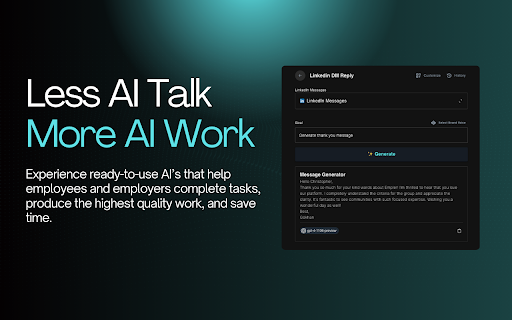


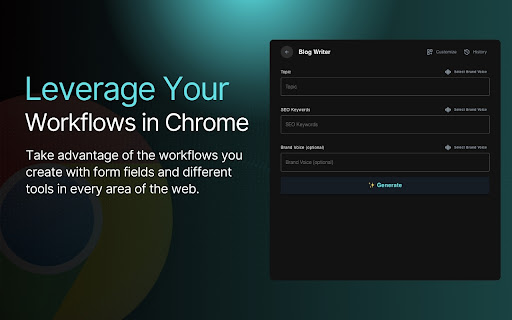
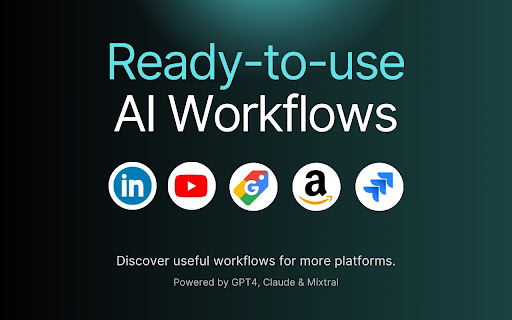
Next-Generation AI Tool For Better Outcomes. Empler AI is a powerful AI extension designed to revolutionize the professional and business world, available in the Chrome Web Store. It is equipped with a user-friendly interface and various AI-powered features. Empler AI helps you in your business in the best way with ready-made AI templates. There are currently LinkedIn-specific templates and templates for all sites. AI templates for other platforms will be added soon. Ready-made templates for the whole Web: Rewriter, Summarizer, Simply explainer, Translator, Grammar Checker, Paragraph Merger, Text Shortener, and Sentence Expender. Ready-made templates for LinkedIn: We offer many ready-made templates for production, reply, research, etc. in the areas of posts, articles, profiles, and messages. - Make sure you are in the LinkedIn post-related workflows with the link to the post as you are not in the stream. - When drafting a reply to all comments, do not forget to make all comments open by pressing the Load More button in the comments. - DM only works when you are in a Message Box. - In all Workflows, the option to add Brand Voice for more relevant AI outputs is optional. - Artificial Intelligence Powered Content Generation: Create any text quickly and efficiently using GPT, Claude, and Mixtral AI models. - Multi-Platform Compatibility: We offer ready-made templates for many platforms other than LinkedIn. Automate your workflows on these platforms too. - User-Friendly Interface: Empler AI provides an easy and intuitive experience for users of all levels. Although not through Chrome, we make it possible to create workflows from https://empler.ai. The workflows you create are automatically added to the Recent field in our Chrome Plugin. - Form Fields: These are fields for you to enter information. You can create form fields for reference information, language, tone of voice, etc. You can pass this information to one or more elements in the workflow. - Workflow elements: Models like GPT and Mixtral AI can also be added to workflows according to the needs of many web scrapers. You can change the prompts for models and Agents. We offer more than 50 ready-to-use prompts. The output from each element can be passed to another element via curly brackets. Thus, multiple AI tasks can be completed in an endless chain. - You can share the workflows they create with others. - Workflows can run instantly or time-based. It can be run regularly in the background at specified times every day. - Time Savings: Speed up your content creation, response, and engagement processes with Empler AI. - Increased Productivity: Automating your workflows allows you to get more done in less time. - Strengthening Engagement: Expand your network and strengthen your brand with quality content and engagement. 🛡️ Privacy and Security - We Care About Your Privacy: Protecting your data is a priority for us. Empler AI respects user privacy and will never share your data with third parties. It does not show advertisements to its users. Our privacy policy is available on our website (https://empler.ai/legal/privacy-policy) - Disclaimer: Empler AI is not affiliated with LinkedIn, OpenAI, Claude AI Model (trademark of Anthropic), and Mixtral (trademark of Mistral AI). We do not accept any responsibility for the answers provided. With the motto "Less AI Talk, More AI Work", Empler AI is designed for AI assistants to create real value in your work life. With Empler AI, professionals and companies can use their time more efficiently, automate their business processes, and increase their interactions. Empler AI is ready to transform your work life. Download it now from the Chrome Web Store and meet your AI-powered assistant. Empler AI gives you everything you need to start a new era in your business. - Click "Add to Chrome" to install the extension. - Copy and paste the information into the form fields or type what you want in the Goal field after the ready-made information. - Press the Generate button. It's that simple. You are starting to get AI responses to do the most effective work. 🌟 Points and Support If you like Empler and find it useful, you can help spread the word. Share Empler with your colleagues and network. You can help us reach more people on the Chrome Web Store by clicking ⭐⭐⭐⭐⭐ and leaving a reply. Empler is designed and developed with love by Empler AI Inc. All rights reserved. for support, you can contact us at .

Definio AI: Multi-Modal AI Sidebar
Definio runs every LLM model from one sidebar. Throw your question at any of them, switch on a whim, never open a new tab. Definio AI is a powerful AI assistant that brings multiple language models together in a single browser extension—helping you explore, reason, and research faster, directly within your browsing flow. 🚀 CHAT WITH THE TOP AI MODELS – ALL IN ONE PLACE: Models from all major providers. 🧠 ASK BETTER QUESTIONS, GET SMARTER ANSWERS: Select any text on a page and start a conversation with multiple AI agents at once. Cross-check facts, get diverse insights, or bring specialised models into the discussion—right from your browser sidebar. ⚡ BUILT FOR DEEP THINKING AND FAST WORK: Use AI to break down dense content, summarize complex topics, compare perspectives, or brainstorm ideas—all without switching tabs. Definio adapts to your browsing context for precise, real-time assistance. 📷 COMPUTER VISION & SCREENSHOTS: Capture the active tab or snip a region with one click and drop it straight into the chat. Vision-capable models read the screenshot for you—ask "what does this chart say," "translate this menu," "what's broken in this UI," or "summarise the page I just captured." You can also drop in your own image files (PNG, JPG, WebP) and combine selected text, screenshots, and typed questions in the same message for richer prompts. ⌨️ CHAT SHORTCUTS – TYPE "/" TO RUN COMMANDS: - /new — start a new chat - /model — switch the AI model mid-conversation - /search — toggle web search on or off - /think — toggle extended thinking on or off - /theme — flip between dark and light mode - /capture — screenshot the visible tab - /snip — screenshot a region you draw Plus Alt+Shift+O (Option+Shift+O on Mac) to open the side panel from anywhere—rebindable in chrome://extensions/shortcuts. 🔄 YOUR AI WORKFLOW, SUPERCHARGED: Whether you're a student, researcher, or professional, Definio helps you turn questions into knowledge. Use customizable shortcuts to boost productivity—summarize articles, extract key points, or auto-respond to content. 💡 WHY DEFINIO? Unlike traditional AI chatbots, Definio lets you bring multiple minds into the room. It's not about one model's opinion—it's about reaching clarity through comparison, consensus, and control. 📝 Whether you're researching, learning, or need quick explanations — Definio AI Chat is your intelligent companion right in your browser. Multiple Access Options: - Keyboard Shortcut: Press Alt+Shift+O (default shortcut, customizable in Chrome extensions settings) to open the AI Chat side panel instantly - Right-click Menu: Right-click anywhere on any webpage and select "Open Chat" to launch the AI Chat side panel - Extension Icon: Click the Definio AI extension icon in your browser toolbar to open the side panel Quick Access Methods: - Once the side panel is open, you can select any text on the page to automatically send it to the AI Chat for analysis or questions - Use the right-click "Open Chat" option for instant access without needing to select text first - The side panel stays open as you navigate between different websites, keeping your chat history accessible Chrome Limitations: - ⚠️ The extension does not work with PDF files viewed in the browser - ⚠️ For best experience with text selection, open the side panel first and then select the text you want to discuss with AI - Privacy First: Unlike popup extensions, Definio AI works in its own dedicated space without injecting content into web pages - Non-Intrusive Design: The side panel never covers or alters the content you're reading - Better Workflow: Ask questions about what you're reading without losing your place in the text or having floating boxes interrupt your flow - Persistent Chat: Keep your AI conversation visible while continuing to read and navigate the web - Seamless Integration: Instantly discuss any text you encounter while browsing

BoomConsole - Web Organizer & Contact Management
BoomConsole is the organizational tool to capture your online viewing experience with your description and folders. Bank Your Connections with BoomConsole Bank Your Insights, Chats, Contacts and Web views to your personal database, Safe and Secure in the Cloud. BoomConsole is a button and sidebar for your web browser that lets you describe your thoughts on the web page you are visiting, capture texts, images and screenshots of the page and secure the composition of all the captured information in folders you remember in your own personal safe database. Search, Find, Organize, View and Review the insights in your safe. We help you Secure Your AI Chats from Chat GPT, Google Gemini, You Chat and Poe Chat. The Boom Console button known as an ‘‘Extension’’ or ‘Add-on’ that you download from the Google Chrome Web Store. The Boom Console Button works on the Chrome Browser, Edge Browser and Brave Browser. (Firefox and Safari coming soon) --------------------------------------------------------------------------------------------------------------------- Key Features: 1. Bank Your AI Chat Interactions: Save and secure the chats you had with AI Chatbots like: ChatGPT, Gemini, You Chat, Poe Chat, then edit and export memories of your chats into Word, PDF, JSON, and CSV formats. 2. Bank Your Online Contents: BoomConsole helps you to Describe and file the web pages you visit. Capture screenshots, HTML, URLs, images, off a website. Revisit your web pages whenever you need it. 3. Bank your Contact information Import your contacts from social media platforms like: LinkedIn, WhatsApp, Google Maps, Indeed, and Monster. Store phone numbers, emails, map locations into your personal contact manager and find them whenever you need it. 4. Smart Categorization Consolidate all your chats, emails, contacts, and contents into the private organized directory system you create. Assign unique title names to the folders you remember. Who Can Benefit? -> Any internet user can benefit from BoomConsole by using it as a personal memory bank to save and remember important information, web pages, and online interactions. -> Professionals and entrepreneurs can save LinkedIn profiles and industry-related online content for networking, market analysis, and business development enhancing project management and creative workflows. -> Sales professionals can capture business locations, helping them keep track of important addresses and contact information. -> Marketers can benefit from the screen capture feature to save visual elements, such as social media posts or website designs, for inspiration or content planning. -> Professors can use BoomConsole to capture and combine online educational resources and course materials for curriculum development. Disclaimer: BoomConsole is an independent platform and is not affiliated with or sponsored by any of the companies whose data it captures, including LinkedIn, Google Maps, Indeed.com, and Monster.com. The use of trademarks and logos is for informational purposes only and does not imply endorsement.

ChatGPT Prompt Generator for Business
Your instant gateway to expert business advice from ChatGPT, without the hassle. Are you an entrepreneur or small business owner that wants to get the best business advice from ChatGPT? But, you don't want to spend hours doing research or writing long, complex prompts? Well now you can with just One Click: Introducing One Click GPT for Business! "It's like a Business Browser for Chat GPT!" Here's Why One Click GPT for Business is a Game-Changer: Say goodbye to the headache of creating complex prompts. With just one click, you can now generate high-quality prompts tailored to your specific business needs. 🔥 High-Level and Advanced Business Strategies: Get access to targeted advice in areas like marketing, sales, finance, operations, and more. Our extension is designed to understand the intricacies of your business, and providing solutions that lead to 10X returns with 10X less effort. 🕒 Time-Saving and Efficient: No more hours wasted on tedious research. Get the advice you need, right when you need it, anytime and anywhere. 🔒 Your Privacy is Our Priority: We respect your data privacy. One Click GPT for Business operates without recording or collecting any private information. 📈 Customized Advice for Growth: Leverage the full potential of ChatGPT but without the hard work. Get immediate strategies that deliver real results, transforming generic advice into personalized action plans that will 10X your business results. How One Click GPT for Business Elevates Your Business In the fast-paced world of business, time is money. Our extension cuts down your effort, delivering the insights you need at lightning speed. Harness the power of AI to make informed, strategic decisions that propel your business forward. Designed with simplicity in mind, our extension integrates seamlessly with your Chrome browser and ChatGPT, making high-level business strategy more accessible than ever. Ready to Revolutionize Your Business? Embrace the future of business strategy with One-Click GPT for Business. This Chrome Extension is more than a tool; it’s your AI partner in giving you an edge in the complex world of entrepreneurship. Download Now and 10X Your Business Today! Click 'Add to Chrome' to begin your journey towards streamlined, efficient, and impactful business growth. With One Click GPT for Business, you’re not just keeping up with the competition; you’ll blow past them all.

AITREE - AI Tools Hub
Discover amazing 🤖 AI tools at your fingertips with this handy Chrome extension! 🌐 Explore solutions like: 🧠 ChatGPT - Solves anything 🥗 MyAIMealPlan - Your personalized AI-powered meal planner 🎨 Midjourney - Generate art from text 📽️ Kaiber - Text to video 💬 Elevenlabs - Your text to speech 🛠️ RunwayML - 30+ Content creation tools 🗣️ Synthesia - Create talking avatars 🎙️ Adobe Podcast - Remove noise from voice recordings ✍️ Jasper AI - Writes anything Install the extension now and unlock the power of AI! 🚀💡
