
kkkbiiikppgjdiebcabomlbidfodipjg


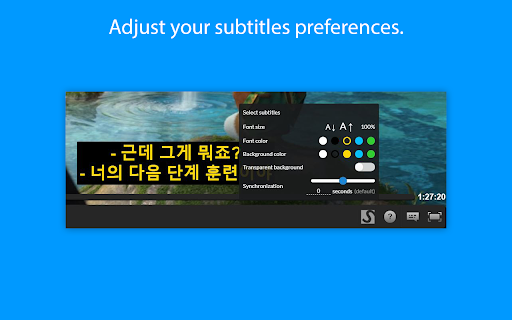
Be it on Netflix, Disney+, Youtube or any other online streaming website - Our mission is to fill any language gap that exists whether for entertainment, language learning or to make videos accessible to the Deaf and Hard-of-Hearing. RECENTLY UPDATED & ACTIVELY MAINTAINED: - April 2026: Fixes for Amazon Prime Video. Expanded video detection for more websites. - September 2025: Fixes for HBO Max, Netflix, and Disney+. Mubi now officially supported. - May 2025: Fixes for Amazon Prime Video and Dailymotion. - December 2024: Migrated to Manifest V3. Fixes for Disney+ and ok.ru. FEATURES: - Supports Netflix, HBOMax, Disney+, Amazon Prime Video, YouTube, and many other video platforms. - Search for subtitles with the built-in-search feature. - Add your own subtitles with drag and drop (supported format: SubRip (.SRT) or ZIP archive containing a .SRT). - Manually synchronize the subtitles, if they are out of sync. - Change the subtitles font size, text colour and background color. - Supports special characters for languages like Greek or Arabic. - Can be used on android mobile devices with the Kiwi browser - Substital is passive by default and won't be automatically injected in the pages you visit. Only YOU decide when to add subtitles to a video. HOW TO USE: - Add the extension to your browser. - Pin it, so you can find it easily (Highly recommended). - Navigate to a website containing a video. - Click on the Substital extension at the top right of your browser. It will open a pop-over. - Select the detected video. - Add subtitles by searching or drop your own file. Enjoy watching and if you like our product, please leave a review or let us know how we can make Substital even better! 🌞 Happy customers 🌞 “I've tried 9 different desktop media players but none of them display subtitles as accurately on time and precise as Substital” “This is an awesome extension for watching things on third party sites, would hundred percent recommend it.” “Very useful for non native english speakers such as me to watch movies and series in english” Substital is proud to support the Hearing Health Foundation, a nonprofit that promotes hearing health for everyone. We invite you to help our mission when you are shopping at partner stores, at no cost to you. Support is always optional, and can be permanently disabled at any time. Substital may get paid commissions directly from companies and/or via affiliate programs on sites visited and/or products purchased while using this browser extension. These commissions/affiliate-payments become the donations that go to your selected charity. Aside from these paid commissions, Substital is completely free, without any ads and no hidden costs. Therefore donations are very appreciated to help me to maintain the extension. Rating and reviewing helps a lot as well. You can donate here: https://substital.com/donations or bitcoins here: https://substital.com/donations/btc

speak subtitles extension
Reproductor subtítulos cerrados en videos (Actualmente funcional en PluralSight). Extensión de accesibilidad para reproducir subtítulos de un video mediante síntesis de voz, de modo que se pueda realizar una pseudo traducción en tiempo real de un video. Actualmente funciona en videos de las siguientes fuentes: - https://www.pluralsight.com/ Más fuentes serán añadidas en posteriores actualizaciones según sean demandadas.

Movie Subtitles
Add your own subtitles almost anywhere you want such as Disney, Netflix, YouTube and many more! Add your own subtitles on almost any video/movie streaming platform you can think of, such as Amazon Prime, Netflix (with some restrictions), Disney+ (with some restrictions), Youtube, Twitch and many more! Unfortunately, Movie Subtitles does not have a subtitle search. You have to download the subtitles online before you can use them in the extension. There are many websites that offer free subtitles. Two of the most popular ones are opensubtitles.org and yts-subs.com. Once you’ve got the subtitles you're good to go! Movie Subtitles was originally developed to facilitate language learning and comes with many useful features for that purpose, such as the ability to jump between dialogues, skip silence and many more! Features: - Skip silence (scenes between dialogues) - Skip music (if supported by the subtitle file) - Synchronize subtitles - Adjust subtitle style - Select/Copy subtitle text (in edit mode) - Upload subtitles in 40+ languages - Supported formats (.txt, .srt, .sub) - Shortcuts (not on Netflix) Movie Subtitles is an open-source project. If you have any ideas for improvement, found a bug, or want to contribute in some other way, you're welcome to do so! https://github.com/gignupg/Movie-Subtitles If you want to use Movie Subtitles to skip certain scenes of a movie, such as violent scenes, sexual scenes etc. check out the article on Medium I wrote about this topic: https://gignu.medium.com/how-to-skip-violent-scenes-and-adult-content-in-movies-3c7d89b813ad - The extension was built using Ixieyang's React Boilerplate https://github.com/lxieyang/chrome-extension-boilerplate-react License: This project is licensed under the MIT License

Subtitles for Youtube
Use this extension to add subtitles available to user to any YouTube video Subtitles for Youtube Want to use your own custom subtitles for Youtube videos? Want to watch a Youtube video which is in a foreign language? There are a lot of volunteers who are kind enough to manually make subtitles for popular Youtube videos. Using our software extension, you can use these manually translated subtitles on the Youtube videos instead of relying on auto-generated subtitles which are not as accurate/do not capture the context of the video correctly. To begin using this software, here is what you need to do Install our software extension Go to the Youtube video page you want to see subtitles for Click on our extension icon and upload the subtitle file manually from your computer Play the Youtube video and the subtitles will display at the bottom of the video. Disclaimer: Please note this extension is NOT made by Google and is made by an independent development team. All copyrights belong to their respective owners. Google doesn’t endorse or sponsor this Chrome extension. Subtitles for Youtube is not owned by,it is not licensed by and is not a subsidiary of Google Inc.

EasySubs – Learn languages by watching films and series
Customizable subtitles and a popup dictionary to master your vocabulary while watching YouTube or Netflix. Open-source and free. Improve your language skills by watching TV shows and movies with subtitles. Enjoy seamless experience – point over a word to get it translated, the video playback will be automatically paused. You can even translate the whole phrase by clicking on it. Do you have a subtitle file in your native language? Upload it and easily sync it with the video if needed. – TRANSLATION: Hover over or click on subtitles for single-word or full-sentence translations. – WORD PRONUNCIATION: Improve your listening and speaking skills with correct pronunciations. – VOCABULARY EXPORT: Export words to language learning services like Anki, LinguaLeo, and Puzzle English. – UPLOAD YOUR OWN SUBTITLES: Supports .SRT and .VTT formats. – SMART AUTO-PAUSE: Hover over a word, and the video will pause automatically. – SUBTITLE PROGRESS BAR: Navigate subtitles easily. Click to rewind the video to the desired point. – MANUAL SUBTITLE SYNC: Adjust subtitles if they’re out of sync with the video. – REWIND AND FAST-FORWARD BY SUBTITLES: Use the right arrow key to replay the last sentence. – SHOW ALL AVAILABLE SUBTITLES: Access all subtitles and audio tracks on Netflix, regardless of region. – YouTube (videos and originals) – Netflix – Coursera – KinoPub …and more coming soon. Please note that some services may not be available in your region or may require a subscription (e.g., Netflix). We are not affiliated with these services. ❤️ QUESTIONS AND FEEDBACK EasySubs is a completely free, open-source Chrome extension with no ads or hidden costs. If you like it, please leave a positive review – it helps a lot. – Send your feedback to support@easysubs.cc – Ask your question in our Telegram group: @easysubs_ext – Contribute to the project – find more details on our GitHub page: https://github.com/Nitrino/easysubs
