
kkhkjhafgdlihndcbnebljipgkandkhh

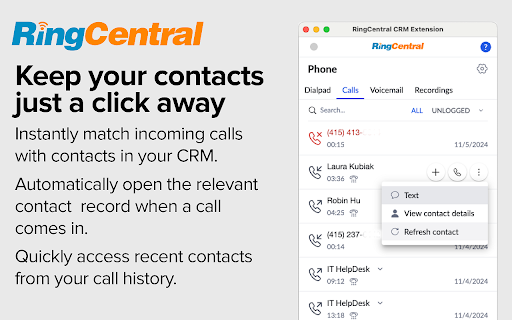


A RingCentral extension for CRM platforms Documentation: https://ringcentral.github.io/rc-unified-crm-extension/ Release notes: https://ringcentral.github.io/rc-unified-crm-extension/release-notes/ The RingCentral App Connect embeds a fully-functional web phone into a set of supported CRM platforms. In addition, the App Connect provides a deep integration with your RingCentral account to automate a number of key functions to help sales people save time and be more efficient. With the App Connect users can easily click any phone number to call that number and send an SMS, synchronize their call history with their CRM platform, schedule meetings, enter custom call disposition notes, among a number of other things. The RingCentral App Connect currently supports the following CRM platforms: Insightly, Redtail, Pipedrive, and Clio. Don't see your CRM in the list? Submit your idea to the RingCentral Ideas portal so that we can add support for it. Disclaimer: RingCentral Labs is a program that lets RingCentral engineers, platform product managers and other employees share RingCentral apps they've created with the customer community. RingCentral Labs apps are free to use, but are not official products, and should be considered community projects - these apps are not officially tested or documented. For help on any RingCentral Labs app please consult each project's GitHub Issues message boards - RingCentral support is not available for these applications.

RingCentral RingCX for NetSuite
RingCentral RingCX for NetSuite The RingCX for NetSuite app provides seamless integration between NetSuite and your RingCX contact center. It offers the following features: Omnichannel customer engagement - Handle inbound voice calls, live chat interactions, and more directly from your account within NetSuite - Give your agents a complete view of the customer journey so they can serve customers better Tight integration with your NetSuite CRM data - Quickly identify customers for personalized experiences - Easily create new tickets or update existing ones for faster after-contact work Easy to deploy and use - Prebuilt integration to deploy in hours, not weeks - Use your browser on any platform (Windows®, Mac®), no software installation is needed Guides: - https://support.ringcentral.com/article-v2/installing-and-setting-up-ringcx-for-netsuite-for-admins.html?brand=RingCentral&product=RingCX&language=en_US - https://support.ringcentral.com/article-v2/using-ringcx-for-netsuite-as-an-agent.html?brand=RingCentral&product=RingCX&language=en_US article-v2

RingCentral for Google
For organizations powered by Google Chrome, Workspace and ChromeOS, the browser is the primary engine of productivity. However,… For organizations powered by Google Chrome, Workspace and ChromeOS, the browser is the primary engine of productivity. However, fragmented tools and "context switching" between work and separate communication apps can hinder team focus and data consistency. RingEX for Google makes it easy for your teams to access key phone features without leaving their Google applications, simplifying workflow, and increasing productivity. The new version of RingEX for Google Chrome provides a unified, enterprise-grade and feature-rich communication layer that lives in the Chrome browser where your teams work. At an overview, this version offers: ✅ Eliminate manual dialing or copy-paste using click-to-call and other actions from any browser webpage ✅ Efficient client handoffs with contextual transfer from an AI Receptionist to a staff member ✅ Handle high-volume inbound traffic with integrated Queue Call Handling ✅ Centralize your team communication with a shared SMS inbox and AI writing tools ✅ Capture every important detail automatically using AI-powered Live Notes during calls. ✅ Unified visibility with "Heads-Up Display" (HUD) to see who is online or busy at a glance across the organization. ✅ Maintain a paperless, secure environment with Digital Faxing ✅ Search through your RingCentral, Google, and Microsoft contacts in one centralized list. Ready to modernize your workflows? You can upgrade to the latest version from within the app. For steps to upgrade, visit: https://support.ringcentral.com/article-v2/2104.html?brand=RingCentral&product=RingEX&language=en_US Contact your administrator if installation is restricted by your organization. For admin guide, visit: https://support.ringcentral.com/article-v2/managing-your-ringcentral-for-google-settings-in-the-integration-console.html?brand=RingCentral&product=RingEX&language=en_US New users? Sign up to see how browser-based communication can transform your workflow at https://www.ringcentral.com/office/plansandpricing.html

GReminders Sidebar
GReminders is an all in one meeting management platform designed for financial professionals. We combine automated scheduling, SMS/email reminders, CRM automation, and AI notetaking into one seamless solution. Whether you're a financial advisor, accountant, attorney, therapist, or sales professional, GReminders eliminates the back-and-forth of scheduling while reducing no-shows and automating your post-meeting workflows. Eliminate No Shows and cut out all the back and forth of appointment scheduling. Integrates with Web Meeting Providers and all major CRMs such as Redtail, Wealthbox, Salesforce, Hubspot, Pipedrive, Dynamics, etc... GReminders works HOW YOU WORK, using your EXISTING calendars, and focuses on simplicity and service! Give it a Try today for Free! Visit https://www.greminders.com GReminders Sidebar is a Companion Product to GReminders.com which will help you Schedule Meetings, and access common tasks such as Single Use Links, Book One Off Meetings, Mark Meetings as Completed/No Show, etc... without opening another Tab or Browser.

RingCentral RingCX for HubSpot
RingCentral RingCX for HubSpot The RingCX for HubSpot app provides seamless integration between HubSpot and your RingCX contact center. It offers the following features: Omnichannel customer engagement ● Handle inbound voice calls, live chat interactions, and more directly from your account within HubSpot ● Give your agents a complete view of the customer journey so they can serve customers better Tight integration with your HubSpot CRM data ● Quickly identify customers for personalized experiences ● Easily create new tickets or update existing ones for faster after-contact work Easy to deploy and use ● Prebuilt integration to deploy in hours, not weeks ● Use you browser on any platform (Windows®, Mac®), no software installation is needed 🔗 Navigating RingCX for HubSpot as a user https://support.ringcentral.com/article-v2/Navigating-RingCX-for-HubSpot-as-a-user.html?brand=RingCentral&product=RingCX&language=en_US 🔗 Navigating RingCX for HubSpot as an admin https://support.ringcentral.com/article-v2/Navigating-RingCX-for-HubSpot-as-an-admin.html?brand=RingCentral&product=RingCX&language=en_US
