
kkgaechmpjgbojahkofamdjkaklgbdkc


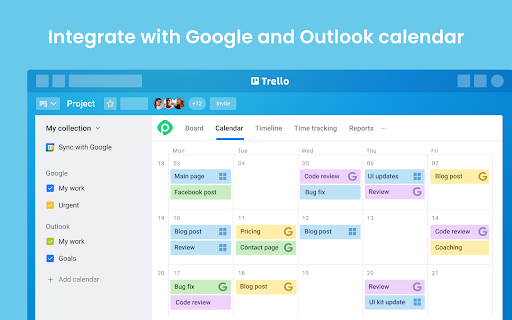
Explore the most powerful features: ✔️ Calendar (daily, weekly and monthly views) ✔️ Timeline (grouped by members, boards, lists, and labels) ✔️ Time tracking and reporting ✔️ Workload ✔️ Gantt-like roadmap ✔️ Multi-board view ✔️ Dependencies ✔️ Recurring cards ✔️ Subtasks ✔️ Export to PDF, Excel, and CSV ✔️ Integration with Google Calendar, Outlook, and more Planyway is an intuitive Trello Chrome extension that significantly expands Trello capabilities in personal planning and project management. See why Planyway extension for Trello is an excellent choice for managing your weekly schedule: ✔️ DRAG&DROP SCHEDULING Simply drag cards from Trello board and drop them on the calendar to schedule ✔️ INTEGRATION WITH GOOGLE CALENDAR, OUTLOOK, ETC. See and edit events from Google and Outlook calendars in Planyway. Or, sync Planyway with Google to see and edit Trello cards in Google Calendar. The app also supports 1-way integration with any other calendar for viewing purposes. ✔️ RECURRING TASKS Put Trello cards on repeat to visualize them in your calendar as often as you need automatically ✔️ NOTIFICATIONS AND REMINDERS Set reminders and notifications not to miss anything. You can receive them both on your computer or mobile ✔️ RESOURCE MANAGEMENT Manage work of your team with a powerful timeline view. Group it by team members to distribute tasks easily, see who is working on what, and avoid burnout ✔️ PROJECT ROADMAPPING Visualize your project plan on a Gantt-like timeline view to keep track of how you’re progressing to make sure you deliver work on time ✔️ TIME TRACKING AND REPORTING Track time against estimates to easily identify areas for improvement and make sure you stay on time and within budget. All data can be visualized with reports or exported in Excel or PDF Need help? If you have any questions about Planyway Chrome extension, reach out at support@planyway.com. We’re always happy to help:)

TrelloExport
TrelloExport (Trello Export) allows to export Trello boards to Excel spreadsheets, HTML with Twig templates, Markdown, OPML and CSV. TrelloExport (Trello Export) is a Chrome extension to export data from Trello to Excel, Markdown, HTML (with Twig templates, OPML and CSV. How to use: open a Trello Board, click Show Menu, More, Print and Export, TrelloExport. Version 1.9.82 - fix error 403 in loading many cards: added automatic retry with exponential backoff for 403 errors - optimize API requests: only request checklists/attachments/comments when needed based on selected columns - removed unnecessary API parameters (organization_fields, membersInvited) that could trigger 403 - reduced member_fields from 'all' to 'fullName,username' Version 1.9.78 - Injection of TrelloExport button for Chinese (Traditional) language Version 1.9.77 - Improved injection of TrelloExport button in menu for more languages Version 1.9.76 - Improved injection of TrelloExport button in menu - Added error monitoring for 429 (rate limit) and 504 (timeout) errors - Added small delays between API requests to reduce rate limit issues Version 1.9.73: - update jquery - fix OPML export of comments due date, issue #91 - improvements for issue #29 Version 1.9.72: - finally restored the capability to load templates from external URLs, issues #86 and #87 Version 1.9.71: - Manifest v3 - checklist items' due date, assignee and status added to checklists' mode excel export Version 1.9.68: - avoid duplicate header row before archived cards in CSV export (issue #76) - export the cards "start" field (issue #84) Version 1.9.67 - Added the HTTP header "x-trello-user-agent-extension" to all AJAX calls to Trello, trying to find a solution for https://github.com/trapias/TrelloExport/issues/81 Version 1.9.66 - Added the dueComplete (bool) field to exported columns Version 1.9.65 - fix exporting of Archived items to Excel and CSV Version 1.9.64 - fix some UI defects for the "export columns" dropdown - new CSV export type - please test this! - fix issue #55, Export Done and Done By is missing for archived cards - sort labels alphabetically - HTML Twig: added "linkdoi" function to automatically link Digital Object Identifier (DOI) numbers to their URL, see [http://www.doi.org/](http://www.doi.org/), used in Bibliography template - Apply filters with AND (all must match) or OR (match any) condition, [Issue #38](https://github.com/trapias/TrelloExport/issues/38) - enable export of custom fields for the 'Multiple Boards' type of export (please see the [Wiki](https://github.com/trapias/TrelloExport/wiki) for limits) - bugfix: export checklists with no items when selecting "one row per each checklist item" - new feature: save selected columns to localStorage ([issue #48](https://github.com/trapias/TrelloExport/issues/48)) - new look: the options dialog is now built with [Tingle](https://robinparisi.github.io/tingle/) - new sponsor: support open source development! [read the blog post](https://trapias.github.io/blog/2018/06/19/TrelloExport-1.9.53) - avoid saving local CSS to localstorage - fix filters (reopened issue [issue #45](https://github.com/trapias/TrelloExport/issues/45) - paginate loading of cards in bunchs of 300 (fix [issue #47](https://github.com/trapias/TrelloExport/issues/47) due to recent API changes, see https://trello.com/c/8MJOLSCs/10-limit-actions-for-cards-requests) - bugfix export of checklists, comments and attachments to Excel - change "prefix" filters description to "string": all filters act as "string contains", no more "string starts with" since version 1.9.40 - bugfix due date exported as "invalid date" in excel and markdown - filters back working, [issue #45](https://github.com/trapias/TrelloExport/issues/45) - bugfix HTML encoding for multiple properties - small fixes in templates - two slightly different Newsletter templates - Added a button to clear all settings saved to localStorage - new jsonLabels array for labels in data - updated HTML default template with labels New SPONSORED feature: Twig templates for HTML export. See the [BLOG POST](http://trapias.github.io/blog/2018/04/27/TrelloExport-1.9.43) for more info! - new organization name column in Excel exports ([issue #30](https://github.com/trapias/TrelloExport/issues30)) - custom fields working again following Trello API changes ([issue #31](https://github.com/trapias/TrelloExport/issues30)), but not for 'multiple boards' export option. - persist TrelloExport options to localStorage: CSS, selected export mode, selected export type, name of 'Done' list (([issue #24](https://github.com/trapias/TrelloExport/issues/24))) - fix due date locale - expand flag to export archived cards to all kind of items, and filter consequently - list boards from all available organizations with the "multiple boards" export type - https://github.com/trapias/TrelloExport/issues/28 ok with Done prefix - contains vs startsWith filters for the "done" function - css cleanup - re-enabled tooltips - export custom fields (pluginData handled with the "Custom Fields" Power-Up) to Excel, (issue #22 https://github.com/trapias/TrelloExport/issues/22) Bugfix multiple css issues and a bad bug avoiding the "add member" function to work properly, all due to the introduction of bootstrap css and javascript to use the bootstrap-multiselect plugin; now removed bootstrap and manually handled multiselect missing functionalities. Temporary disabled tooltips, based on bootstrap. - only show columns chooser for Excel exports - can now set a custom css for HTML export - can now check/uncheck all columns to export

Focus To-Do: Pomodoro Timer & To Do List
Focus To-Do combines Pomodoro Timer with Task Management, it is a science-based app that will motivate you to stay focused and get things done. It brings Pomodoro Technique and To Do List into one place, you can capture and organize tasks into your todo lists, start focus timer and focus on work & study, set reminders for important tasks and errands, check the time spent at work. It's the ultimate app for managing Tasks, Reminders, Lists, Calendar events, Grocery lists, checklist, helping you focus on work & study and tracking your working hours. Focus To-Do syncs between your phone and computer, so you can access your lists from anywhere. How it works: 1. Pick a task you need to accomplish. 2. Set a timer for 25 minutes, keep focused and start working. 3. When the pomodoro timer rings, take a 5 minute break. Key Features: - ⏱ Pomodoro Timer:Stay focused and get more things done. Pause and resume Pomodoro Customizable pomodoro/breaks lengths Notification before the end of a Pomodoro Support for short and long breaks Skip a break after the end of a Pomodoro Continuous Mode - ✅ Tasks Management: Task Organizer, Schedule Planner, Reminder, Habit Tracker, Time Tracker Tasks and projects: Organise your day with Focus To-Do and complete your to do, study, work, homework or housework you need to get done. Recurring tasks: Build lasting habits with powerful recurring due dates like "Every Monday". Reminders: Setting a Reminder ensures you never forget important things ever again, you can set up recurring due dates to remind you each and every time. Sub-tasks: Break down your task into smaller, actionable items or add a checklist . Task Priority: Highlight your day’s most important To-Do with color-coded priority levels. Estimated Pomodoro Number: Estimate the workload or set a goal. Note: Record more detailed about the task. - 📊 Report: Detailed statistics of your time distribution, tasks completed. Support the calculation of the total time of Focus Time. Gantt Chart of the Focus Time. Statistics on completed To Do. Statistics on time distribution of project. Trend chart of the completed To Do and the focus time. - 🖥📲 All-Platform synchronization: View and manage your goals wherever you are for better goal achieving. Support seamless synchronization within iPhone、Mac、Android、Windows、iPad、Apple Watch. - 🎵 Various Reminding: Focus Timer finished alarm, vibration reminding. Various white noise to help you focus on work & study. Contact Us: focustodo@163.com, reply within 24 hours. Website: http://www.focustodo.cn Pomodoro ™ and Pomodoro Technique ® are registered trademarks of Francesco Cirillo. This app is not affiliated with Francesco Cirillo. Users have been focused on our app for 200 million hours, join us and we help you to be focused and increase your productivity, reduce procrastination and anxiety.

Toby: Tab Management Tool
Your productivity hub. Save and organize your browser tabs from anywhere. Close your tabs without fear. Toby has them. If you have 40+ browser tabs open right now and you're afraid to close any of them, Toby was built for you. Toby lives on your new tab — a visual workspace for organizing your browser sessions into collections. Save everything in one click, sync across every device you use, and come back tomorrow to find it all exactly where you left it. No more rebuilding your workspace from scratch every morning. No more anxiety about closing the wrong window. Used daily by teams at Google, Netflix, Amazon, HubSpot, and IBM, plus 300,000+ individuals in 144 countries. ☁️ Cloud Sync — Your collections follow you across devices and browsers. Save a session on your laptop, open it on your desktop. No exports, no manual backups. 🤖 Toby AI — Let AI name, sort, and group your open tabs automatically. ⚡ Session Save & Restore — Close your entire browser and reopen everything with one click. No more "don't close this window" anxiety — and no more losing track of previously opened tabs. 📁 Collections & Spaces — Organize tabs into projects, topics, and areas. Your whole digital world, visible at a glance on every new tab. Switch between work contexts easily. ✋ Drag & Drop — Move tabs between collections with a click and drag. Organize on the fly without breaking your flow. 🔍 Instant Search — Find any saved tab across all your collections in seconds. No more re-Googling things you already found, no more digging through browser history for that doc you had open last week. 🔗 Toby Links — Type to/docs or to/standup in your browser and jump straight there. No bookmarks, no digging. ✅ Toby Next — Turn tabs into a prioritized to-do list. Work through your day without losing your place. 📝 Notes — A personal notepad built into your workspace. Capture ideas without leaving Toby. 📌 Quick Access — Pin Toby to your toolbar and save or open collections from any window, any time. 🎨 Light/Dark mode & Themes — Pick the look that fits how you work. Light, dark, or somewhere in between. #1 Chrome Extension on Product Hunt. Featured by MIT Tech Review, Business Insider, and Google Chrome's feature page. ★★★★★ If Toby has changed how you work, a review helps us keep building. We only request the permissions Toby needs to function. We never access website content, never sell data, and are committed to protecting your privacy.

New Tab Todo List: Checklist, Notes, Outliner
Beautiful and sharable checklists, notes, and to-do lists. Collaborate and outline in real-time. Turn your New Tab into a Todo List! ✏️ A lightning fast new tab productivity page and dashboard with stunning backgrounds, todo, tasks, lists, and more. Make your new tab / start page the way it should be: Fast, customizable, beautiful and productive! Make lists, outlines, todos, and more. With the New Tab Todo List extension for Chrome, just open a New Tab to capture your ideas, goals, and daily tasks. New Tab Todo List is a friendly space for your lists, outlines, and teams. Use it as your simple to-do list and task manager. You can instantly make a list and share it with your friends, family, and team. Simple, clean, and beautifully designed with relaxing themes and backgrounds. New Tab Todo List declutters your thoughts so you can focus on your tasks, ideas, and getting things done. Use New Tab Todo List to capture your ideas, goals, daily tasks and stay organized. A homepage you will fall in love with! Checklists, tasks, todos, quick notes, calendar and more. Replace your new tab with a personal productivity tool featuring to-do, task lists, team outliner, and inspirations. • New Tab into a beautiful task list • Collaborate with others, with real-time syncing • Share your task lists instantly using a share link • Easily invite friends and teammates to New Tab Todo List • Work together in a shared team space • Task lists with a natural editing interface • Edit to-do lists like a word doc and document • Mark any items as complete, whether bullet, number, or checkbox. • Infinitely nested lists with indent / outdent • Tag and filter tasks using #hashtag and @mentions • Works on phones and tablets, with live real-time syncing between devices • Automatic syncing between your phone, tablet and computer • Simply click to edit, like a text document • Easily expand and collapse outlines and lists • Inspirational wallpapers and photos • Beautiful and minimal interface • Simple, instant and FREE • Feel good, get motivated, seize the momentum and get things done! Yes, New Tab Todo List is completely free. Soon you will have the option to upgrade to New Tab Todo List Pro, which will have additional features like themes, sticker packs, and customizations. ➜ CAN I USE New Tab Todo List WITH MY TEAM? Yes. Create a space and invite your team instantly. It helps keep your lists and team organized. Members will have full access to lists in space. Use New Tab Todo List as your collaboration tool to help each other get stuff done. Meeting notes, task lists, collaborative documents and processes are now in one place in your shared New Tab Todo List space. Unleash your team’s potential ➜ CAN I COLLABORATE WITH OTHERS? Yes. New Tab Todo List allows you to edit lists dynamically with anyone through a share link in real-time. Your task lists are in sync across all devices live and in real-time. Collaboratively edit together in real-time with teams and groups. Simply select and share the edit link. Stay organized and make progress with your team projects using New Tab Todo List. Your team is on the same page!
