
kmmnaeamjfdnbhljpedgfchjbkbomahp
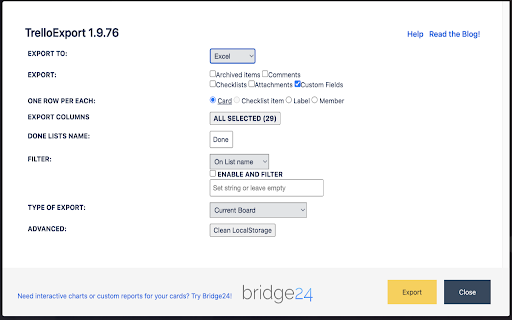
TrelloExport (Trello Export) allows to export Trello boards to Excel spreadsheets, HTML with Twig templates, Markdown, OPML and CSV. TrelloExport (Trello Export) is a Chrome extension to export data from Trello to Excel, Markdown, HTML (with Twig templates, OPML and CSV. How to use: open a Trello Board, click Show Menu, More, Print and Export, TrelloExport. Version 1.9.82 - fix error 403 in loading many cards: added automatic retry with exponential backoff for 403 errors - optimize API requests: only request checklists/attachments/comments when needed based on selected columns - removed unnecessary API parameters (organization_fields, membersInvited) that could trigger 403 - reduced member_fields from 'all' to 'fullName,username' Version 1.9.78 - Injection of TrelloExport button for Chinese (Traditional) language Version 1.9.77 - Improved injection of TrelloExport button in menu for more languages Version 1.9.76 - Improved injection of TrelloExport button in menu - Added error monitoring for 429 (rate limit) and 504 (timeout) errors - Added small delays between API requests to reduce rate limit issues Version 1.9.73: - update jquery - fix OPML export of comments due date, issue #91 - improvements for issue #29 Version 1.9.72: - finally restored the capability to load templates from external URLs, issues #86 and #87 Version 1.9.71: - Manifest v3 - checklist items' due date, assignee and status added to checklists' mode excel export Version 1.9.68: - avoid duplicate header row before archived cards in CSV export (issue #76) - export the cards "start" field (issue #84) Version 1.9.67 - Added the HTTP header "x-trello-user-agent-extension" to all AJAX calls to Trello, trying to find a solution for https://github.com/trapias/TrelloExport/issues/81 Version 1.9.66 - Added the dueComplete (bool) field to exported columns Version 1.9.65 - fix exporting of Archived items to Excel and CSV Version 1.9.64 - fix some UI defects for the "export columns" dropdown - new CSV export type - please test this! - fix issue #55, Export Done and Done By is missing for archived cards - sort labels alphabetically - HTML Twig: added "linkdoi" function to automatically link Digital Object Identifier (DOI) numbers to their URL, see [http://www.doi.org/](http://www.doi.org/), used in Bibliography template - Apply filters with AND (all must match) or OR (match any) condition, [Issue #38](https://github.com/trapias/TrelloExport/issues/38) - enable export of custom fields for the 'Multiple Boards' type of export (please see the [Wiki](https://github.com/trapias/TrelloExport/wiki) for limits) - bugfix: export checklists with no items when selecting "one row per each checklist item" - new feature: save selected columns to localStorage ([issue #48](https://github.com/trapias/TrelloExport/issues/48)) - new look: the options dialog is now built with [Tingle](https://robinparisi.github.io/tingle/) - new sponsor: support open source development! [read the blog post](https://trapias.github.io/blog/2018/06/19/TrelloExport-1.9.53) - avoid saving local CSS to localstorage - fix filters (reopened issue [issue #45](https://github.com/trapias/TrelloExport/issues/45) - paginate loading of cards in bunchs of 300 (fix [issue #47](https://github.com/trapias/TrelloExport/issues/47) due to recent API changes, see https://trello.com/c/8MJOLSCs/10-limit-actions-for-cards-requests) - bugfix export of checklists, comments and attachments to Excel - change "prefix" filters description to "string": all filters act as "string contains", no more "string starts with" since version 1.9.40 - bugfix due date exported as "invalid date" in excel and markdown - filters back working, [issue #45](https://github.com/trapias/TrelloExport/issues/45) - bugfix HTML encoding for multiple properties - small fixes in templates - two slightly different Newsletter templates - Added a button to clear all settings saved to localStorage - new jsonLabels array for labels in data - updated HTML default template with labels New SPONSORED feature: Twig templates for HTML export. See the [BLOG POST](http://trapias.github.io/blog/2018/04/27/TrelloExport-1.9.43) for more info! - new organization name column in Excel exports ([issue #30](https://github.com/trapias/TrelloExport/issues30)) - custom fields working again following Trello API changes ([issue #31](https://github.com/trapias/TrelloExport/issues30)), but not for 'multiple boards' export option. - persist TrelloExport options to localStorage: CSS, selected export mode, selected export type, name of 'Done' list (([issue #24](https://github.com/trapias/TrelloExport/issues/24))) - fix due date locale - expand flag to export archived cards to all kind of items, and filter consequently - list boards from all available organizations with the "multiple boards" export type - https://github.com/trapias/TrelloExport/issues/28 ok with Done prefix - contains vs startsWith filters for the "done" function - css cleanup - re-enabled tooltips - export custom fields (pluginData handled with the "Custom Fields" Power-Up) to Excel, (issue #22 https://github.com/trapias/TrelloExport/issues/22) Bugfix multiple css issues and a bad bug avoiding the "add member" function to work properly, all due to the introduction of bootstrap css and javascript to use the bootstrap-multiselect plugin; now removed bootstrap and manually handled multiselect missing functionalities. Temporary disabled tooltips, based on bootstrap. - only show columns chooser for Excel exports - can now set a custom css for HTML export - can now check/uncheck all columns to export

Table Capture
Copies HTML tables to the clipboard or exports them to Microsoft Excel, CSV, Google Sheets, Office 365, etc. Table Capture gives you the ability to easily capture HTML tables for use in a spreadsheet, whether using Microsoft Excel, Office 365, Open Office, Google Sheets, etc. Features: • Copy tables to the clipboard with the proper row & column separators • Export to Google Sheets • Batch export tables to the clipboard, Excel & Google Sheets • Capture tables (or any repeating items on a website) • Exports of up to 250 rows Table Capture Pro features (requires annual subscription): • Download tables directly as an Excel spreadsheet or as a CSV file • Capture multi-page tables and tables that load as you scroll • Copy tables to the clipboard as Markdown • Screenshot tables (save as PNG images) • Export tables to Office 365 • Create "Recipes" for handling tables on specific websites • Export tables from PDF files (locally and from the web) Table Capture Cloud features (requires subscription): • Real-time sync to Google Sheets • Magic Columns: AI-based column parsing • Table Talk: Ask ChatGPT free-form questions about your data! • Ollama Integration: Use a local LLM for your advanced data processing needs Support & Testing: support@georgemike.com • Please test the extension on the tables provided here: https://www.georgemike.com/tables/test/

Table Exporter - Scrape & Extract Data to Excel, Sheet, CSV & JSON
Automatically detect and extract tables data from any website. Export HTML tables to Excel, CSV, JSON, or Clipboard in one click. Table Exporter is a fast and easy browser extension that lets you extract and export any HTML table from any webpage in just one click. Perfect for anyone working with data from dashboards, reports, analytics tools, research pages, admin systems, or business reports. No manual copying, no formatting issues, and no extra tools required. The extension automatically detects all tables on the page and allows you to export them as CSV, XLS, or Copy. If a webpage has multiple tables, you can choose which one you want. For users working with complete datasets, Table Exporter can also **extract and keep hyperlinks inside table cells**, ensuring you don’t lose important reference URLs such as product pages, document links, resource pages, or tracking information. 📍Export Any Webpage Table ✅ Automatically detects and extracts data from HTML tables. 📍 Export to CSV, XLS, JSON or Copy & Past ✅Compatible with Excel, Google Sheets, BI tools, and reporting systems. 🧩 Works with Multiple Tables on a Page ✅Export one table or all tables with a single click. 🔗 Extract Hyperlinks from Table Cells ✅Preserve important URLs and references in your exported data. ⚡ No Copy-Paste Needed ✅Clean and structured data without manual work or formatting. 👨🎓 Ideal for All Types of Users Great for students, researchers, data analysts, SEO specialists, developers, testers, and business professionals. 🧠 Simple and Easy to Use Lightweight interface with instant one-click exporting. 🎯 Who Is Table Exporter For? Students gathering research data Data analysts extracting online reports SEO professionals collecting SERP or competitor tables Developers testing content or UI output Business users preparing spreadsheets or presentations Content creators organizing online information Anyone who needs fast and accurate data extraction 🚀 So what are you waiting for? Install it now and start exporting tables in seconds!

HTML Table Exporter
⭐ HTML Table Exporter detects the table for you Standard HTML tables, JavaScript-rendered grids, and the data views inside modern business web apps. No copy-paste. No scraper setup. No code. The table is already on your screen, this gives you a clean file in one click. 🔍 Works Where Copy-Paste Breaks Copy-paste loses structure and drags in hidden formatting. Plain exporters choke on modern web apps. HTML Table Exporter reads the table that is already rendered in your browser and returns clean rows from: - CRM list views and record tables - Professional network search results and prospect lists - JavaScript data grids built in React, Angular, and Vue - ARIA grids and treegrids (role="row" / role="gridcell") - Virtualized tables that only render the rows you can see - Marketing and analytics dashboards 🔒 Privacy by Design - Runs entirely in your browser: no servers, no uploads - No data collection · No analytics · No telemetry - Limited permissions: activeTab, storage, downloads, scripting - No account, no signup, no email required 👥 Built For - Sales and revenue ops exporting list and contact records - Marketing and growth teams pulling data from analytics views - Data analysts preparing tables for Excel, Pandas, or SQL - Data engineers feeding pipelines with clean CSV/JSON - Financial analysts collecting figures from market and portfolio sites - Consultants and researchers assembling reports from web data 🚀 One-Click Export to CSV, Excel, JSON, NDJSON, SQL - Automatic table detection: export one table or all of them as a ZIP - Output ready for Excel, Pandas, DuckDB, and common SQL tools - Works offline once installed: no network needed for standard exports ✨ Smart Data Cleaning (PRO) - Normalizes dates to ISO format - Cleans numbers and currency formatting (separators, symbols) - Handles null and empty values consistently - Normalizes booleans (yes/no, true/false, 1/0) - Removes UI noise such as sort arrows and decorative characters 🧩 Complex Tables (PRO) Many business web apps render data in ways a browser cannot copy as plain HTML. PRO uses dedicated parsing logic for ARIA grids, virtualized renderers, Shadow DOM components, and framework-based data grids, returning clean rows from whatever is currently on the page. 🏠 PRO Features for Power Users - Reusable export profiles: Pandas, Excel European, Excel US, DuckDB, BigQuery, Default - Column selection and drag-and-drop reordering - Export history with one-click repeat - Hover preview of cleaned data before you export - NDJSON for data pipelines, SQL INSERT statements for database imports 📊 Supported Formats - FREE: CSV, Excel (XLSX), JSON, ZIP (CSV) - PRO: NDJSON, SQL, multi-format ZIP with metadata, plus everything in FREE HTML Table Exporter is free for standard exports: no time limits, no row caps, no account. 🔗 Website: https://gauchogrid.com/html-table-exporter Built by GauchoGrid. Tools that respect your data.

Gemini MathJaxify
Render LaTeX math with MathJax on Gemini, ChatGPT, and NotebookLM. Auto-rendering, export to HTML/Markdown/CSV, and message pinning. MathJaxify makes mathematical notation easier to read inside ChatGPT, Gemini, and NotebookLM by detecting TeX/LaTeX expressions in AI-generated responses and rendering them with MathJax. It is designed for students, teachers, researchers, engineers, and anyone who regularly reads formulas, derivations, proofs, or technical explanations in AI chat tools. - Detects and renders TeX/LaTeX math expressions in chat responses - Works on ChatGPT, Gemini, and NotebookLM - One-click rendering for individual responses - Auto Render mode for newly generated responses - Quick MathJaxify access from supported site UI areas - Keyboard shortcut support with Ctrl+B - Adjustable rendered math size - Typography controls for rendered text - Custom font upload for rendered content - Optional math rendering when using a custom font - Optional Physics package support for commands such as `\qty`, `\dv`, `\pdv`, `\vb`, and `\vu` - Export conversations to HTML, Markdown, and CSV - Pin important messages for later reference - DOM Limiter option for long supported conversations - Gemini workspace tools, including Projects and Session Manager MathJaxify runs locally in the browser. It does not require an external account, does not send chat contents to a separate server, and uses Chrome storage only to keep local settings and extension state.
