
kkeakohpadmbldjaiggikmnldlfkdfog

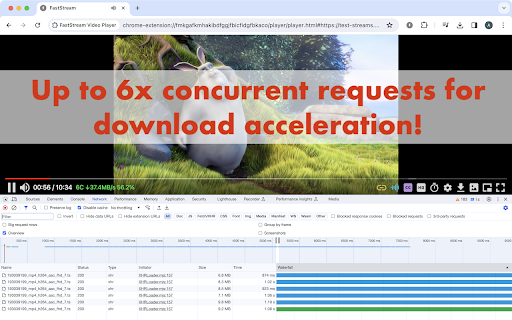

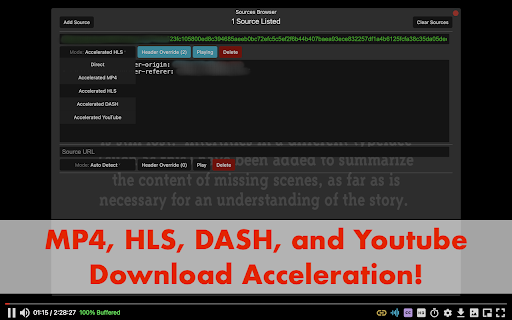
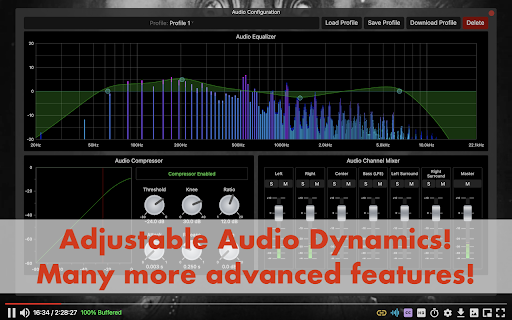
Stream without buffering. Fix bad video players on the internet. Tired of having videos buffer with slow internet speeds? Frustrated by a website's lack of accessibility features? This extension will replace videos on websites with a video player designed for your needs. Say goodbye to buffering and hello to a more accessible video experience! 1. Automatic fragmentation and parallel requests for up to 6x faster download speeds. Watch videos without interruptions by predownloading the video in the background. 2. Advanced subtitling features include: customizable subtitle appearance, built-in OpenSubtitles support to find subtitles on the internet, and an intuitive subtitle syncing tool to adjust subtitle timings on the fly. 3. Adjustable audio dynamics (equalizer, compressor, mixer, mono, volume booster), and video settings (brightness, contrast, hue, LMS daltonization for color blindness) for your unique audiovisual preferences. 4. 20+ remappable keybinds and accessible tool buttons for easy control of the player. 5. Available in multiple languages! Translated into Spanish, Japanese, Russian, and Malay by the FastStream community. Support for more languages is coming soon! The player currently supports: - MP4 videos (.mp4) - HLS streams (.m3u8) - DASH streams (.mpd) - Youtube (download not supported on Chrome unless manually installed due to Web Store policy) To use the player, simply: 1. Go to any website you want with a video and toggle the extension on. Any video it detects will be automatically replaced with the FastStream player. 2. Alternatively, you can also simply click on or navigate to a stream manifest file (m3u8/mpd) to begin playing. 3. Navigate to a new tab and press the extension icon to go to the player. Play sources detected on other tabs through the Sources Browser. You can also drag and drop video files from your computer. Notes: - We do not officially support Brave, or other Chromium based browsers besides Chrome. Please keep in mind that not all features may be available on those platforms. - Livestreams are not supported. They will not be supported in the near future. - This player will not function with DRM protected content. This is intended. Please be mindful of how you use this tool. FastStream should not be used to infringe copyright. - This player is still a work-in-progress. Please report any bugs to the Github issue tracker here: https://github.com/Andrews54757/FastStream/issues - For your privacy, this extension does not collect telemetry. Nor does it require additional resources from the internet to function. It will work fully offline. Feel free to browse the codebase on Github. - We take accessibility concerns seriously! If you need accommodations not available in the latest version, please contact us and we will work on it ASAP. Also, please feel free to submit feature requests or suggestions on the Github issue tracker! - The default maximum size for pre-buffering is 5GB. This can be changed in the settings page. Please be mindful of your computer's storage space when changing this setting. Browsers will offload data in the RAM to the SSD if the video is too large. Frequently pre-buffering large videos can reduce the lifespan of your SSD.

M3U8 Player
Enjoy M3U8 Player extension for online streaming. Play m3u8 files and HLS content in your browser easily. 🌟 Transform your browser into a powerful M3U8 Player with our lightweight extension designed for seamless online video playback. Whether you're dealing with HLS content or need a reliable player for m3u8 files, this add-on delivers exceptional performance for all your media needs. 🚀 Quick Setup Process: 1️⃣ Install the m3u8 player from Web Store 2️⃣ Copy your HLS stream URL 3️⃣ Paste into our m3u8 play online interface 4️⃣ Start playback instantly with chrome M3U8 Player browser functionality Our media solution excels as both an HLS Player and comprehensive playlist tool for web browsers. Experience smooth hls live streaming without complex software installations. 🎯 Core Features: ▸ Universal Compatibility: Versatile extension supports various playlist formats ▸ Smart Detection: Built-in content finder identifies compatible files automatically ▸ Instant Playback: Direct M3U8 Player experience with zero delays ▸ Seamless Integration: Smooth browser integration for professional use 💡 Perfect for Various Users: ➤ Developers testing video feeds and online playlist functionality ➤ Content creators sharing compatible links through url video online ➤ Students learning how to play without complicated setup procedures ➤ Professionals requiring reliable online hls m3u8 player for business presentations 🔧 Advanced Capabilities: Our M3U8Player combines cutting-edge technology with user-friendly design. The extension serves as your primary m3u8 finder solution in one powerful tool. Unlike traditional desktop applications, this lightweight chrome extension won't slow down your browser while providing comprehensive HLS support. 📊 Technical Excellence: 🔹 Cross-platform compatibility including linux M3U8 Player chrome functionality 🔹 Optimized playlist performance for smooth video delivery 🔹 Advanced hls stream capabilities for professional broadcasting needs 🔹 Robust MPD player alternative for specific playlist file formats 🌐 Global Accessibility: Our online tool supports international content consumption with multilingual interface options. The M3U8 Player online feature ensures universal access to video content regardless of geographical location. 🛠️ User Experience Focus: ◆ Intuitive interface design makes how to play m3u8 simple for any skill level ◆ One-click activation for immediate hls functionality with chrome m3u8 extension support ◆ Streamlined workflow eliminates complex configuration requirements ◆ Responsive design adapts to various screen sizes and resolutions ❓ What makes this M3U8Player different from other solutions? 🔹 Our extension offers superior integration with web browsing workflows, eliminating the need for separate applications while maintaining professional-grade performance standards. ❓ How does the playlist extension handle different file formats? 🔹 The extension automatically detects and processes various playlist formats, ensuring broad compatibility with industry-standard protocols and encoding methods. ❓ Can I use this as my primary hls player extension? 🔹 Absolutely! The extension provides comprehensive HLS support with advanced features rivaling dedicated software solutions, while maintaining the convenience of browser-based operation. ❓ Does the extension browser feature support all video qualities? 🔹 Yes, our technology supports multiple resolution options and adaptive bitrate playback, ensuring optimal viewing experience regardless of connection speed. ❓ How reliable is playback performance with play hls? 🔹 Our optimized player delivers consistent, high-quality media with minimal latency, making it suitable for both casual viewing and professional content evaluation. ❓ Can I chrome play m3u8 in browser directly? 🔹 Yes, the extension functions as a complete hls solution providing seamless browser integration. ❓ Is this compatible as HLSplayer - m3u8 streaming player? 🔹 Absolutely! The extension operates as a comprehensive media solution supporting both standard and advanced playlist formats. Choose M3U8Player for its simplicity, power, and comprehensive feature set. Download today and revolutionize your online video experience!

VLC online - multimedia player
Play most multimedia files, and various streaming protocols with this VLC distributed online. VLCOnline is an extension designed to enhance your online media streaming experience. With seamless integration and intuitive features, our extension provides the app VLC but distributed online from our cloud servers. As such, it provides the following functionality: 1. Effortless VLC online Media Player Integration: Our extension allows you to integrate the renowned VLC Media Player directly into your browser, enabling you to play various media files without leaving your favourite websites. 2. Online Media Streaming: Access your favourite online media platforms, including popular streaming websites, and enjoy a seamless experience with VLC's versatile playback capabilities. 3. Wide Range of Media Support: VLC online supports a wide range of media formats, guaranteeing compatibility for your diverse media content, including audio, video, and even live streams. 4. Advanced Media Controls: Take full control of your media playback with an array of advanced features. Play, pause, rewind, fast forward, adjust volume, and even create bookmarks effortlessly. 5. Instant Video Streaming: No more waiting for media files to fully download. With our extension, you can start streaming your desired content instantly with VLC's adaptive streaming capabilities. Install VLCOnline today to elevate your online media streaming experience to an entirely new level. Discover the convenience and versatility of VLC Media Player integrated directly into your web browser. This is a VLC online distribution. See https://www.videolan.org/legal.html about the VLC distribution terms we are compliant with.

MediaPlayer - Video and Audio Player
A powerful media player built on top of the video.js project with HTTP Live Streaming (HSL), speed control, and playlist support The "Media Player" is a browser extension to play music and video files either locally or from online sources. This project aims to bring a VLC-liked media playing experience using native HTML5 technology. The add-on is built on top of the well-known "video.js" project by applying a few custom plug-ins to enhance the user experience. This player supports media boosting, speed control, playlist media selection, fullwidth-progress bar, HTTP-streaming (M3U8), cast to a remote device, and wave surfer visual for audio files. How to Use (local resources): Open the interface and drop the media link to it How to Use (remote resources): Open a video page like https://www.w3schools.com/html/html5_video.asp Right-click on the player and select "Open in Media Player" You can start watching an offline video file by dragging and dropping the video file into the player or pressing the big play button. To have the player load subtitle make sure to drop both video and subtitle files together (The dropped subtitle should have the same name as the file and needs to be in SRT or VTT format). Also, you can add a subtitle file later using the "+CC" button. This button appears when there is no subtitle found for the current track. Extra Features: 1. Video casting: right-click on the player. If your browser supports this feature, you can transfer the media to a remote device. 2. Take a screenshot: Press the "screenshot" button on the player 3. 2x volume-boosting: Like VLC, you can boost the audio by 200%. Use the boosting feature when the volume is not loud enough. 4. Media Capturing: The player can optionally detect media files in the current tab and transfer them to the media player 5. Play in a separate window or inside a browser tab 6. Supports media keys even if the player is not focused 7. Supports native context menu on Chrome OS. You can right-click on the finder window (explorer) and use this player to open media files. You can use your keyboard to control the following playback options: 1. "F" key: This will toggle the fullscreen mode on and off 2. "Space" key: This will toggle the playing state of the player 3. "Key Up" and "key Down": Increase or decrease volume. 4. "Key Left" and "Key Right": Seek backward and forward for 10 seconds. 5. "U" key: Shuffle playlist 6. "R" key: Toggle repeat, repeat one, and no-repeat 7. "S" key: Take s screenshot 8. "B" key: Boost volume (2x or 200%) 9. "O" key: Open network URLs Change Log: 0.1.2: 1. Media Player now supports history (it will save the current track position and retrieves it after a restart) 2. Media player now supports global keyboard shortcuts for toggle pause and play state, moving to the previous track and moving to the next track 0.1.3: 1. Better playlist! 0.1.4: 1. For audio tracks, a seek-able wave-surfer is replaced with the old poster image 2. playback rate is now adjustable. 0.1.7: 1. Supports live stream (m3u8) 2. Supports folder drop and recursive media file search 0.2.3 1. Partial support for MKV video container 0.2.5 1. Better support for video/mkv format

m3u8 Sniffer TV - Find and Play HLS Streaming URLs
Grabs m3u8 webRequests from visited web pages and provides options for using them. Important Note: This extension will NOT help you access videos from sites like YouTube or Netflix. The extension does not provide any video streaming content of its own, it only makes it easier to find and use links for video streams that are already publicly available. The extension intercepts visited web page's network requests and identifies all m3u8 video stream URLs. When a m3u8 URL request is found, it is displayed in a box that overlays the visited web page (see images above) from which you can copy the m3u8 URL or play the video stream. Also, you can open the extension's popup window to view the first and last m3u8 URLs found for each site, as well as to set a variety of extension options. This extension does NOT provide functionality to download the actual video streams. There are already quite a few other extensions and programs for that. For example, I use this extension mostly to identify video streams from live TV news streaming pages. If they use m3u8 files for the stream, I can play them with the extension's integrated video player, or copy the links to the clipboard to use with other video playing and recording programs like VLC, Kodi, or Jaksta Media Recorder. Please visit the extension's companion web site for the complete documentation at: https://sniffertv.com/docs/
