
jnldlhlanhljflfkkfcadgdcomnngpim
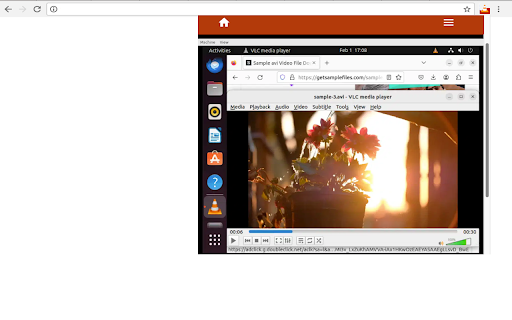


Play most multimedia files, and various streaming protocols with this VLC distributed online. VLCOnline is an extension designed to enhance your online media streaming experience. With seamless integration and intuitive features, our extension provides the app VLC but distributed online from our cloud servers. As such, it provides the following functionality: 1. Effortless VLC online Media Player Integration: Our extension allows you to integrate the renowned VLC Media Player directly into your browser, enabling you to play various media files without leaving your favourite websites. 2. Online Media Streaming: Access your favourite online media platforms, including popular streaming websites, and enjoy a seamless experience with VLC's versatile playback capabilities. 3. Wide Range of Media Support: VLC online supports a wide range of media formats, guaranteeing compatibility for your diverse media content, including audio, video, and even live streams. 4. Advanced Media Controls: Take full control of your media playback with an array of advanced features. Play, pause, rewind, fast forward, adjust volume, and even create bookmarks effortlessly. 5. Instant Video Streaming: No more waiting for media files to fully download. With our extension, you can start streaming your desired content instantly with VLC's adaptive streaming capabilities. Install VLCOnline today to elevate your online media streaming experience to an entirely new level. Discover the convenience and versatility of VLC Media Player integrated directly into your web browser. This is a VLC online distribution. See https://www.videolan.org/legal.html about the VLC distribution terms we are compliant with.

Media player classic
Watch videos using Picture-in-Picture mode (Floating Video Player). Watch videos using Picture-in-Picture mode (Floating Video Player). Our software supports all kinds of video websites. Picture-in-Picture lets you to watch videos in a popup window (always on top of other windows) so you can keep an eye on what you’re watching while surfing the Internet. Features: - Adds a Picture in Picture button to the video player of supported sites - Users can choose to click on the Picture in Picture button on the video player or on the extension icon on the Google Chrome toolbar - Save time and continue browsing the Internet and watching your videos at the same time YouTube is a trademark of Google Inc. Use of this trademark is subject to Google Permissions. The floating image mode in Picture mode (PIP) for Chrome is not created, is not associated with Google Inc. or not supported.

MediaPlayer - Video and Audio Player
A powerful media player built on top of the video.js project with HTTP Live Streaming (HSL), speed control, and playlist support The "Media Player" is a browser extension to play music and video files either locally or from online sources. This project aims to bring a VLC-liked media playing experience using native HTML5 technology. The add-on is built on top of the well-known "video.js" project by applying a few custom plug-ins to enhance the user experience. This player supports media boosting, speed control, playlist media selection, fullwidth-progress bar, HTTP-streaming (M3U8), cast to a remote device, and wave surfer visual for audio files. How to Use (local resources): Open the interface and drop the media link to it How to Use (remote resources): Open a video page like https://www.w3schools.com/html/html5_video.asp Right-click on the player and select "Open in Media Player" You can start watching an offline video file by dragging and dropping the video file into the player or pressing the big play button. To have the player load subtitle make sure to drop both video and subtitle files together (The dropped subtitle should have the same name as the file and needs to be in SRT or VTT format). Also, you can add a subtitle file later using the "+CC" button. This button appears when there is no subtitle found for the current track. Extra Features: 1. Video casting: right-click on the player. If your browser supports this feature, you can transfer the media to a remote device. 2. Take a screenshot: Press the "screenshot" button on the player 3. 2x volume-boosting: Like VLC, you can boost the audio by 200%. Use the boosting feature when the volume is not loud enough. 4. Media Capturing: The player can optionally detect media files in the current tab and transfer them to the media player 5. Play in a separate window or inside a browser tab 6. Supports media keys even if the player is not focused 7. Supports native context menu on Chrome OS. You can right-click on the finder window (explorer) and use this player to open media files. You can use your keyboard to control the following playback options: 1. "F" key: This will toggle the fullscreen mode on and off 2. "Space" key: This will toggle the playing state of the player 3. "Key Up" and "key Down": Increase or decrease volume. 4. "Key Left" and "Key Right": Seek backward and forward for 10 seconds. 5. "U" key: Shuffle playlist 6. "R" key: Toggle repeat, repeat one, and no-repeat 7. "S" key: Take s screenshot 8. "B" key: Boost volume (2x or 200%) 9. "O" key: Open network URLs Change Log: 0.1.2: 1. Media Player now supports history (it will save the current track position and retrieves it after a restart) 2. Media player now supports global keyboard shortcuts for toggle pause and play state, moving to the previous track and moving to the next track 0.1.3: 1. Better playlist! 0.1.4: 1. For audio tracks, a seek-able wave-surfer is replaced with the old poster image 2. playback rate is now adjustable. 0.1.7: 1. Supports live stream (m3u8) 2. Supports folder drop and recursive media file search 0.2.3 1. Partial support for MKV video container 0.2.5 1. Better support for video/mkv format

Local Media Player
Local media player lets you play your favorite media (be it video, music or audio) files without any third party software. Local Media Player: The Ultimate Browser-Based Player Looking for a reliable video player and audio player that works instantly? Local Media Player is a powerful browser video player that allows you to play local files directly from your computer without needing to install heavy, third-party software. If you want to play local videos in browser safely and smoothly, this is the perfect VLC alternative Chrome users can rely on. Seamless Offline Viewing Enjoy your content anywhere, anytime. Our extension acts as a complete offline media player, meaning no internet connection is required. Whether you need a dedicated Chromebook video player or a low CPU media player for an older desktop, our lightweight media player ensures lag-free performance. It functions as a true no download video player—simply drag and drop your files into the tab. It has never been easier to watch videos offline on Chromebook, Windows, or Mac. MKV player: Easily open MKV files without VLC and play MKV in Chrome without complicated codecs. MP4 player: Enjoy high-definition playback for standard video files. It is also an excellent local video player for music and podcasts! If you want to listen to downloaded music, you can seamlessly play MP3 browser tracks directly through the interface. Privacy & Security First We need certain permissions like access to list of urls you visit, to keep you safe while you download videos to your local drives and also stream videos on websites. We call this new feature 'Safe Video Streaming'. We don't sell this data to third parties neither is this data personally identifiable. 1. Add the extension to your browser. 2. Click the extension icon or use the web-based player interface. 3. Select or drag-and-drop your audio or video file. 4. Sit back and enjoy!

Local Video-Audio Player
Play local video and audio files with speed control, playlist, shuffle, and volume-boosting 🎬Local Video & Audio Player: Your All-in-One Browser Media Hub Looking for a reliable play local video extension? This tool transforms your browser into a powerful, lightweight offline media player. Instead of downloading heavy desktop software, you can now seamlessly play local files in Chrome with a smooth, native experience. Whether you need a dedicated browser audio player for your music collection or a high-performance video hub, this extension is built to handle it all. 🎬 Universal Format Support Tired of your browser rejecting certain file types? Powered by advanced FFmpeg browser player technology, this extension breaks the limits of standard playback. Use it as your go-to FLV player Chrome solution. Functions as a dynamic WMV to MP4 player right in your tab. Naturally supports MP4, WEBM, MP3, and all standard web formats. 🚀 Advanced Playback Controls Take absolute control over how you consume media: Video volume booster: Audio too quiet? Instantly boost video volume 300% so you never miss a word. Video speed controller: Skim through lectures or slow down tutorials with customizable playback speed 8x adjustments. Video screenshot capture: Grab high-quality snapshots of your favorite moments with a single click or hotkey. 📂 Smart Playlist & Remote Streaming Keep your media organized with the built-in video playlist manager. Shuffle, repeat, or extract entire directories of media in seconds. Not just for offline files, you can also seamlessly play remote video URL links by simply right-clicking a hosted video link and selecting "Play with Video Player." Experience the ultimate local video player directly within your browser. Fast, secure, and fully contained within your current tab. 🌐 You may also use Online Local Media Player as well https://mediaplayer.chromecrxstore.com/ 💿 This extension offers to play media files from a local disk or a remote resource. It uses the standard caching method to play remote sources with minimal interruption. Privacy & Security First We need certain permissions like access to list of urls you visit, to keep you safe while you download videos to your local drives and also stream videos on websites. We call this new feature 'Safe Video Streaming'. We don't sell this data to third parties neither is this data personally identifiable. 👀 You can watch remote hosted videos in 2 ways. First Method: 1️⃣ Open "https://www.w3schools.com/html/html5_video.asp" in a browser tab 2️⃣ Right-click on the player 3️⃣ Use "Play with Video Player" Second Method: 1️⃣ Open "https://www.w3schools.com/html/html5_video.asp" in a browser tab 2️⃣ Right-click and save the video to the disk 3️⃣ Open the player and drop the video to the player's interface
