
mgmhnaapafpejpkhdhijgkljhpcpecpj
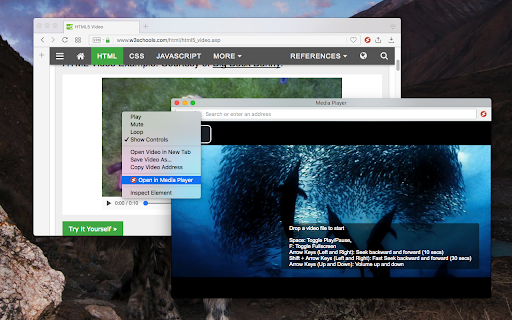
A powerful media player built on top of the video.js project with HTTP Live Streaming (HSL), speed control, and playlist support The "Media Player" is a browser extension to play music and video files either locally or from online sources. This project aims to bring a VLC-liked media playing experience using native HTML5 technology. The add-on is built on top of the well-known "video.js" project by applying a few custom plug-ins to enhance the user experience. This player supports media boosting, speed control, playlist media selection, fullwidth-progress bar, HTTP-streaming (M3U8), cast to a remote device, and wave surfer visual for audio files. How to Use (local resources): Open the interface and drop the media link to it How to Use (remote resources): Open a video page like https://www.w3schools.com/html/html5_video.asp Right-click on the player and select "Open in Media Player" You can start watching an offline video file by dragging and dropping the video file into the player or pressing the big play button. To have the player load subtitle make sure to drop both video and subtitle files together (The dropped subtitle should have the same name as the file and needs to be in SRT or VTT format). Also, you can add a subtitle file later using the "+CC" button. This button appears when there is no subtitle found for the current track. Extra Features: 1. Video casting: right-click on the player. If your browser supports this feature, you can transfer the media to a remote device. 2. Take a screenshot: Press the "screenshot" button on the player 3. 2x volume-boosting: Like VLC, you can boost the audio by 200%. Use the boosting feature when the volume is not loud enough. 4. Media Capturing: The player can optionally detect media files in the current tab and transfer them to the media player 5. Play in a separate window or inside a browser tab 6. Supports media keys even if the player is not focused 7. Supports native context menu on Chrome OS. You can right-click on the finder window (explorer) and use this player to open media files. You can use your keyboard to control the following playback options: 1. "F" key: This will toggle the fullscreen mode on and off 2. "Space" key: This will toggle the playing state of the player 3. "Key Up" and "key Down": Increase or decrease volume. 4. "Key Left" and "Key Right": Seek backward and forward for 10 seconds. 5. "U" key: Shuffle playlist 6. "R" key: Toggle repeat, repeat one, and no-repeat 7. "S" key: Take s screenshot 8. "B" key: Boost volume (2x or 200%) 9. "O" key: Open network URLs Change Log: 0.1.2: 1. Media Player now supports history (it will save the current track position and retrieves it after a restart) 2. Media player now supports global keyboard shortcuts for toggle pause and play state, moving to the previous track and moving to the next track 0.1.3: 1. Better playlist! 0.1.4: 1. For audio tracks, a seek-able wave-surfer is replaced with the old poster image 2. playback rate is now adjustable. 0.1.7: 1. Supports live stream (m3u8) 2. Supports folder drop and recursive media file search 0.2.3 1. Partial support for MKV video container 0.2.5 1. Better support for video/mkv format

YouTube Music Web Player Search
Quickly search the YouTube Music Web Player using the popup, right-click menu or Omnibox (YTM+Tab). 🎶 YouTube Music Web Player Search: Instant Music Discovery Stop manually navigating to YouTube Music just to search! YouTube Music Web Player Search is the essential Chrome extension built for music lovers who demand speed and efficiency. Instantly search the YouTube Music platform, access your Music Library, and save your search history—all from a single, powerful popup or directly from your address bar. 🚀 NEW IN VERSION 1.4: Omnibox Shortcut! Search faster than ever. Simply type "YTM" in your address bar, press Tab, and enter your song or artist name to search immediately. Top Features for High-Speed Music Workflow: ⚡️ Instant Music Search: Execute a targeted YouTube Music search directly from the popup. Now powered by a specialized Google™ Enhanced search engine to deliver the most relevant track, album, and artist results. ⌨️ Smart Omnibox Support: Use the "YTM" + Tab hotkey to search without even clicking the extension icon. 📚 Quick Library Access: Features a dedicated, glowing My Library button that sends you straight to your personal YouTube Music Library with a single click. 💾 Last 10 Searches: Never retype a query! View and instantly re-run your last 10 searches using the convenient dropdown history feature. 🖱️ Context Menu Search: Highlight any artist or song name on any webpage, right-click, and select "Search YouTube Music" for effortless music discovery. ✨ Seamless Experience: Enjoy a clean, user-friendly interface with a dedicated, glow-on-hover Search button and a bold YouTube-red border. Why Choose This Extension? This is the ultimate utility designed to streamline your listening. If you are looking for the fastest way to search YouTube Music, manage your search history, and gain quick access to your music library directly from your browser, this is the tool for you. Competitors & Compatibility: Works alongside your favorite streaming habits. Compare us to the workflow of Amazon Music, Apple Music, Boomplay, Deezer, and Spotify users—you'll find our search speed unmatched for the YouTube Music ecosystem. Install YouTube Music Web Player Search today and find your favorite tracks faster than ever. To provide this functionality extension takes over you default search for seamless experience.. Disclaimer: YouTube™, YouTube Music™, and their related trademarks, names, and logos are the property of Google LLC. This extension is not affiliated with, sponsored, or endorsed by YouTube or Google. All other trademarks, names, and logos used in the extension are the property of their respective owners. New Feature: Added Omnibox support! Type YTM + Tab in the address bar to search instantly. Improvement: Integrated a specialized custom search engine for better music discovery. Added "Recent History" (Last 10 searches) with auto-save. Improved search suggestions for a better user experience.

Video Player for Local Files
A web video player for local files. An easy-to-use and very lightweight video player for local video/audio files, powered by Web technology. It works completely offline. In addition to using the mouse, it supports many useful keyboard shortcuts, as well as a few simple settings. Updates: 1.0.0 (May 1, 2023): Support playlist UI and loop playback mode. FAQ: 1.How to open the player? Click the extension icon. 2.How to open files? • Click the "Folder" icon in the panel • Keyboard shortcut: Ctrl/Cmd + O • Drag and drop files to the player 3.Subtitles Independent or embedded subtitles are not supported. Maybe I will support independent subtitle files in the future. Of course, if the subtitles are already in the video stream, they can be displayed. 5.Video format and codec Because the underlying core functions are completely implemented by the browser, only some video formats and codec are supported. In addition, it doesn't support multiple audio tracks switching.

BetterPlayer - A Modern Video Player
A complete replacement for the default HTML5 video and audio player. ⭐ BetterPlayer was designed as a modern replacement for the default player built into Chrome. ⌨️ With BetterPlayer, you can use various keyboard shortcuts to quickly control the video playback.

Video player extension
More control over the video player Adds keyboard shortcuts to the video player on any website. Use space bar to pause and '[' and ']' to adjust speed by 0.1x increments. 'o' and 'p' to move forward and backward by 3 seconds. '\' make the video very fast for a short time.
