
kkcgdamhkijlpibacnelakenbkejjidm

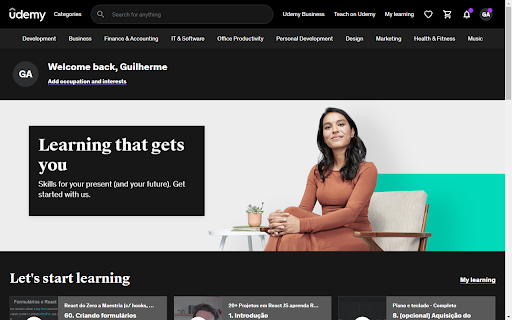


A simple dark theme for Udemy. Watching your lessons using your new dark theme in udemy.com Install and Use Step 1: Install the extension from the Chrome Web Store. Step 2: Acess udemy.com Did you like it, or do you want improvements? Your feedback is important to us. Please leave your thoughts and rate us below. Support: Are there any blank or unstyled elements in the extension? Send us a printout so we can fix it. Disclaimer: This simple extension is nonprofit and not officially affiliated with Udemy.

Midnight Dark mode - Dark theme Chrome
Turn on dark mode across all websites. Customize dark theme and brightness. Dark reader - dark skin for Chrome. Dark Mode - Midnight Chrome: A Night-Time Companion for Your Browsing Experience Transform your browsing experience with Dark Mode - Midnight Chrome, the ultimate Chrome extension designed for comfortable and eye-friendly internet usage at any hour.* Key Features and Benefits: 1. Universal Dark Mode: Instantly apply a sleek, dark theme across all your favorite platforms, including YouTube, Facebook, and more, ensuring a consistent and strain-free viewing experience. 2. Reading Night Shift Mode: Automatically adjusts your screen to warmer tones during night-time, reducing blue light exposure and aiding in better sleep quality. 3. Collaborative Browsing Support: Enhance group work or shared screen experiences with an interface that's easy on everyone's eyes, ideal for late-night study sessions or team projects. 4. Customizable Viewing: Tailor your browsing experience with adjustable brightness, contrast, grayscale, and color temperature settings, providing personalized comfort and accessibility. 5. Enhanced Contrast for Accessibility: Specialized contrast settings to aid users with visual impairments, ensuring the web is accessible and enjoyable for everyone. 6. Free to Use: Enjoy all these premium features at no cost, making it an ideal choice for students, professionals, and casual users alike. 7. Multi-Language Support: Catering to a global audience, ensuring a user-friendly experience for diverse users. 1. Install with a Click: Simply add the "Dark Mode - Midnight Chrome" extension to your Chrome browser from the Chrome Web Store. 2. One-Touch Activation: Enable dark mode across all sites with just one click. 3. Customize Your Experience: Access the extension's menu to adjust brightness, contrast, and more to fit your viewing preferences. 4. Enjoy Collaborative and Individual Browsing: Whether it's for personal use or while collaborating, the extension adapts to your needs. - Eye Comfort: Reduces eye strain, particularly during night-time browsing. - Enhanced Readability: Improves text clarity and reduces glare. - Energy Efficient: Can lead to reduced screen power consumption. - User-Friendly: Intuitive design for ease of use and customization. With "Dark Mode - Midnight Chrome," night-time browsing is no longer a strain on your eyes. Whether you're a night owl, a professional working late, or someone who enjoys a customizable browsing experience, this extension is your go-to solution for a more comfortable and personalized internet experience.

Ecosia Dark Mode
A dark theme for the Ecosia search engine This simple extension has a toggle for the dark mode, to allow you to turn it on and off whenever you like. Permissions & Privacy details and information can be found on the GitHub homepage in the link above. This extension is also available for the FireFox browser! Please allow a few days for updates if you notice any styling issues, as Ecosia are constantly updating their web-pages.

YouTube Dark Theme
A light, dark theme for YouTube with easy toggle on and off and scheduling support. This theme is based on the default YouTube theme "Dark Theme for YouTube" extension converts YouTube theme to a highly customizable dark charcoal/blue theme. This extension is built on top of the default YouTube theme (native dark theme) so it is very light-weighted compare to using themes injected by Stylish or Stylus extensions. Features: Turn on and off from the action button to switch between light and dark themes Accepts scheduling to turn on only on the specified period Customize default color scheme Inject custom CSS to alter the default theme (change font-size or font-family for instance) How does this extension work? This extension alters a cookie globally to turn the dark theme on and off. It also injects a lite script to the YouTube pages to alter the color scheme of the root element. In oppose to the other similar extensions, there is no resetting of the default theme or inverting the white theme with an inversion filter. Both of these methods are computationally inefficient. Instead, this extension asks YouTube to turn the native dark theme and only alter the global CSS variables to alter the colors. Note that this method only works if the product supports native coloring. Some Google products do not yet support this feature. Privacy Policy: This extension does not send or receive any data to any server whatsoever. Bug Report: Please either use the commenting section of the FAQs page or the GitHub page for bug reporting. Change Log: 0.2.0 Use the built-in dark theme (Material Design only)

Dark Mode - Dark Reader for Сhrome
Dark Mode a classic dark theme for every website. Switch website to dark reader and for night and daily browsing. Dark Mode - Dark Reader for Chrome will put dark theme on all websites, suitable for those work at night and dark reader for online news or book reading. Apply all websites in browser into dark mode and exclude any domain from black theme for better experience. It's possible to create your own custom theme with any color you like. What will you get from Dark Mode extension: - Turn on/off the dark mode manually - Click on the extension icon to turn on/off. - Exclude/Include a site from the dark mode - Choose "Dark Mode" > "Disable/Enable for this site" - Customize colors for websites - Change all colors you want. - Automatic schedule - Enable "Auto ON/OFF" in the section. No more needs to open settings one by one for different websites - just one app brings black theme across the whole net. Option page is now available! Useful features: - Site exclusion. Enter a correct web address to exclude the page from black theme applying. - Page exclusion. Optionally add domains that you don't want to apply into black theme. - Theme changer. Create your own custom theme! Save it, rename and apply at any time. This eye-care extension enables night mode by creating dark themes for websites on the fly. Dark Reader inverts bright colors, making them high contrast and easy to read at night. Extension will put dark theme on all websites, suitable for those work at night and dark reader for online news or book reading. Feel free to ask any questions and leave comments for extension. Your feedback is very important for us!
