
kkbaccngljoklnejedmjicfdfkhgblnd
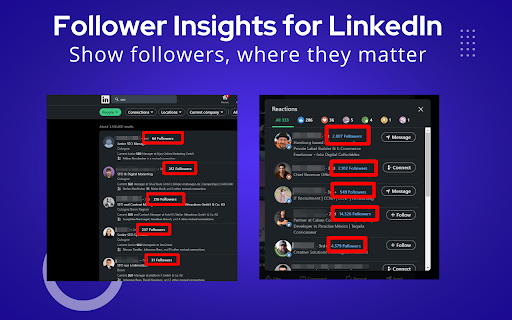


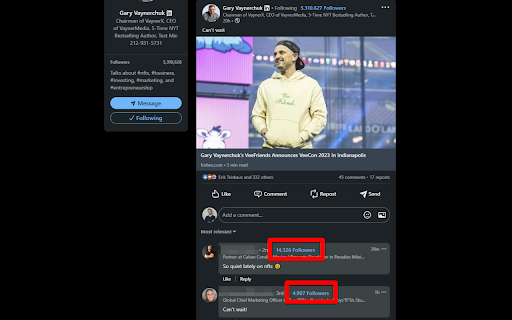
Show the number of followers of a LinkedIn profile at relevant positions. This powerful browser plugin shows follower counts for every LinkedIn account — right where it’s most useful! ✅ What the Free Version Includes: After installing the plugin, you’ll start seeing follower counts in the following places on LinkedIn: • In every post in your feed • In the reactions section • In every comment • In search results • In incoming contact requests 🔹 For profiles with more than 1,000 followers, the free version displays “1.000+” Upgrade to the Pro Version to unlock: • Exact follower counts for all profiles — no limits • Full follower visibility on any profile, including those above 1,000 followers 👉🏻 Learn more and compare both versions: • German: https://jens.marketing/follower-insights-fuer-linkedin • English: https://jens.marketing/en/follower-insights-for-linkedin/ ⚠️ This extension is not affiliated with LinkedIn. I developed it independently because I genuinely missed this feature. Heads up: LinkedIn changes their interface frequently, which can occasionally break the plugin. If something’s not working, just reach out — I’ll fix it as fast as possible!

LinkOff - Filter and Customizer for LinkedIn™
LinkOff cleans and customizes LinkedIn. It filters out the junk, leaving behind the posts and page elements that you want to see. Make your LinkedIn experience better, instantly! With fewer distractions and better filtered content your sales, lead generation and networking will be a smoother and more enjoyable experience. No more seeing unwanted likes and comments by your connections. Block the feed or filter it using custom keywords and find the connections and posts you want more easily. Job seeking? Advanced job filtering coming soon. While you are waiting, clean up your inbox - it can do that too! 🚀 Features - Option to hide the whole feed - Post filtering by content (polls, videos, promoted, shared, etc) - Hide posts by companies or specific people - Filter by custom keywords (politics, coronavirus, vaccination, Noah Jelich, whatever) - Hide posts shown due to interactions (comments, reactions, followed by connections) - Hide irrelevant old posts (older than an hour, day, week, month) - Select messages for mass deletion (clean your inbox) - Message filters (COMING SOON) - Unfollow all collections - Job filtering (COMING SOON) - Block ads on LinkedIn (banners and sidebar) - Hide LinkedIn learning and course recommendations - Hide community panel and follow recommendations - Stop LinkedIn premium upsell pestering - Fully configurable to suit your need! - Completely FREE and with NO ADS - Made with ❤️ by Noah Jelich :) > Are you going to make a Tampermonkey/Greasemonkey script? > What about Vivaldi/Brave/Edge/Opera and other browsers? The extension can be natively installed on all chromium browsers. > What about Safari and MacOs? The store charges 100$ per year to post apps, which I cannot afford. Since neither Chrome or Firefox allow for extensions in mobile browsers, you need to install a chromium distribution that does. I recommend Kiwi Browser (if you have any issues, please report them, still testing mobile support).

PerfectPost: makes Linkedin 10x better
A browser extension to improve your LinkedIn writing experience PerfectPost is a Chrome extension designed to transform your LinkedIn experience and help you create, organize, and publish content more effectively, directly within the LinkedIn interface. It is built for content creators, freelancers, entrepreneurs, marketing teams, and community managers who want to structure their LinkedIn presence, save time, and engage with the right people at the right moment. Everything happens where you already work: on LinkedIn. Key features of the PerfectPost extension Rich text editor for LinkedIn Easily add bold text, italics, and emojis to your LinkedIn posts. Instantly see the final rendering without using external tools or copy-paste tricks. Built-in writing assistant Get help while writing your LinkedIn posts to improve clarity, impact, and overall quality. Publish faster while staying relevant and engaging. LinkedIn draft management Save your ideas and post drafts directly from LinkedIn. Prepare content in advance, organize your drafts, and come back to them anytime without losing your work. Post scheduling Schedule your LinkedIn posts in advance directly from the LinkedIn interface. Maintain a consistent posting rhythm without daily effort. Post preview before publishing See exactly how your post will look before publishing, including formatting, line breaks, and emojis. Mobile preview Preview how your LinkedIn posts will appear on mobile devices. Essential to ensure readability and impact on smartphones. “See more” line preview Know exactly where LinkedIn will cut your post with the “see more” line. Optimize your hooks and place key messages before the cut. Custom LinkedIn Feeds Create personalized LinkedIn feeds directly inside LinkedIn. Custom Feeds allow you to group specific profiles and follow only the posts from people that matter most to you. Perfect for • Tracking prospects • Engaging with clients • Following strategic connections • Never missing important posts Custom Feeds replace the standard LinkedIn feed with a focused, engagement-driven view. Engagement and interaction tracking Access key metrics to better understand your LinkedIn performance. Identify your best posts, top commenters, and quickly spot comments that still need a reply. Organization and productivity PerfectPost turns LinkedIn into a real content and engagement workspace. You centralize your posts, interactions, and daily LinkedIn activity in one place. • Save time every day • Publish higher-quality content • Focus on meaningful engagement • Clear and structured workflow • No need to leave LinkedIn PerfectPost does not modify LinkedIn. The extension adds powerful features directly into the existing interface, seamlessly and naturally. Easy installation and instant onboarding Once installed, the extension automatically activates on LinkedIn with no complex setup required. PerfectPost is the ideal tool to write, organize, schedule, and engage effectively on LinkedIn, directly from your browser.

LinkedIn Follower Grower
Grow your LinkedIn followers automatically through mutual follows—approximately 50 followers per week Supercharge your LinkedIn growth with Linkingrow Chrome Extension. Automatically increase your follower count by leveraging mutual follows—It simply opens a dedicated LinkedIn tab to effortlessly follow users who will reciprocate, boosting your network and visibility. Start expanding your LinkedIn presence today!

Social Comments GPT
A chrome extension that creates engaging comments on social media, powered by OpenAI's ChatGPT. This extension can be a time-saver for professionals or influencers looking to increase their engagement, reach, and leads. Currently supports LinkedIn, Instagram, and Twitter.
