
kjibhijiffgfkfgmjjaekglfjjacecao
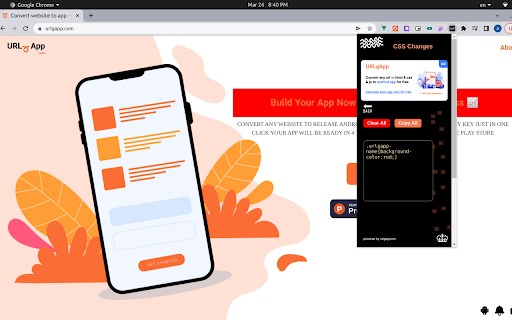
Edit your HTML & CSS style and copy your code A powerful CSS Extention, was created to help web developers make CSS editing easy for anyone beginner or professional Copy and paste all your editing code into your project easily Reset default values by refreshing the page This tool does not work directly In your project it helps you to see changes in real-time and copy all your code changes and also you can choose any element to modify by clicking word inspect to choose your CSS class or ID to change style

StarterCSS
Rapidly implement CSS layouts, effects, and designs without parsing through online docs StarterCSS is a beginner-friendly version of devtools that cuts out time spent Googling for CSS docs and tutorials. StarterCSS provides a dashboard to implement, experiment with, and visualize CSS features at just a few clicks. The dashboard is directly embedded as a devtool panel (alongside the "Styles" and "Computed" panels) for quick access. Simply inspect an element and quickly make changes to it in the StarterCSS panel. With StarterCSS, you can: ✅ Add and customize layouts like flexboxes and grids, in addition to various visual attributes, in seconds ✅ Visualize and test CSS code in isolated environments ✅ Encounter fewer context switches from needing to look up CSS docs ✅ Export created designs/layouts into CSS for copying into your local code editor To access the extension, go to the "Elements" Tab in Chrome Devtools (Right Click > "Inspect" or Command+Shift+C). You should see a separate row with tabs like "Styles", "Computed", and "Layout". StarterCSS will be another panel here; if you've just downloaded the extension, you may have to click the ">>" (see more) icon to see all panels. If you'd like to leave feedback, visit bit.ly/startercss-feedback.

CSS Unites
CSS Unites specially develop for Frontend Engineers. CSS Unites specially develop for Frontend Engineers. You can convert any kind of CSS units. When input your value in any field then other field will be converted.

Extractify
Extracts terms and definitions from a PowerPoint file Extractify is the ultimate tool for students looking to easily extract and organize key terms and definitions from their class readings and study materials. Extractify makes it simple to quickly pull important information from your lecture slides and study more efficiently. Upload your .pptx file and Extractify does the rest by automatically recognizing terms and definitions for you! Say goodbye to tedious manual highlighting and note-taking - Extractify does the heavy lifting for you. Plus, with the option to export your extracted information as a .pdf file, you can seamlessly integrate Extractify into your existing study workflow. Don't waste any more time sifting through pages of irrelevant information - install Extractify today and take control of your studying.

Inline
Extract and analyze fonts from any webpage, and copy the SVG, CSS or HTML code to use in your own projects. With Inline, you can easily figure out which fonts are used in any website and use them in your own projects. You can copy the font and its styling as an SVG file, allowing you to integrate it into your own design projects. You can also copy the whole CSS code of the font, or copy the font and its styling as an HTML code. And if you're only interested in a particular CSS property, you can copy that too. (Please be sure to restart Chrome the first time you install Inline)
