
kjacjjdnoddnpbbcjilcajfhhbdhkpgk

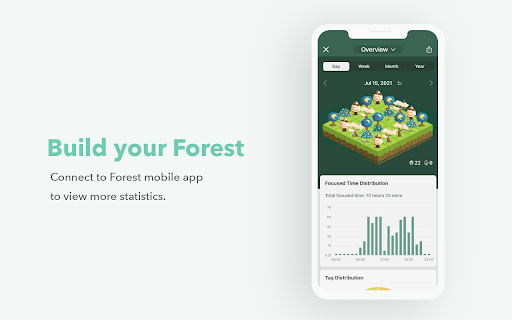
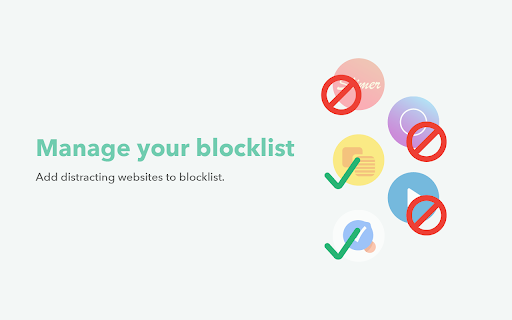
Features: • A self-motivated and interesting method to help you beat Internet addiction • Cultivate your personal pattern of time management: make good use of 30-minutes to fully concentrate on your work and finish it effectively • Share your trees with friends

Taskade - AI Agents, Chat Bots, & Task Automation
AI Agents, task lists, and workflow automation. Get work done faster and smarter with Taskade. ➜ TASKADE CHROME EXTENSION: ELEVATE YOUR PRODUCTIVITY WITH AI-POWERED AUTOMATION AND COLLABORATION Transform your browser into an all-in-one productivity powerhouse with the Taskade Chrome Extension. Capture ideas, automate workflows, and collaborate effortlessly using AI agents that think, learn, and act. Whether you’re brainstorming ideas, managing projects, or automating workflows, Taskade is the ultimate tool to supercharge your productivity. • Highlight text and right-click to "Add to Taskade" for instant organization. • Automate repetitive tasks with Taskade Automation's smart triggers and actions. • Train AI agents with knowledge from files, links, projects, and live data. • Manage tasks, projects, and workflows with powerful AI tools. • Collaborate in real-time with AI chat, mind maps, and team tools. • AI AGENTS: Build, train, and deploy custom AI agents to automate tasks, conduct research, and enhance workflows. • TASKADE AUTOMATION: Create workflows with "If this, then that" logic to handle repetitive tasks and boost efficiency. • TOOLS FOR AI AGENTS: Equip agents with advanced tools to execute commands, interact with external platforms, and streamline tasks. • KNOWLEDGE FOR AI AGENTS: Train agents with files, links, and live data for smarter, contextual, and adaptive responses. • TASKS AND PROJECTS: Organize tasks in lists, boards, calendars, and mind maps, enhanced with AI for creativity and structure. • AI COLLABORATION: Collaborate with teammates and AI agents using real-time chat, video conferencing, and automation tools. Taskade Automation enables you to streamline repetitive workflows and put your projects on autopilot. Using simple "If this, then that" logic, you can create automation flows tailored to your team’s needs. • Automate task creation and notifications. • Integrate with tools like Google Sheets, Slack, and WordPress. • Use AI agents in automation flows to execute commands and handle decisions. • Schedule automations to run at specific intervals, such as daily or weekly. • Share automation flows and templates with your team for consistent productivity. ➜ TOOLS FOR AI AGENTS Give your AI agents the ability to perform actions and interact with external platforms using powerful tools. Tools for AI Agents unlock new possibilities for dynamic workflows. • Create and manage tasks or projects within your workspace. • Send messages to team channels, email contacts, or publish blog posts directly from Taskade. • Integrate seamlessly with external platforms like Google Drive, Dropbox, or WordPress. • Enable specific tools for your agents to handle specialized tasks, like scheduling or generating reports. ➜ KNOWLEDGE FOR AI AGENTS Train your AI agents to provide smarter, more context-aware responses by equipping them with knowledge from a variety of sources. Combine static and dynamic knowledge to enhance agent performance. • Upload files like PDFs, DOCs, and spreadsheets to your agent's knowledge base. • Add live resources such as web links, YouTube videos, and blogs for real-time learning. • Integrate workspace projects as sources, including text, tasks, and embedded data. • Manage bulk knowledge uploads to keep agents updated with the latest information. • View knowledge backlinks in projects to track agent usage and sources. ➜ BUILD YOUR ULTIMATE AI-POWERED WORKSPACE • Capture ideas instantly by turning any webpage into actionable tasks with one click. • Automate workflows with Taskade Automation to save time and reduce effort. • Train AI agents with files, live data, and external resources for smarter assistance. • Collaborate smarter with AI-powered chat and real-time video conferencing. • Use tools for AI agents to interact with external platforms and handle complex tasks. ➜ HOW TASKADE BROWSER EXTENSION WORKS • Turn your new tab into a productivity dashboard where tasks, goals, and agents are one click away. • Use automation flows and tools to execute workflows, generate insights, and streamline decision-making. • Enable agents to handle dynamic knowledge for real-time, adaptable responses. ➜ PERFECT FOR INDIVIDUALS AND TEAMS Taskade adapts to your needs, whether managing personal projects or collaborating with a global team. • Unlimited workspaces to organize tasks and notes. • Customizable templates to create repeatable workflows. • Cross-device sync for seamless access on web, mobile, and desktop. ➜ GET STARTED FOR FREE Taskade is free to use, with optional upgrades to unlock additional features. Learn more at https://taskade.com/pricing. Join millions of users from companies like 3M, Netflix, Tesla, Adobe, and Airbnb who rely on Taskade to stay organized and productive. Read testimonials at https://taskade.com/reviews Reimagine how you work with Taskade and 10x your productivity. Download the Taskade Extension today and take your productivity to the next level.

Visor
Screen dimmer and reading aid, may help with fluency, eye-strain, concentration and comprehension whilst reading. Version 2.0.4: Bug-fixes and updated style. As well as being a great general purpose screen dimmer, Visor's overlays and point of focus feature may be assistive to users with visual perceptual difficulties such as Dyslexia, Scotopic Sensitivity Syndrome and Visual Stress. Whilst research shows results vary from person to person, some users may find that the use of overlays can help with fluency, eye-strain, concentration and comprehension whilst reading. In addition to the traditional overlay method, Visor also employs a point of focus feature, designed to further reduce visual confusions and the tendency to skip lines. This horizontal focal point tracks your mouse, giving full focus to the content being read, whilst reducing the visual noise of the surrounding page. Visor requires no special permissions, so must be reactivated with each page load. Note: This extension will not work on Chrome's start page, options pages or the Chrome web store. This is a restriction of chrome.

one sec | Website Blocker, Screen Time, Digital Detox, ADHD, Block Websites
one sec gives you the chance to think twice – before you get sucked into an endless loophole designed to draw you in for hours. one sec forces you to take a deep breath whenever you open social media or other distracting websites. It’s as simple as effective: You will reduce your social media usage just by becoming aware of it. one sec is the focus app that tackles the problem of unconscious social media use at its root. It is designed to change your habits on a long-term basis. You just wanted to check that one message – and ended up scrolling for 30 minutes on Instagram? Social media companies use psychological traps to keep you hooked and spend as much time on their apps as possible. Time that could be spent so much better – with your family and friends, getting work done or for your hobbies and wellbeing. Many apps and tools block social media for a limited amount of time to help you focus. This might increase your productivity for the moment, but the real problem – your habitual urge to check apps and websites to get that dopamine boost – stays. The one sec Chrome Extension is designed from ground up to keep your information private and secure. All usage data is stored offline, on-device, and only you can access it. I make money selling apps and subscriptions, not your data! one sec is also available for iPhone, iPad, and Android Devices to block native apps and websites. More info on my website.

Pause - Stop Mindless Browsing
Pause distracting websites before they open. Be mindful and intentional with your browsing using this simple extension. Pause breaks the cycle of distraction and mindless browsing and helps you be more focused, productive, and intentional with your technology use. When you open a distracting website, Pause creates a gentle interruption by displaying a calming green screen. After pausing for five seconds (adjustable), you can choose to continue to the site, remain on the green screen with the site temporarily blocked, or close the tab. The interruption created by Pause gently nudges you to make informed, intentional decisions about how you are spending your time. - Pause comes pre-seeded with a list of 50 top distracting websites, which you can add to or edit as needed. - You can also adjust the length of the Pause time (5 seconds is the default.) Keep Pause enabled in your browser. It’s a simple and powerful tool to help you control distraction and create more mindful browsing habits that will help you stay focused. Pause is a product of Freedom Labs, where we develop new ways to meaningfully interact with technology. Like our other extensions, Pause is highly privacy-conscious. None of your data is sent anywhere (the cloud, our servers, etc.) It remains secure on your own device. Learn more about Freedom here: https://freedom.to
