
kinhdlpfleklibmdlgppipidahjhmfgh
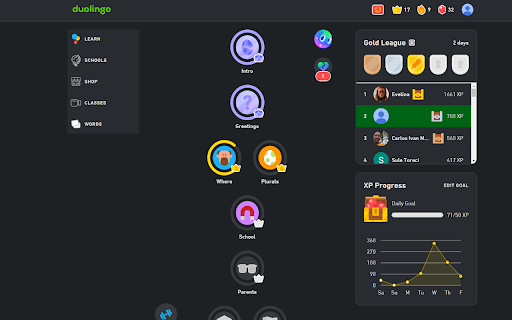

Changes the duolingo werbsite to darkmode Gives the Duolingo Webpage a Darkmode.

Duo Strength
Adds individual skill strengths back into the duolingo webpage, similar to data on duome.eu Duo Strength is a browser extension that adds back into the Duolingo webpage an indication of the strength of each skill. Any skills that need strengthening (i.e. not at 100% strength) are displayed in a clickable list at the top of the tree for quick access. Designed to provide much of the information on duome.eu/Username/progress on your duolingo tree itself. If you have comments bugs or issues, or want to help improve this extension, please visit its GitHub page: https://github.com/ToranSharma/Duo-Strength

Duolingo Spaced Repetition
A Chrome Browser Extension to Add Spaced Repetition to Duolingo Spaced repetition is an evidence-based learning technique that has been proven to increase the rate of information retention. It works by presenting the user with new and more difficult lessons more frequently, while older and less difficult lessons are shown less frequently in order to exploit the psychological spacing effect :brain: It is commonly used for studying languages, however good tooling currently only exists for flashcard based studying systems such as Anki and SuperMemo. The Duolingo Spaced Repetition extension aims to bridge the amazing power of Duolingo with the proven methodology of spaced repetition by introducing a new study mode! :sparkles: Simply install the extension and you will see a new study mode button for spaced repetition. Use the new study mode and it will auto select your study lessons based on what evidence shows will help you retain information the best! :tada:

Duolingo Fast Mode
Learn more on Duolingo. Hints help you save time and stress less. - Provides immediate feedback on correctness - Auto complete using buttons or hotkeys - Indicates when the task is safe to check - Supports all non speaking challenge types - Enable / disable hinting by challenge type - Typing : Enable hints for typing exercises - Wordbank : Enable hints for wordbank exercises - Native : Enable hints for translations to native language - Select : Enable hints for option selection exercises - Confirm : Auto continue exercises after Check button - Buttons : Display buttons for auto completion - Hotkeys : Enable hotkeys for auto completion Please note that this extension has no affiliation with Duolingo.

Duolingo Annoyance Blocker
Remove annoying stuff from Duolingo such as pop-up ads, mid-lesson motivation cards and 'let's review missed exercises' card Click on the extension to open the settings menu and configure what annoys you - disable pop-up ads, mid-lesson motivation cards or 'let's review missed exercises' card. Or all of them. The settings are synced with your Google account.
