
gcdpjnmeepdndbnjionjfhmhhpealbjp
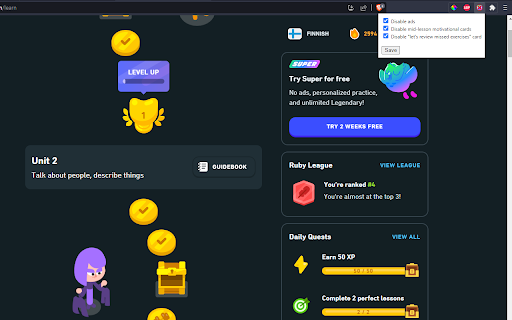
Remove annoying stuff from Duolingo such as pop-up ads, mid-lesson motivation cards and 'let's review missed exercises' card Click on the extension to open the settings menu and configure what annoys you - disable pop-up ads, mid-lesson motivation cards or 'let's review missed exercises' card. Or all of them. The settings are synced with your Google account.

Duolingo Mistake Exporter
- In the process of using Duolingo, automatically add incorrect questions to Anki for review. - Export Duolingo incorrect answers to Excel.

Duolingo PRO
Unofficial Chrome wrapper for the Duolingo PRO userscript — tools and automation on duolingo.com. Duolingo PRO for the web: run the PRO panel on Duolingo, toggle it from the popup, open Duolingo in one click. Enhance your Duolingo web sessions with extra tools and automation from one lightweight extension. Open the popup to jump to Duolingo, turn the script on or off, and reload the tab when you change the setting so it takes effect. What you get • Runs the Duolingo PRO experience directly on duolingo.com / duolingo.cn — no separate userscript manager required. • Simple popup: enable/disable, open Duolingo, version info. • Your choice is remembered locally. How to use 1. Install the extension and pin it if you like. 2. Visit Duolingo in the browser. If you disabled the script in the popup, reload the page after turning it back on. 3. Use the features provided by the in-page panel after the lesson page loads. Notes This extension wraps third-party script functionality. It is not affiliated with Duolingo Inc. Use in line with Duolingo’s terms of service and your local laws.

Duolingo Fast Mode
Learn more on Duolingo. Hints help you save time and stress less. - Provides immediate feedback on correctness - Auto complete using buttons or hotkeys - Indicates when the task is safe to check - Supports all non speaking challenge types - Enable / disable hinting by challenge type - Typing : Enable hints for typing exercises - Wordbank : Enable hints for wordbank exercises - Native : Enable hints for translations to native language - Select : Enable hints for option selection exercises - Confirm : Auto continue exercises after Check button - Buttons : Display buttons for auto completion - Hotkeys : Enable hotkeys for auto completion Please note that this extension has no affiliation with Duolingo.

Duolingo Hard Mode
Replaces multiple-choice questions in Duolingo with typing input. Learning a language requires active recall, but Duolingo relies heavily on word banks and multiple-choice questions. I decided to fix that. 🔥 Introducing Duolingo Hard Mode – an open-source Chrome extension that: ✅ Converts word bank challenges into text input ✅ Supports translation, gap-fill, tap-complete, select-transcription and more to come challenges ✅ Maintains Duolingo’s original styling for a seamless experience ✅ Enforces real typing-only learning
